
Square Golf OMNI Review (2026): Hands-On Test of the $1,599 Indoor/Outdoor Launch Monitor
Four cameras. Ball and club data. A built-in display. Real turf and direct sunlight. No subscription. Golf Simulator Videos got one of the first Square Golf OMNI Edition units in the USA — this is the complete GSV review, verified spec breakdown, and the only exclusive Square Golf discount code: GSVSQUARE.
By Golf Simulator Videos — the world's largest dedicated golf simulator YouTube channel, hosted by Jay. The Square OMNI was personally tested indoors, outdoors on turf, and in direct sunlight. All specs verified from squaregolf.com.
Is the Square Golf OMNI Worth $1,599?
Short answer: it depends on where you hit balls. You should buy the OMNI if you want one camera unit for the simulator, the range and real grass, with club data. The Square Golf OMNI Edition takes everything that made the $699 Home Edition a budget favorite and fixes its two biggest limitations: it works outdoors on real grass, and it captures full club data alongside ball data. Add a built-in display, a replaceable battery, marker-free ball tracking, and zero subscription fees, and the OMNI competes with units that cost two to three times more.
It is not perfect — a couple of early-firmware quirks turned up in testing, and the review below covers them honestly. But as a complete package at this price, nothing else in the indoor/outdoor camera category matches it.
GSV Take: The replaceable battery might be the most underrated feature on the OMNI. A battery that goes bad doesn't kill the unit — you just swap it. That's huge for long-term ownership, and almost nobody else at this price does it.
Square Golf OMNI — Rated After Real Testing
Scores reflect GSV's hands-on testing indoors and outdoors on one of the first USA production units. The software score accounts for early-firmware issues we expect Square to patch — details in the honest limitations section below.
The Full Square Golf OMNI Video Review — Unboxing, Setup & GSPro Test
Before the written breakdown, watch the full review. We take the OMNI through unboxing, setup, Bluetooth connection, hitting zone testing, shot shaping, chipping, putting, and GSPro course play — everything you need to see before buying.
Want every OMNI video in one place? The complete GSV Square OMNI coverage — updates, tests, and follow-ups — is in the Square Golf OMNI playlist on YouTube.
Square Golf OMNI: $1,599 — use code GSVSQUARE at checkout for 5% off (about $1,519). The exclusive Golf Simulator Videos code on the official Square Golf USA store.
Claim 5% Off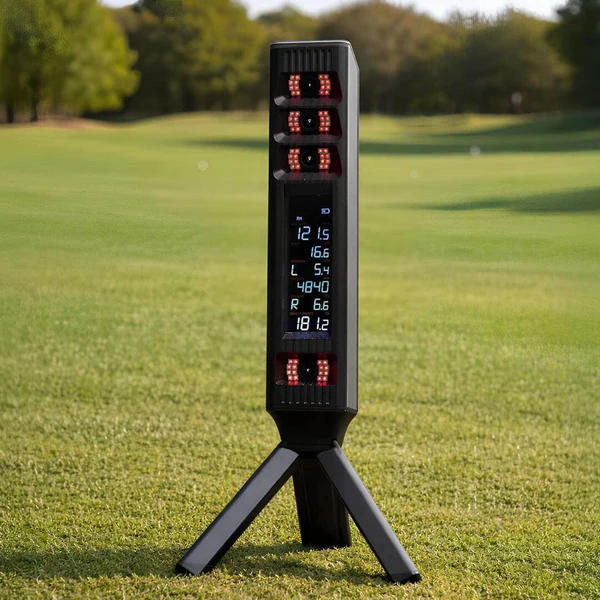
What Is the Square Golf OMNI Edition?
The OMNI Edition is Square Golf's flagship launch monitor. It sits beside the ball and uses machine vision with four high-speed cameras to capture both ball and club data at the moment of impact — including precise impact location on the face.
The two headline upgrades over the Home Edition: advanced marker-free dimple tracking means you can hit any golf ball with no markings, and the unit is built for indoor and outdoor use, including natural turf. A dedicated on-device display shows your shot data in real time, so you can practice at the range without opening an app or connecting a single device.
In the box: the OMNI Edition launch monitor, tripod stand, Li-ion battery, and a target line alignment stick.
Square Golf OMNI Specs & Setup Requirements
Every spec below is verified from Square Golf's official documentation and the GSV production unit — no third-party guesses.
| Spec | Square Golf OMNI Edition |
|---|---|
| Price | $1,599 — code GSVSQUARE takes 5% off at checkout |
| Model | SQGOE300A |
| Camera system | 4 high-speed cameras with machine vision tracking |
| Ball tracking | Marker-free dimple tracking — use any ball, no markings required |
| Club data | Captured at impact; optional club markers add precise club feedback; club data display requires the app |
| Impact location | Yes — precise impact location on the face |
| Environments | Indoor and outdoor, including natural turf |
| Built-in display | Yes — on-device screen shows real-time shot data, no app required for ball data |
| Connectivity | Bluetooth 5.1 Low Energy |
| App support | iOS, Android, Windows PC |
| Battery | Replaceable Li-ion, 14.4V / 5,000mAh — up to 6 hours per charge (GSV testing measured 5–7 hours real-world) |
| Charge time | About 6 hours (DC 20V / 3.0A input) |
| Ready zone (hitting area) | 25cm × 25cm — roughly a 10" × 10" hitting zone |
| Ball position | 35cm (14") in front of the unit, offset 5cm (2") to the side |
| Alignment | Included target line alignment stick, placed 35–60cm (14–24") in front of the unit |
| Subscription | None — no subscription required |
Setup tip from GSV testing: position the ball toward the front portion of the ready zone for the best club data capture — too far back and the cameras may not catch the club image. The unit compensates for height differences and tilt, but extreme tilt can shrink the usable ready zone.
For the complete metric-by-metric measurement table, see the official OMNI spec sheet at squaregolf.com — or watch the data screens live in the review above.
The Data: What the OMNI Actually Measures
This is where the OMNI earns its price jump over the Home Edition. The four-camera array captures the complete picture at impact — how the ball launched and what the club was doing to cause it:
● Ball Flight Data
Full ball launch measurement from the dimple-tracking cameras — speed, launch, direction, spin, and complete distance outcomes — on any golf ball with zero markings. Chipping and putting are tracked too, which we test on camera in the review.
● Club Data at Impact
The cameras read the club through impact, including precise impact location on the face — so you see the cause behind every shot, not just the result. Optional club markers sharpen club feedback further, and club data displays through the app.
GSV Take: Impact location is the sleeper feature here. Once you can see exactly where on the face you struck it, your mishits stop being a mystery — that's the data that actually lowers scores.
Does the OMNI Really Work Outdoors? We Tested It in Direct Sunlight
Outdoor capability is the OMNI's biggest promise — so we took it outside and put it through a full field test: real turf conditions, direct sunlight, the exact environment that kills most camera-based launch monitors. Watch the results:
This matters for one simple reason: one $1,599 unit now covers your winter simulator and your summer range sessions. For cold-weather golfers who sim all winter — like we do here in Michigan — that is a genuinely different ownership proposition than an indoor-only unit.
What Needs Work: Early-Unit Findings From GSV Testing
No review on this site oversells a product — so here is what turned up on one of the first USA production units:
- Early software quirks. We hit a software crash during testing and found flop shot tracking inconsistent. Both are firmware-level issues, and we expect Square to address them in updates — Square has been consistently active with software updates on the Home Edition.
- Club data lives in the app. The built-in display gives you real-time shot data at the unit, but the full club data picture requires connecting the app on iOS, Android, or Windows PC.
- Ball position matters for club capture. Play the ball toward the front of the 10" × 10" ready zone — too far back and the club image may not be captured.
- A cosmetic first impression. Our early unit shipped with a typo on the power adapter label. Harmless, but worth a chuckle — and worth flagging for transparency on first-batch units.
- Driver spin axis. In GSV's 10-drive test in GSPro in May 2026, three drives at 157 to 162 mph of ball speed read a spin axis of zero, one of them with a visible curve left. The rest read as expected: good drives carried about 270 to 275 yd with 2,200 to 2,300 rpm, and a strike low on the face showed the lower launch and higher spin it should. Jay plans another driver test after the next firmware update.
None of these change the verdict. They are the honest asterisks on an otherwise outstanding value.
Square Golf OMNI vs Home Edition: Which One Should You Buy?
The Square Golf Home Edition (HE) at $699 is still a strong budget option. GSV has tested it extensively, and you should buy it if the build is indoor only. Here is exactly what the extra $900 buys you with the OMNI:
| Feature | Home Edition — $699 | OMNI Edition — $1,599 |
|---|---|---|
| Environments | Indoor only — no direct sunlight | Indoor and outdoor, including real turf |
| Golf balls | Marked balls for best spin accuracy (3 included) | Any ball — marker-free dimple tracking |
| Club data | Via club marker sticker | Camera-captured at impact, incl. impact location; optional markers refine it |
| Display | App on phone, tablet, or PC | Built-in on-device display + app |
| Battery | Built-in, up to 8 hours | Replaceable Li-ion, up to 6 hours (spares swappable) |
| Simulation | Included — native software + GSPro connection free | Included — native software + GSPro connection free |
| Subscription | None | None |
| With code GSVSQUARE | About $664 | About $1,519 |
The GSV bottom line: if you only ever sim indoors and budget is the priority, the Home Edition at $699 is still a remarkable unit. If you want to take it to the range, want the full club data picture, and want the built-in screen — the OMNI is the upgrade worth making.
Deeper reading: the full Square Golf HE hands-on review and the complete Square HE vs OMNI comparison. Weighing the OMNI against the Rapsodo MLM2XPRO? See MLM2XPRO vs Square Golf OMNI.
GSPro, Square's Software & What It Costs to Play
The OMNI runs Square's own simulation software through the app on iOS, Android, and Windows PC — practice modes, course play, and full shot data with no subscription attached to the hardware.
For third-party simulation, the big one is GSPro: the OMNI's GSPro connection is free — there is no connector fee to link the unit. We play GSPro with the OMNI in the review video above so you can see the pairing in action. Keep in mind GSPro itself is separate paid software with its own annual cost; what Square gives you is the free connection to it.
No subscription, ever: unlike several competing launch monitors, Square does not charge an ongoing fee to unlock your own data or connect third-party software. What you pay at checkout is what the OMNI costs.
Square Golf OMNI Discount Code: GSVSQUARE (5% Off)
Whether you searched for a Square Golf OMNI discount code, promo code, or coupon code — GSVSQUARE is the only exclusive code for Square Golf USA, and it works on both the OMNI Edition and Home Edition. Three steps:
Go to the official Square Golf USA store using the GSV OMNI link.
Add the OMNI (or Home Edition) to your cart and head to checkout.
Enter code GSVSQUARE in the discount field — 5% comes off instantly.
Hunting for more codes? Every verified Square Golf offer stays updated on the Square Golf discount code page — and UK / Europe buyers can use code SQUAREGSV at SimSpace Golf.
Square Golf OMNI: Frequently Asked Questions
How much does the Square Golf OMNI cost?
The Square Golf OMNI Edition is $1,599 on the official Square Golf USA store. With the exclusive Golf Simulator Videos code GSVSQUARE you save 5% at checkout, bringing it to about $1,519.
Is there a Square Golf OMNI discount code or promo code?
Yes — GSVSQUARE is the exclusive Golf Simulator Videos discount code for Square Golf USA and works on both the OMNI Edition and the Home Edition. It is the same code whether you call it a discount code, promo code, or coupon code. Enter it in the discount field at checkout on squaregolf.com for 5% off.
Can the Square OMNI be used outdoors?
Yes. The OMNI is designed for indoor and outdoor environments, including natural turf. GSV field-tested it outdoors in direct sunlight — the full test video is on this page.
Do I need marked golf balls with the Square OMNI?
No. The OMNI uses advanced marker-free dimple tracking, so you can hit any golf ball with no markings. Optional club markers are available to provide even more precise club feedback.
Does the Square OMNI measure club data?
Yes. The four-camera system captures club data at impact, including precise impact location on the face. Viewing club data requires connecting the app on iOS, Android, or Windows PC.
Does the Square OMNI require a subscription?
No. There is no subscription for the OMNI's data or software connections, and the GSPro connection is free with no connector fee. GSPro itself is separate paid software with its own cost.
What is the difference between the Square OMNI and Home Edition?
The OMNI ($1,599) works indoors and outdoors, tracks any ball without markings, captures club data with impact location, and adds a built-in display and replaceable battery. The Home Edition ($699) is indoor-only and uses marked balls and a club marker sticker. Code GSVSQUARE works on both.
How much space does the Square OMNI need?
The unit sits to the side, 35cm (about 14 inches) from the ball, with a 25cm x 25cm (roughly 10 x 10 inch) hitting ready zone. Because it is side-mounted and camera-based, it fits tighter rooms than radar units that need distance behind the ball.
How long does the Square OMNI battery last?
Square rates the replaceable 14.4V/5,000mAh Li-ion battery at up to 6 hours per charge; GSV testing measured 5 to 7 hours in real-world use. Because the battery is replaceable, you can swap in a spare or replace an aging battery without replacing the unit.
Building a Simulator Around the OMNI? Get Free GSV Build Help.
Golf Simulator Videos offers free simulator planning help — enclosures, mats, projectors, and complete package pricing through trusted partners that often beats buying pieces separately. Whether it's a garage build, a budget setup, or a full home bay, one email gets you honest advice from the channel that has built them all.
Ready to buy? Use code GSVSQUARE at squaregolf.com — 5% off the OMNI or Home Edition, no subscription ever.
Get the Square OMNIMore from Golf Simulator Videos
- Best Golf Simulators 2026: My Complete Guide After Testing Them All
- Square Golf HE vs OMNI: Buy Now or Wait?
- Square Golf Home Edition Review: The Honest GSV Take
- Square Golf Discount Code: Save With GSVSQUARE
- FlightScope Mevo Gen 2 vs Garmin R10: Budget Launch Monitor Battle
- Garage Golf Simulator: 9 Real Builds
Build the rest of your sim
- Enclosure and screen$250 off at Shop Indoor GolfShop
- Carl's Place enclosure5% off, code sent by emailShopGet the code
- Hitting mat$20 off at Shop Indoor Golf. GSV5OFF is more on a first order over $400Shop
- Projector5% off at Shop Indoor Golf. First-time buyersShop
- Simulator computerSurfThing: $100 off applied automatically, no codeShop
- TouchscreenGSV code for TouchscreenGuruShop
- Complete package$250 off at Shop Indoor Golf. GSV5OFF is more on a first order over $5,000Shop
GSV earns a small commission on these links, at no extra cost to you. Shop Indoor Golf takes one code per order.
All GSV posts on this (5)
- Square Golf OMNI 1.4 Firmware Update Review: Driver Side Spin 2026
- Square Golf OMNI vs Sun & Turf | Honest Field Test & Review ! ☀️ ⛳ 2026
- Square Golf OMNI Driver Accuracy Test in GSPro 2026
- Square Golf OMNI Review – Unboxing, First Look & GSPro Test! 2026
- Square Golf NEW Omni Launch Monitor at the 2026 PGA + Range Product! 2026