
A golf simulator touchscreen is the screen beside the tee that runs the simulator: it mirrors the big screen, so clubs, aim, courses and settings are a tap away without walking to a keyboard. Most rooms add a second screen for the shot data, and some add a third for club data. This page sets out the setups GSV sees most, what each screen shows, which sizes fit, where they go in the room and how high they hang. The room figures are from the GSV Sim Builder, and the touchscreen specifications are TouchscreenGuru's own, for the Ultra-Series that Jay Lasco, host of Golf Simulator Videos, uses in the GSV Studio.
- 27, 32 or 43 inThe sizes GSV plans with
- 1 to 3Screens beside the tee
- 6 ft 10 inTop of a 43 in wall screen over a PC cabinet
- GSV5GSV's code at TouchscreenGuru
Plan your touchscreens in the GSV Sim Builder
The short answer
One touchscreen at the desk, a 27 in or a 32 in, runs the software and mirrors the big screen. It is all a simulator needs.
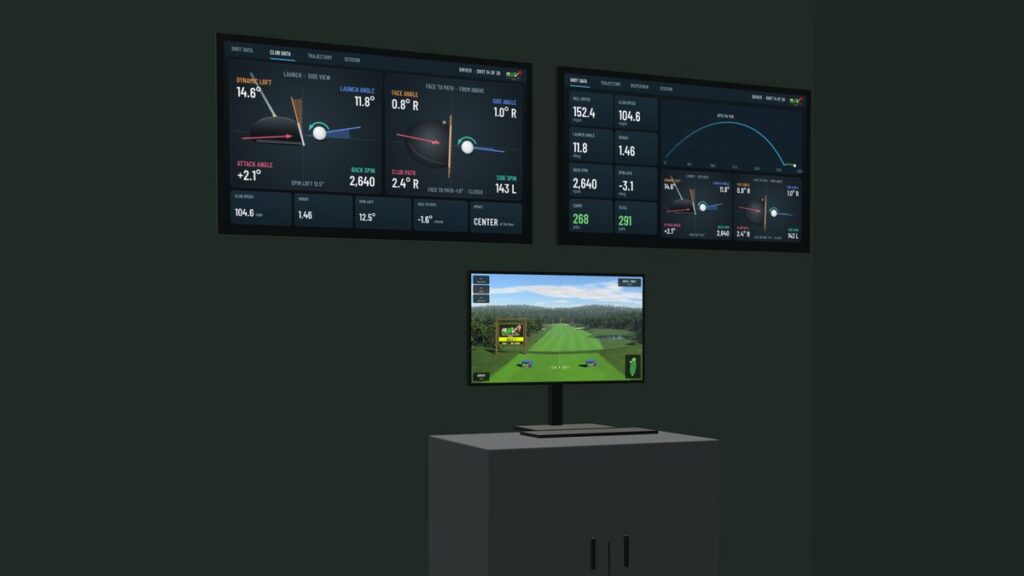
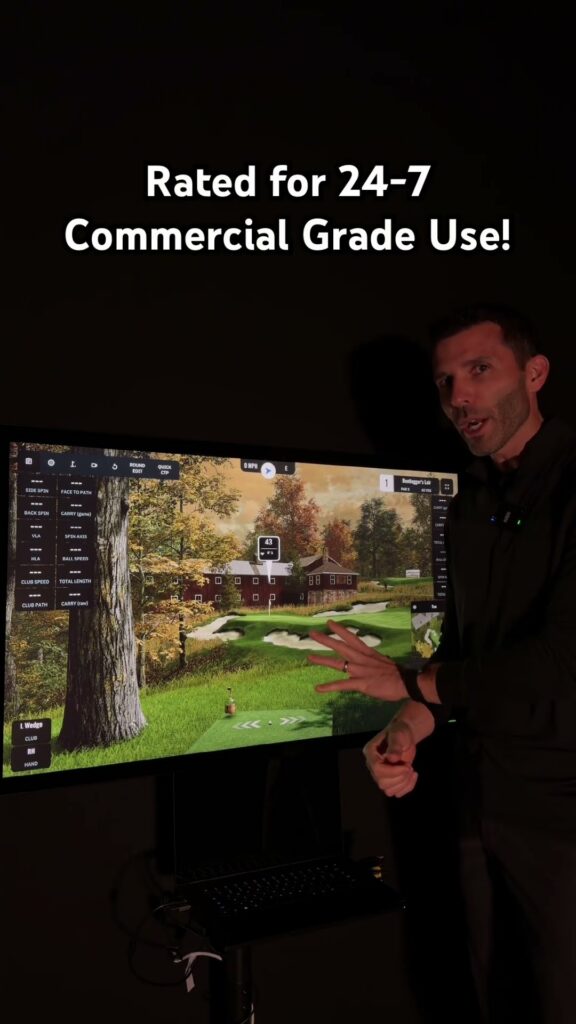
Two screens is how most owners set it up: the touchscreen at the desk mirrors the big screen, and a bigger screen on the wall shows the shot data, large enough to read from the tee. The GSV Studio has a 27 in on its PC cabinet and a 43 in on the wall above it.
Three screens add club data: the desk touchscreen mirrors the big screen, and two on the wall, side by side or stacked, show the shot data and the club data.
One, two or three screens
| Setup | What each screen shows | Wall it takes |
|---|---|---|
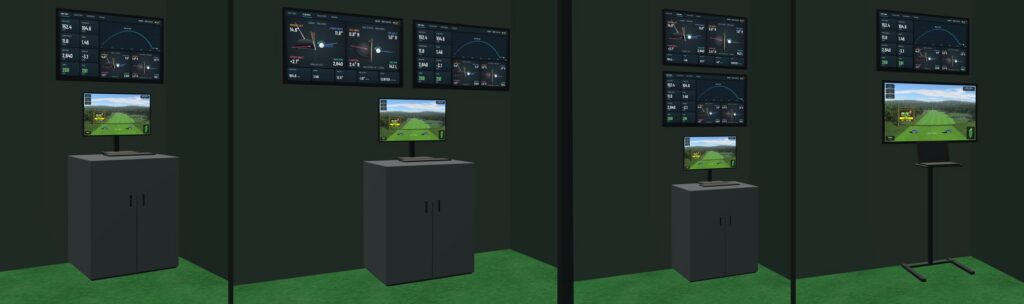
| One touchscreen at the desk | The mirror of the big screen | 2 ft 6 in, a PC cabinet |
| Two: the desk and one on the wall, as in the GSV Studio | Desk: the mirror. Wall: the shot data | 3 ft 3 in with a 43 in |
| Three, side by side | Desk: the mirror. Wall: the shot data and the club data | 6 ft 10 in with two 43 in, 5 ft 2 in with two 32 in |
| Three, stacked | Desk: the mirror. Lower wall screen: the shot data. Top: the club data | 3 ft 3 in with 43 in |
Two wall screens can also go up with no desk screen under them, side by side over the desk. Then one mirrors the big screen and the other shows the shot data. A floor stand with a laptop tray takes the place of the desk: its own touchscreen mirrors the big screen, and wall screens go over it or beside it.
What each screen shows
The mirror. The touchscreen at the desk shows what the projector shows. It is where the club is picked, the shot is aimed and the course is changed, so it sits within reach and lower than the wall screens.
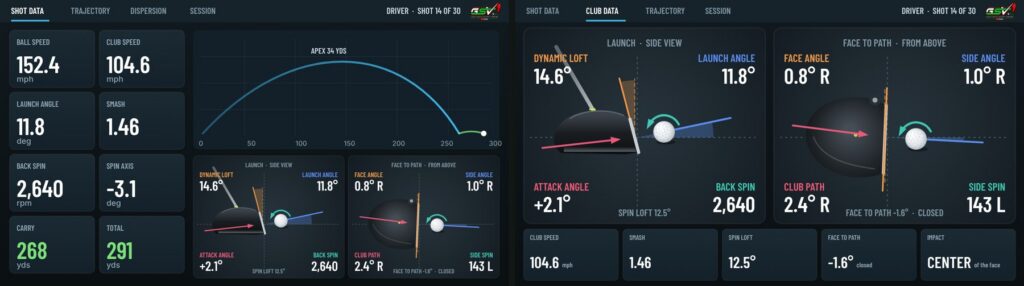
The shot data. Ball speed, launch, spin, carry and total, and the flight from the side, big enough to read from the tee. This is the screen most owners put on the wall.
The club data. Face, path, attack angle and dynamic loft at impact, from launch monitors that measure the club. On a third screen it sits beside or above the shot data.
What a data screen can show depends on the launch monitor and the simulator software. The pictures above are the GSV Sim Builder's drawings for one driver shot, with estimated figures, not a screen from any software.
Which size: TouchscreenGuru Ultra-Series 27, 32 and 43 in
All three are 4K, 3840 x 2160, 16:9, with 10-point projected capacitive touch, sealed glass rated IP65 at the front, and HDMI 2.0, DisplayPort and DisplayPort Alt Mode video inputs, the last one USB-C on the 27 and 43 in, with a USB-B cable for the touch.
| Size | Outside size, width x height x depth | Weight |
|---|---|---|
| 27 in | 24.25 x 14.44 x 1.75 in | 16.7 lb |
| 32 in | 29.0 x 17.0 x 2.25 in | 19.1 lb |
| 43 in | 39.18 x 23.0 x 2.375 in | 53.0 lb |
| Size | Mounting | Stand |
|---|---|---|
| 27 in | VESA 100 x 100 | Desktop stand included |
| 32 in | VESA 100 x 100, 200 x 200 or 400 x 200 | Desktop stand included |
| 43 in | VESA 400 x 400 | Mount not included |
| Size | Brightness and coating | Warranty |
|---|---|---|
| 27 in | 500 nits, anti-glare and anti-fingerprint | 3 years |
| 32 in | 500 nits, anti-glare and anti-fingerprint | 3 years, commercial |
| 43 in | 700+ nits, anti-fingerprint | 2 years |
The figures are from TouchscreenGuru's Ultra-Series product pages, read on October 11, 2026. TouchscreenGuru also makes 55 and 65 in models.
At the desk, a 27 in or a 32 in: both come with a desktop stand and sit within reach of the tee. On the wall, a 43 in reads from the tee, and a 32 in suits a short wall or a low ceiling. A 43 in weighs 53 lb and needs a VESA 400 x 400 wall mount rated for it.
Where the touchscreen goes in the room
GSV puts the touchscreen and the computer against the side wall the golfer faces, behind the ball and never ahead of it, toward the back corner. On that side it keeps at least 3 ft from the ball. On the golfer's back side it has to clear the swing: GSV's guide there is 7 ft for a 5 ft 9 in golfer. When right- and left-handed golfers share the room, it goes to the far back corner, clear of both.
Wall length is what decides a setup. Two 43 in screens side by side need 6 ft 10 in of wall, two 32 in 5 ft 2 in, and a stack only the width of one screen. With seating along the back wall, or in a short room, the wall behind the ball runs out first. The GSV Sim Builder places the station, and when the wall behind the ball is too short it says by how much and what would shorten it: stacking the screens, 32 in screens, or the screens over a floor stand instead of beside it.
How high the wall screens hang
Where the GSV Sim Builder hangs them, measured from the floor, over a PC cabinet with a 27 in touchscreen on it, or a floor stand:
| Setup | Middle of the lower wall screen | Top of the highest one |
|---|---|---|
| One 32 in over the cabinet | 5 ft 8 in | 6 ft 4 in |
| One 43 in over the cabinet | 5 ft 11 in | 6 ft 10 in |
| Two 43 in side by side over the cabinet, desk screen kept | 5 ft 11 in | 6 ft 10 in |
| Two 43 in side by side in place of the desk screen | 4 ft 9 in | 5 ft 9 in |
| Two 32 in stacked over the cabinet | 5 ft 8 in | 7 ft 11 in |
| Two 43 in stacked over the cabinet | 5 ft 11 in | 8 ft 11 in |
| One 43 in over a floor stand with a 43 in touchscreen | 7 ft 1 in | 8 ft 1 in |
The cabinet is a typical one, about 3 ft tall, and every height is a GSV estimate to plan with. The builder keeps the top screen at least 2 in under the ceiling. A stack of two 43 in screens over the cabinet needs a ceiling of about 9 ft 1 in. Under a lower one the stack comes down, the lower screen sits behind the desk touchscreen, and the builder says so and names what fits better.
Setting it up with the simulator PC
Each touchscreen takes two cables from the PC: one for the picture, HDMI or DisplayPort, and a USB cable for the touch. The graphics card needs an output for every screen, the projector included. TouchscreenGuru lists Windows, Linux, Android and OS X, with a driver needed for OS X.
To mirror the projector, select the desk touchscreen in the Windows display settings and duplicate it with the projector, then extend the desktop to the data screen. With more than one screen, Windows can send the touch to the wrong one. Microsoft's fix is the Tablet PC Settings app: Setup, then Touch input, then touch the screen it asks for. On newer versions of Windows the app may not come up in a search, and Microsoft's note gives a shortcut to open it.
Where to buy and the GSV code
Buying through GSV's links and codes helps support the channel: GSV earns a small commission at no extra cost to you, and you still get every saving available.
GSV's code GSV5 gives a saving on Ultra-Series touchscreens at TouchscreenGuru, shown at checkout. Every GSV code is on the golf simulator discount codes page, and the TouchscreenGuru Ultra-Series review covers the 27 and 43 in models in use.
TouchscreenGuru Ultra-Series touchscreens
- TouchscreenGuru touchscreensGSV code for TouchscreenGuru: GSV5.
Prices are on the shop's page. Codes last checked September 17, 2026.
Quick clips
Shorts from the Golf Simulator Videos channel. Tap one to watch it here.
Free consultation with GSV's partner builders
Planning the PC corner with the rest of the room? Jay works with official partners: master builders he hand-picked, who get on a call quickly and make sure you have the right fit before you buy anything. They offer package deals on the whole build, DIY packages to put together yourself, full installation, and more. The consultation is free.
Golf simulator touchscreen questions
What size touchscreen is best for a golf simulator?
A 27 in or a 32 in at the desk, to run the software, and a 43 in on the wall for the shot data, big enough to read from the tee. The GSV Studio has a 27 in on its PC cabinet and a 43 in on the wall above it.
Where should the touchscreen go in a golf simulator?
Against the side wall the golfer faces, behind the ball and never ahead of it, toward the back corner. GSV keeps it at least 3 ft from the ball on that side. On the golfer's back side it has to clear the swing: 7 ft from the ball for a 5 ft 9 in golfer.
How high should a golf simulator wall screen be mounted?
Over a PC cabinet with a 27 in touchscreen on it, the GSV Sim Builder hangs a 43 in wall screen with its middle 5 ft 11 in off the floor and its top at 6 ft 10 in. Two 43 in screens stacked there reach 8 ft 11 in, so they need a ceiling of about 9 ft 1 in.
What does the second screen in a golf simulator show?
Most owners mirror the big screen on the touchscreen at the desk, where the club is picked and the shot aimed, and show the shot data on a bigger screen on the wall. A third screen can show club data: face, path, attack angle and dynamic loft at impact.
How do you mirror the projector on a touchscreen?
Select the touchscreen in the Windows display settings and duplicate it with the projector, then extend the desktop to any data screen. The graphics card needs an output for every screen. If the touch goes to the wrong screen, Microsoft's fix is the Tablet PC Settings app: Setup, then Touch input, then touch the screen it asks for.
Does a 43 in touchscreen need a wall mount?
Yes. TouchscreenGuru's 43 in Ultra-Series does not include a mount. It weighs 53 lb and takes a VESA 400 x 400 mount. The 27 in and the 32 in come with a desktop stand.
Does a golf simulator touchscreen work with a Mac?
TouchscreenGuru lists Windows, Linux, Android and OS X for the Ultra-Series, with a driver needed for OS X.
Is there a GSV discount code for TouchscreenGuru?
Yes. GSV5 gives a saving on Ultra-Series touchscreens at TouchscreenGuru, shown at checkout.
Is there free help planning a golf simulator?
Yes. Jay offers a free consultation with GSV's partner master builders, hand-picked by Jay, who get on a call quickly and make sure everything fits. They offer package deals, DIY packages, full installation and more. Use the free consultation button on this page.
More from GSV
- TouchscreenGuru Ultra-Series review
- GSV Sim Builder: free 3D room planner
- The best computer for a golf simulator
- Golf simulator for a low ceiling
- Golf simulator discount codes
All GSV posts on this (2)
Build the rest of your sim
- Enclosure and screen$250 off at Shop Indoor GolfShop
- Carl's Place enclosure5% off, code sent by emailShopGet the code
- Hitting mat$20 off at Shop Indoor Golf. GSV5OFF is more on a first order over $400Shop
- Projector5% off at Shop Indoor Golf. First-time buyersShop
- Simulator computerSurfThing: $100 off applied automatically, no codeShop
- Complete package$250 off at Shop Indoor Golf. GSV5OFF is more on a first order over $5,000Shop
GSV earns a small commission on these links, at no extra cost to you. Shop Indoor Golf takes one code per order.