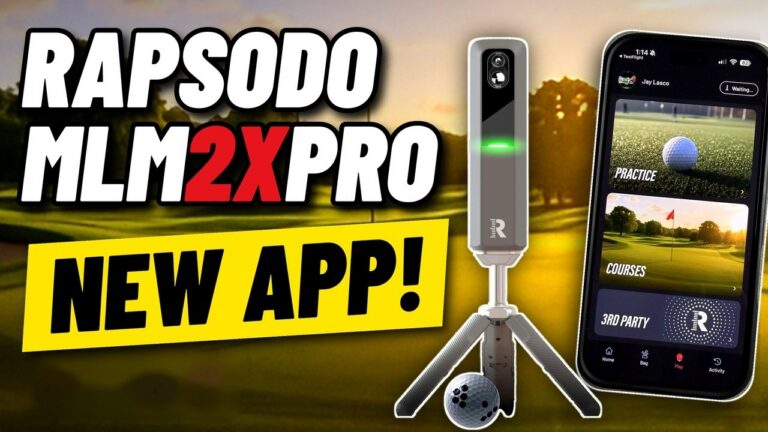
The full guide: Rapsodo MLM2XPRO vs MLM2PRO
The Rapsodo MLM2XPRO is the new version of the MLM2PRO: the same two cameras and Doppler radar, now with simulated putting, faster shot processing (twice as fast, Rapsodo told GSV), a screen on the unit and a tilt built into its stand. It is $899.99 at Shop Indoor Golf and from Rapsodo, and it launches alongside Rapsodo's new PC app and Rapsodo Studios, a library of 4K courses. Jay Lasco, host of Golf Simulator Videos, unboxed it, set it up on a PC in the GSV studio, played courses in the new PC app and tested chipping and putting on video, published on October 10, 2026. The video is at the top of this page, and what GSV found is below.
Quick buy: Rapsodo MLM2XPRO
- Rapsodo MLM2XPRO5% off at Shop Indoor Golf with code GSV5OFF.First-time buyers only, one use. Not valid on a standalone Trackman, the Square Golf launch monitor or the ProTee VX.
Buying through GSV's links and codes helps support the channel: GSV earns a small commission at no extra cost to you, and you still get every saving available.
- $899.99Rapsodo's price, with 12 RPT balls
- PuttingThe first Rapsodo with simulated putting
- 2xFaster shot processing, Rapsodo told GSV
- 15Ball and club figures
- $199.99A year for Core, after a 21-day trial
- $399.99A year for Studios, the 4K courses
What is new on the MLM2XPRO
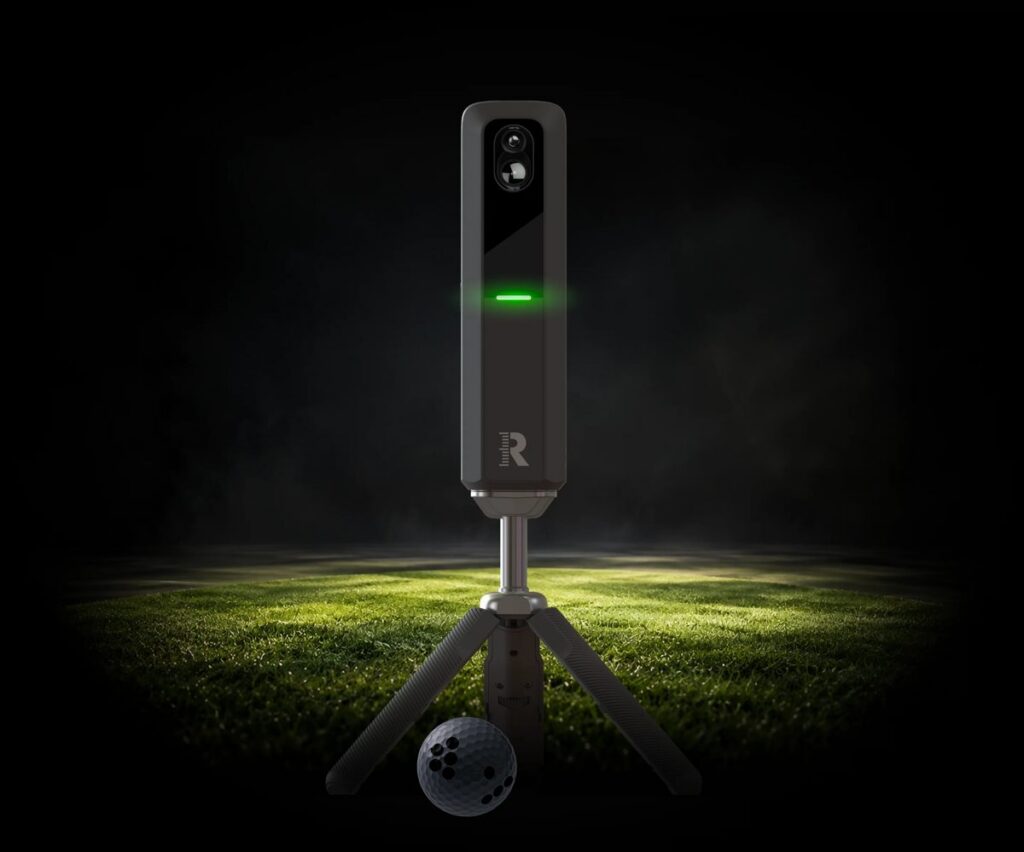
Side by side with an MLM2PRO, the two look alike apart from the darker gray. The differences are in the stand, the top of the unit and what it does inside:
| MLM2PRO | MLM2XPRO | |
|---|---|---|
| Sensors | Two cameras and Doppler radar | Two cameras and Doppler radar |
| Simulated putting | No | Yes |
| Shot processing | As before | Faster: twice as fast, Rapsodo told GSV |
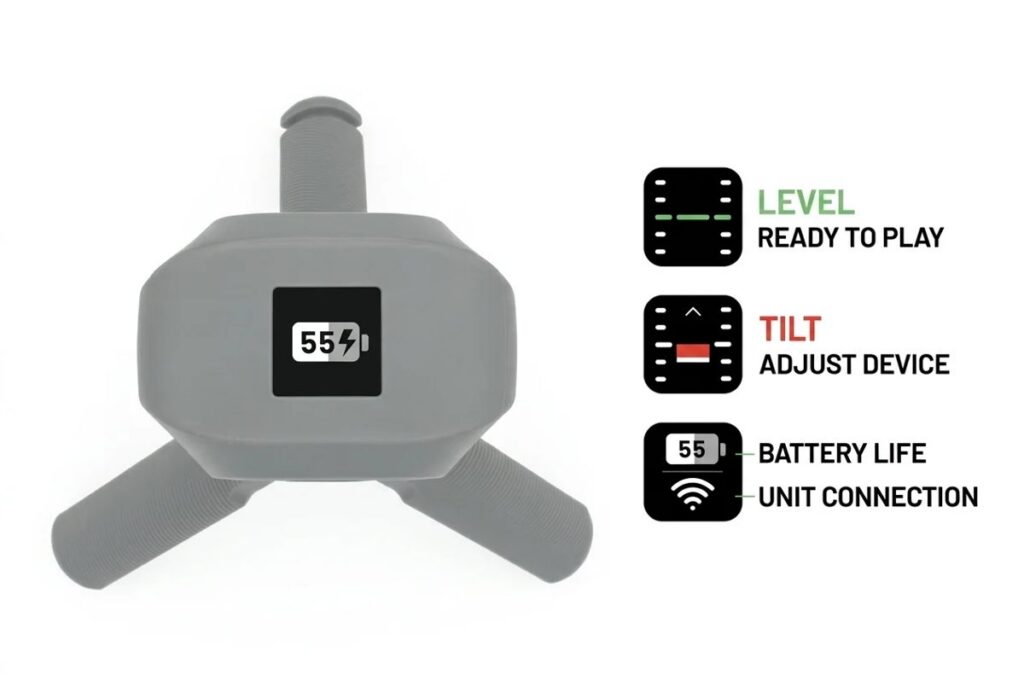
| Screen on the unit | No | Yes: level, tilt, battery and connection |
| Stand | Tripod | Tripod with a built-in tilt adjustment |
| Balls in the box | RPT balls | 12 RPT balls: Titleist Pro V1 or Callaway Chrome Tour |
| Membership | Premium, $199.99 a year | Core, $199.99 a year, or Studios, $399.99 a year |
Rapsodo has not said what changed inside. Twice the processing speed points to a faster processor, which may be what makes putting possible. Rapsodo told GSV it has no plans at this time to bring putting or the faster processing to the MLM2PRO, so the new hardware looks to be what unlocks them. Rapsodo's new phone and PC apps keep supporting the MLM2PRO.
What comes in the box
- The MLM2XPRO
- The tripod, with its tilt adjustment
- A carrying case
- A charging cable (USB-C)
- 12 RPT golf balls: Titleist 2025 Pro V1 or Callaway 2026 Chrome Tour, your choice
- A getting started guide
The screen does more than the tilt. Switched on, it shows the battery as a percentage. Switched off, it shows how long to hold the button. While the stand is adjusted, it shows the tilt, so you can see when the unit is level.
Price and the new memberships
The MLM2XPRO is $899.99 at Shop Indoor Golf and from Rapsodo, and Rapsodo's announcement put the start of orders at October 15, 2026. GSV's code GSV5OFF takes 5% off a first order at Shop Indoor Golf: at a GSV checkout on October 10, 2026 it took $44.99 off, to $855.00. Rapsodo's memberships are new with it:
| Plan | Per year | What it gives you |
|---|---|---|
| Free | $0 | Outdoor range practice and 11 figures in the phone app |
| Core | $199.99 | All 15 figures, two golfer profiles, the practice modes, swing video and Impact Vision, more than 30,000 courses, putting in the simulation, and play on a PC |
| Studios | $399.99 | Everything in Core, four golfer profiles, the 4K course library and on-course practice on a compatible PC |
Studios is $399.99 a year in all, not $399.99 on top of Core. The unit comes with a 21-day Core trial and a preview of Studios: three 18-hole rounds each at Bethpage Black and Magenta Shores, played during the trial. Rapsodo's announcement of October 1 says Studios opens with 25 courses in 4K, among them Bethpage Black, Tobacco Road and Quail Hollow, with more to come. The PC app is free to owners of a Rapsodo launch monitor that works with it.
The data, and when you need RPT balls
Rapsodo lists 15 figures. Measured: club speed, ball speed, launch direction, launch angle, spin rate, spin axis, angle of attack and club path. The other seven: carry, total distance, side carry, smash factor, apex, descent angle and shot type. Rapsodo says spin rate and spin axis are measured with RPT balls, which is why indoors, where the ball flies only a few feet, you hit RPT balls. Outdoors, the radar follows the ball, and ordinary range balls work.
The sensors are the MLM2PRO's, so the data should be too. GSV tested the MLM2PRO's driver numbers against a Foresight GCQuad in the MLM2PRO accuracy test, and the club path and angle of attack it gained in 2025 are in the club data update. In this video the spin and spin axis read the way GSV expects from the RPT balls: about 9,500 rpm on a soft 54 degree wedge, less spin on a draw than a fade, and a thin shot with about 6,000 rpm.
Setting it up and connecting it to a PC
- Switch the MLM2XPRO on and connect to it with the Rapsodo app on your phone, over Bluetooth. The app also puts it on your home network.
- Check for a firmware update in the app. There was one for GSV's unit.
- For the PC app, connect the unit to the PC with a USB-C cable, to a USB-A or USB-C port on the PC. That is how it connects to the PC for now. Plug it in and switch it on first, then open the PC app.
- In the PC app, choose to align the device. It asks for the MLM2XPRO 6 1/2 to 8 1/2 ft behind the ball. Windows may ask to let the app through its firewall.
- Level the unit with the tilt on its stand until the screen says it is level, place the ball in the box the app shows, and the alignment is done.
The app's ready-to-hit marker helps a new golfer in the room: it says when the ball is too far back and locks on quickly once it is in place. Add your clubs under My Bag, and add a putter: without one in your bag, you cannot putt.
Room size. With the unit 6 1/2 to 8 1/2 ft behind the ball, it sits where the MLM2PRO does. Pick the MLM2PRO in the GSV Sim Builder for now to see how it fits your room with the screen, the tee and the unit in 3D.
The new PC app and the 4K courses
The PC app opens in a launcher, where you manage your profile and devices, see the connection and the firmware, and align the unit. Practice is a driving range, a target range and on-course practice. The courses are the standard ones and, with Studios, the 4K library.
- Graphics. A big step up from Rapsodo's earlier software, crisp and detailed, and the courses load quickly. GSV played Cliffhangers, a par 3 course, and hole 19 at Payne's Valley in the new app. The 3D grass, around the greens, is the one part GSV thought could look better: thin, with a lot of ground showing. Judge the graphics yourself in the video.
- Course search. Typing a name finds a course. The filters (recently played, popular, recently added) need work: the list of all courses went missing while clicking between them.
- On the course. A flyover, green grid, heat map and slope views, an approach camera, a drone view, a heat map while hitting, and moving the ball and the aim.
- After the shot. A dispersion chart, a replay you can pause and watch from a broadcast or player view, and a video replay from the unit's camera, which worked well in GSV's dark studio. The impact view showed the ball struck before the turf and in the middle of the face. Videos can be downloaded. A drawing of the club shows its path and face.
- Screens. Display settings for extended, duplicated and mirrored screens, with the 2D map and the data on or off.
What GSV found testing it
Full shots and chipping
- Wedges checked and spun the way they should, and a fade spun a little right after landing.
- Low bump and runs ran out, and higher chips stopped sooner. A low chip landing on the fringe still released onto the green.
- A thin draw at about 6,000 rpm stopped sooner than GSV expected. That and the sound of the ball landing (a click, where GSV would expect a thud) are things GSV is passing to Rapsodo.
- The data fields on screen went back to their defaults during the session. GSV would like them to stay as set.
Putting
- Read from anywhere. The ball did not have to be inside the hitting zone for putts.
- Line. Launch direction was read to a tenth of a degree, from 0 up to 4.3 degrees, and an 8 to 9 ft putt went in at 2.2 degrees left.
- Lag putts. From 47 ft, pace and line were good.
- Very soft putts. A putt hit to stop about 2 ft away read as rolling about a yard, and one that rolled about 5 ft in the studio read as about 3 ft. The next 5 ft putt read right and went in. Babying a short putt is the one place GSV would watch the speed.
- One ghost putt. One putt registered on its own, possibly because the ball was moved after the unit had locked on. Leave the ball still once it is ready.
- A small bug. The green said “2 feet downhill” where the slope looked like 2 inches.
GSV has not yet tried putting outdoors on a real green. That, full rounds on the new software and more testing are coming on the channel.
The phone app on a projector
In a second video, Jay played the MLM2XPRO from the Rapsodo Golf phone app alone: an iPhone with a USB-C to HDMI adapter to the projector, connected locally on the latest firmware.
- Dual screen. Driving Range, Target Practice and Course Practice put the target choice on the phone and the data and a mini map on the projector. Plain Practice shows the range on both.
- Add a putter first. Putting needs a putter in the bag.
- Shot shape. A fade read 2.3 degrees of spin axis and a draw minus 8.6. A pushed pitching wedge read zero, and a 30 ft putt that went in read zero on every figure, which Jay had not seen before and suspects came with the new firmware.
- Course play. Sweetens Cove, a 9-hole par 36 of about 3,000 yd. The green speed cannot be set, and distances on the green show in yards, where Jay would like feet.
- Replays. Shot Vision and Impact Vision look great on the phone, and the swing camera was clear in a dark room. A replay can be scrubbed, but the side-by-side comparison cannot.
- No ready light. Unlike the PC app, the phone app shows nothing when the unit is ready or the ball is in the zone.
Jay's view: it could be very powerful with a ready indicator, scrubbing in the comparison and feet on the green. The iPhone launch monitor guide covers the other ways to play from a phone.
GSPro and other simulator software
Rapsodo says the MLM2XPRO works with GSPro, E6 Connect, E6 Apex and Awesome Golf, as the MLM2PRO does. GSPro is separate software, $250 a year from GSPro, and GSPro's own list of launch monitors named the MLM2PRO but not yet the MLM2XPRO on October 10, 2026. Whether Pureplay connects to it is not known yet. The GSPro compatible launch monitors page has what each launch monitor needs for GSPro. On October 19, 2026 Jay tested putting and chipping with the MLM2XPRO in GSPro: see the MLM2XPRO in GSPro, putting and chipping tested.
MLM2XPRO or MLM2PRO
The MLM2XPRO fits a golfer who wants putting in the simulation, the faster shot processing, the screen and the tilt on the stand, and a dozen RPT balls in the box. The MLM2PRO reads the same 15 figures from the same sensors, without simulated putting. GSV's code takes 5% off either one at Shop Indoor Golf. Both work outdoors on the range, and both have swing video and Impact Vision with a membership. Weighing it against the Square Golf OMNI, a camera unit with no subscription and no marked balls? See MLM2XPRO vs Square Golf OMNI.
Own an MLM2PRO? Rapsodo told its golf community on October 14, 2026 that a Lifetime membership moves to the MLM2XPRO if it is transferred by March 15, 2027, with the new unit activated by March 31, 2027, and that an MLM2XPRO bought from any retailer from October 15 qualifies. Rapsodo stopped selling Lifetime memberships at 11:59 pm CDT on October 14, 2026. Keeping both units costs $99 a year for the second device on the same R-Cloud account, sharing the player profiles and the membership status. From November 15, in the US, Rapsodo will take an MLM2PRO in trade for a year of Rapsodo Studios, about $400 of value by its figure, with the MLM2XPRO bought through R-Cloud. The MLM2XPRO vs MLM2PRO page has the details.
Where to buy and codes
The MLM2XPRO is $899.99 at Shop Indoor Golf, where code GSV5OFF takes 5% off a first order: $855.00 at checkout. The same code works on the MLM2PRO there. Rapsodo sells it direct too: see the MLM2XPRO at Rapsodo. The Rapsodo discount code page has both units and GSV's codes.
5% off at Shop Indoor Golf
First-time buyers only, one use. Not valid on a standalone Trackman, the Square Golf launch monitor or the ProTee VX.
Code last checked October 9, 2026.
Rapsodo MLM2XPRO and MLM2PRO at Shop Indoor Golf
- Rapsodo MLM2XPRO5% off at Shop Indoor Golf with code GSV5OFF.First-time buyers only, one use. Not valid on a standalone Trackman, the Square Golf launch monitor or the ProTee VX.
- Rapsodo MLM2PRO5% off at Shop Indoor Golf with code GSV5OFF, first-time buyers.
Will it fit? See each in your room in the free GSV Sim Builder, in 3D: MLM2XPRO, MLM2PRO.
Free consultation with GSV's partner builders
Building a simulator around an MLM2XPRO? Jay works with official partners: master builders he hand-picked, who get on a call quickly and make sure you have the right fit before you buy anything. They offer package deals on the whole build, DIY packages to put together yourself, full installation, and more. The consultation is free.
Rapsodo MLM2XPRO questions
How much is the Rapsodo MLM2XPRO?
$899.99 at Shop Indoor Golf and from Rapsodo, with 12 RPT balls and a 21-day trial of the Core membership. Code GSV5OFF takes 5% off a first order at Shop Indoor Golf: $855.00 at checkout. Core is then $199.99 a year, and Studios, with the 4K courses, is $399.99 a year in all.
What is the difference between the MLM2XPRO and the MLM2PRO?
The MLM2XPRO adds simulated putting, faster shot processing (twice as fast, Rapsodo told GSV), a screen on the unit and a tilt built into the stand. Both use two cameras and Doppler radar and read 15 figures. Rapsodo has no plans at this time to bring putting or the faster processing to the MLM2PRO.
Does the Rapsodo MLM2XPRO do putting?
Yes, in the simulation, on all of Rapsodo's courses, with the Core membership. In GSV's testing it read lag putts and launch direction well. Very soft, short putts read differently from how far they rolled in the studio, so watch the speed on those. Putting outdoors has not been tested yet.
Does the MLM2XPRO need a subscription?
The free plan gives outdoor range practice and 11 figures in the phone app. Core, $199.99 a year, gives all 15 figures, the simulation with putting, more than 30,000 courses and play on a PC. Studios, $399.99 a year, adds the 4K courses.
Does the MLM2XPRO work with GSPro?
Rapsodo says it works with GSPro, E6 Connect, E6 Apex and Awesome Golf. GSPro is $250 a year from GSPro, and GSPro's own list named the MLM2PRO but not yet the MLM2XPRO on October 10, 2026.
How far behind the ball does the MLM2XPRO go?
6 1/2 to 8 1/2 ft, by Rapsodo's PC app alignment. Indoors you hit RPT balls for measured spin.
How does the MLM2XPRO connect to a PC?
With a USB-C cable to the PC for now. The phone app connects over Bluetooth and puts the unit on your network.
Is there a discount code for the Rapsodo MLM2XPRO?
Yes. GSV's Rapsodo code, GSV5OFF, takes 5% off a first order of the MLM2XPRO at Shop Indoor Golf: at a GSV checkout on October 10, 2026 it took $44.99 off, to $855.00. It works on the MLM2PRO too. Shop Indoor Golf's terms are first-time buyers only, one use.
Is there free help planning a simulator around it?
Yes. Jay offers a free consultation with GSV's partner master builders, hand-picked by Jay, who get on a call quickly and make sure everything fits. They offer package deals, DIY packages, full installation and more. Use the free consultation button on this page.
More on Rapsodo from GSV
Full video transcript
This is the all new MLM2XPRO. Today we're going to give you a full review. We'll do a quick unboxing. We're going to talk about everything that you need to know about this all new unit from Rapsodo and what really stands apart from the original MLM2PRO. Very similar, but actually very different. So let's dive right in and do the unboxing and make sure you stay tuned for the whole video, because we're going to dive into all new software as well. You'll see a PC app behind me. More on that to come. So let's do a quick unboxing. Very nice box actually. Quality box. You can see it comes with a carrying case inside I want to show you the unit. And then we're going to talk about some hardware changes that are noticeable, but also not quite sure what's going inside of the unit, the changes that are actually allowing it to have two times faster shot processing, according to Rapsodo. And it's bringing the long-awaited putting. so many people asked about putting during the MLM2PRO launch and now the MLM2XPRO is bringing it to the table. So nice little carrying case. You actually have a USB-C cable inside here as well. And then inside of the box there's actually some changes that you're going to notice what's included because it actually comes now with a dozen balls of your choice. You get to choose either Callaway Chrome Tour or the Titleist brand. All right. So cool that it comes with a dozen. Now I think that's awesome. Just a quick little getting Started guide. And then we'll put this down to the side. Because I actually have an MLM2PRO here just to kind of show you guys the differences. So at first glance, if you weren't familiar with either unit, you would say, wow, those look really similar, but there are some changes. Yes, it's in a little darker gray color, but actual hardware changes that you can see on the unit. I'll bring it up to the camera. The very first thing that you're going to notice is the stand. Now it has an adjustable built in tilt. Now that's a great feature, but what tops that off is a built in screen on the top that actually allows you to see the tilt while you're adjusting it. And there's some other features that I'll talk about that here in just a little bit, but we don't quite know what's going on inside of the unit, whether it be firmware, whether it be board updates, the fact that it can process shots two times faster than the original MLM2PRO makes me think that they probably upgraded the processor. Maybe that's unlocking the cameras a little bit too. And that's why you're getting simulator putting now. Does it have outdoor putting? I haven't specified that yet and I want to test it. So maybe we'll go out to the GSV practice green and hit outdoor putts as well with the app. And check that out. Now there is a new app. And then also like I mentioned in all new 4K PC software, we're going to show you shots on that here in just a little bit. But let's just talk about the differences really quick. The first thing I'd want to bring up to you is, is the price of the unit. So this is $899 and there's actually two different subscription models that they have. The first one is the core, which is $199 a year. And the big factor to the core is it's going to get you those core features and the access to their 30,000 courses that I've already shown in the channel. If you haven't seen those, make sure you check them out. I do a deep dive analysis on this unit, all kinds of different stuff that you can see. But now they have the new Studios that's available, and that's $399 a year, unlocking access to their new 4K courses. Wait till you see those. So I've been messing around with this a little bit. It's a big upgrade, so real quick orders are going to start on October 15th. You can order this unit. So by the time that you're looking at this video it might be a few days. And if you're seeing this after launch it's probably already available for sale. So 21 day core trial included on this unit. So you get to test it out just in case you need to know if you're going to want core or not. It gives you a limited studios preview in that, which gives you two courses and up to three rounds each. So you get to test it out, see what studio is all about, and make your decision from there. Now the faster connection and shot feedback also allows for easier to set up an alignment, which we talked about. The display obviously shows status. It has an adjustable tripod. And then just so you guys know, they don't plan any updates for MLM2PRO as far as the putting goes or the faster shot processing that's not planned at this time. So I'm assuming that this hardware is what's unlocking that. I just want to make sure you guys know that now. It's the same Doppler radar that's built inside with the two high speed cameras and infrared that's giving you 15 metrics. The RPT balls are needed indoors for the measured spin axis. I've shown that in the channel. You know, it works really well. I don't really expect to have to do a lot of data benchmarking on this, because I've done it on this unit. It can measure spin axis really well indoors. All those different data parameters, I should say two launch angles and ball speed and everything. But outdoors we benchmarked it against the GCQuad. If you haven't seen that video, check it out. That radar obviously can track the ball well outside and you don't need special marked balls. You just use normal range balls so it gives you a lot of versatility. At $899, now that you have full golf simulation play, including putting but also an outdoor unit two that tracks the ball even has built in swing camera, impact camera, those type of features that you don't see across a lot of units and coming in at a sub 1000 price range, that's for sure. So I should say that there is measured club path and angle of attack that already exists. With MLM2PRO. It's obviously going to be included with this unit as well. And then as far as like the membership and courses go, that core includes advanced practice, the video feedback, the 30,000 plus standard courses and the putting is also supported in the standard simulation. So this PC app that you see behind me that includes standard simulation, you can actually put on those standard courses or on the standard app. So there's putting available on those. Just want to make sure you guys know that. Now as far as studio goes, it includes all those core plus premium for courses or 4K courses on top and then on course practice on compatible PC. And that's 399 like I mentioned. Now that's total a year. It's not an additional $399 to get all of that. That's just 399 a year total. All right. So you don't pay the 199 then the 399. It's just $399 a year for everything. Everything. As far as like other apps and simulation go, this is something I always want to point out. So it does have a lot of compatibility. And I've shown this in the channel. It has GSPro connectivity, Awesome Golf, E6 Connect, E6 Apex. I know you guys have probably seen my Pureplay golf simulator software video. It kind of went crazy. It's like over 30,000 views already. If you want to know if that's being connected, I'm not certain yet, but if and when it does get a connection, we'll show it right away. So to stay tuned for that. But they have a lot of connectivity. I can't imagine it not coming, I guess at this point. And I do know a lot of people that don't want to deal with third party connections, and they're just going to use the Rapsodo software. So it kind of gives the best of both worlds. All right. So other than that, I just want to go ahead and just dive right into this unit on the PC software. And we're going to show you guys kind of just talk about some setup. We'll show a little preview of it and then we'll start hitting some balls. So let's go ahead and dive out there. All right. So we have the all new MLM2XPRO connected to our computer and all set up. And I do want to talk about the setup with you guys because I think if you follow these simple steps it's going to go really quickly and seamlessly for you. You just need to power the unit on. I use the new Rapsodo app on my phone to connect to the device. It uses Bluetooth. It allows you to connect to your local network at that time. And then what you can do is is check for a firmware update. I had a firmware update available. I went ahead and did that. I was ready to go at that point. You could use the app on the phone, but we're going to show you guys. The all new PC app. Now. Connecting to the PC app currently is done with a USB-C to USB, either A or C cable. I'm using an A in this case. Will Wi-Fi connectivity or local connectivity be part of it? It sounds like it, but I just don't want to quote that and promise that to you guys. The cable connection is really nice. I mean, you know, it's solid, it's easy. I mean, if you're playing in an environment like this, usually it's no big deal just to have that type of cable. But so we'll follow up more on that. I will say that the screen that is built into the unit is packing more punch kind of than I even thought, because once you power the unit on, you can get a battery indicator that shows you the percentage, which is really nice. Then when you power the unit off, you press the button. It gives you an indicator of how long to hold it until you know it's off. I know that sounds simple, but it's actually really nice to have. And then, of course, that new built in adjustability on the stand, having that built in, you know, gauge, I guess you could call it to know its level. It just makes it so simple. You just know when to slow down. It's locked in and good to go. And then we'll show you guys how the alignment and everything works inside the PC app now as well. So let's go over to the PC app. The first thing you're going to notice is that this is kind of like there. And I'll take my camera down so you can see it all kind of like their new launcher UI. So this isn't the actual software for simulation. I don't think you'll know what I'm saying here in just a second when we launch it, but this is where you're going to in the upper right. If you're going through a connection, go ahead and see that you're connected. It will connect automatically. When I plugged in USB-C, you do want to plug in and power up first, then launch. The software is how I was told to do it. You can see my firmware is already up to date and then you can hit align your device. So align your MLM2XPRO, 6.5ft to 8.5ft behind the ball. And you can hit align now and it's going to probably prompt you. I had a prompt that had to allow through the firewall just this, this camera access I'm assuming, and it pulls up and just allows you for a really seamless connection. All right. So I have the device leveled. I know where my ball data and my club data is. You can see the orange box. There is club data. And I've noticed on putting I don't think you have to be anywhere in that hitting zone works because I did some testing on that. So just go ahead and click next. Alignment is completed and now you can get started. I do want to point out a couple other things. Now if you do want access in the upper left, that's where you can manage your profile, manage devices or get some help and also sign out if you're signing a different player. But my bag is important. So there's a couple things. One, if you load your whole bag, it's going to track all those clubs for you under that activity tab and in your cloud. So you'll have all that you can see in the upper right. It has a cloud connection. But if you don't add a putter you can't putt. So something I noticed right away and that's probably they should do is just like default a generic putter in your bag. So like in case you forget or you don't know what's going on, but you do have to have a putter in your bag to actually putt, at least as of now. All right. So maybe some good feedback form. Right. You can see a new courses Cliffhangers I think we're going to check that one out. It's well known. It'd be really cool. So now I'm going to do on course practice because that way we can bounce around, show you guys graphics, show you guys plotting all that type of stuff. So let's go to practice. Obviously there's driving range and target range we're going to do on course practice. And when I click that you're going to see it says game starting now. I think this is where it's actually loading this engine that they're using for the 4K software, not just the 4K software. You also have the standard courses in here as well. All right. So let's go ahead and show you really quick. Kind of like the search panel. The one thing about the search panel that I noticed is that it probably needs some refinement, like if you're under all courses, I noticed that there's recently played popular and recently added. But like between clicking around the kind of like the all courses disappeared, if I go to 18 holes, you can see 38 results and I can show you all the different studio courses now, the studio or the 4K courses, there's a nice selection of really, really good well known courses in here. There's actually one in here that I couldn't believe I think that's under studio. Let's I mean Tobacco Road, everyone knows that one. That's awesome. But Augusta is standard. But I thought that under studio Sea Island. That's a great one. Quail hollow. That's another great one. I mean, some impressive names under here, you know. So really, really cool. But I just feel like the filter something something's off. You know, we need to kind of get them. Now, if I wanted to search for one, I can just search for one and it comes up. All right. So that does work. But I just wanted to kind of give them some feedback on that. So let's go to Cliffhangers first. And then after that this is kind of cool actually. It pops up and you can preview the whole. So let's say I only wanted to play a certain hole. I want to show you guys kind of that famous one on number three, and then we'll go out and we'll hit some shots and do some putting and stuff, but we'll just start here just to show you. You can see that this is number three is the one. All right. So it kind of gives you a preview I'm going to do selected holes. And then is it. And it says all par threes. Oh yeah. That's right. These are all par three. It's actually whole number three right. Yeah. Sorry I don't know why I'm hitting five because I just saw the par three there. All par three is on Cliffhangers. It threw me off. Now that's funny stuff. Ball type. You want to select your ball type I'm going to use the Chrome Tour balls included. You can change your pin if you are t location at this point if you wanted to, or add a different player under more settings elevation, graphics, quality, environmental, sound, all those type of things. Your course settings. You can see where I have those set, just kind of like in a medium setting. That way you guys can see it. I do have flyover preview on, so you guys can kind of get a flyover when we go out of each hole, and then we'll just hit play and then we'll load up. The one thing I've noticed on these 4K courses, even the studio ones, load fast. Like you can see how fast that loaded graphic quality. Obviously really stepping up their game here versus what we had before. I like the detail that I see. We're going to bounce around and kind of let you guys do the judging of your graphics preference. Graphics are just so you know, I don't even want to call it opinionated. You know, I'm going to let you guys benchmark it against everything I've shown. But they do look nice. They're crisp, huge, huge advancement from what they had before. A couple little things that I've noticed that maybe kind of leave some, you know, enhancement to be desired. But you know, this is brand new software for them. So let's go ahead and select a wedge. All right. We'll just hit lob wedge. And that way the proper club is selected and shown. And then over here you could move the ball I could actually have a green heat map on. Now while I'm hitting I thought that was kind of nice. You can expand your heat map if you want, change your target in any way you want to. You actually have different course views, whether you want to go up and see the green ahead of time. With a green grid and heat map that's available, you have an approach camera that takes you to basically where you're aimed, which is pretty cool. Fly over. You just saw Drone View brings you up above, which is actually a good view. I know a lot of people like those type of views. You can skip whole over here, move the ball and then reset the aim and everything. All right, so we need to hit some shots first and then I'll kind of show you some other things that are inside here. And I want to basically bring my camera back up so you can see what's going on in the studio. I tried to put it in area where you're going to see a lot of data, but at the same time you're going to at least have what you need. As far as like the power goes, the spin deduction, lie angles, you know, but with the data over on the left, there's a few things covered up. But I think I gave you some core points and we're going to review the data anyway when we pull it up. So I did notice that the ready to hit is really nice to have, especially if someone's new in your sim and doesn't know where to place it. It actually now shows you, hey, that's too far back, it needs to be up here. And then once you bring it up there, it locks in. It locks in fast too. So maybe that's part of the processing that two x it locks in fast. So I wanted to point that out. So all right well lots of talking very little swinging I only hit a couple test shots. Let's see if I can get a ball down there. Little 54 degree nice soft 54 degree. How's that? Is that enough club I think. Yeah, I could have hit a little harder. I want you guys to pay attention to the physics that had nice spin on it of 9500. One thing that I think I'm going to give them some feedback on right away. I think it's good feedback. Do you notice when that landed that kind of clicked. It didn't like thud. I think that they need a thud. And I'll show you guys some shot previews, camera previews, all that here in just a second. Let's hit one more shot for you, because I feel like I needed to step on that just a little more. I probably over cut that one. Yeah, it wasn't an awesome impact on the club, you know, just a little open face. I needed to kind of close it and nip the ball a little better. So we'll hit one more. That was the right idea, though. It's what I was trying to do. Trying to cut the ball a little bit, get some spin on it, see if we can get some, you know, check up. That one was hit pretty nice. 97. It's not terrible for me, you know, just kind of get warmed up. See I cut the ball though. Oh, man, I like that. All right. So what I can do now is I can say, wow, that was a great shot. I want to review it. There's a couple things. Let's go in the upper upper right. There's a dispersion graph now and I think I can leave my camera up. Not that bad. Maybe I'll take it down. This because it's covering a little bit. But you can see you have shot last shot, current position tee marker and pin. So it indicates everything for you. You can do all shots of current session. It shows you your stats. All right. You can rotate it depending on maybe the screen you're using. If you like that view better. I kind of like the wide one. Just depends on what you're into, you know? But I like that the dispersion right here quickly accessible as far as replay goes. There's some shot replay options that I think are pretty cool. This is kind of just your standard replay. I thought it was pretty cool that it can be paused at any point in time, so you can see where it's like hitting and then rolled out, and then you can also change your view at any time. Up here in the upper left, it's like a broadcast view or a player view. The player view, at least on this hole, doesn't really do it for me. So we'll just kind of leave that. It just I don't know, it's confusing a little bit. I guess the best way to put it. But I'll show you guys what it looks like, just so you know. So pause and then player it does it like from the player view and then stays but like see how you can't see what's going on. It's exactly what it's supposed to be. But on this whole I think it would confuse you because you can't see where the ball lands. So that's all I meant to say. Now. Video replay this is something that I think is really cool. So this is something that you just don't get from a lot of units, is a built in shot camera that actually works well in low light. So you guys know how dark it is in my studio. I'll check this out. So I could actually look at where I'm at in the top of my swing. I mean, it is it is a solid camera. Now if I want to look at impact, obviously really cool. Everybody loves this. I can look at impact. You can see right here. I can tell that I nipped that ball first before turf. And that's really important for me. You can see it's kind of coming right into the ball and then just just hitting the turf as I'm hitting the ball, which is important, you know. And I can see square in the center of the face, not towards the heel or, towards the toe. All those things are important people. Now you can download it and you can send it to your buddies and show off how good of a shot you had. So it's cool. You can download that. It does give you a graphical representation of whatever club that you've hit. I do think that it's, you know, kind of a little angled here. I don't know if we'd want them to kind of stand that up or not, but I think if they want to show you where everything is kind of at, so like angle of attack but like club path, like I was just a little bit out to in on purpose to cut the ball. They want to show you that line going out to in and make sure you understand where the face of the club is. So and if you want to, you can just replay that. So I think that's cool to have all built in display management is something I should go over really quick. They allow for extended screens not only to be, you know, extended but duplicated and mirrored. You can have the 2D map on and off metrics on and off. So controlled panel for your screens, I think is pretty cool. Shortcuts are exactly what they are, so not a lot to show you on that. And I really want to show you guys another course and I want to show you. So let's go ahead and do this. Let's leave I'm building up the suspense to putting let's go to Payne's Valley. All right. And I want to say, man, I don't know what hole we want to play on Payne's Valley. There's like a par three. That's really cool. Like hole five. And I'm assuming they have 19 on here too. I mean, it's kind of tough not to show off 19, right? So let's select 19. And we can move the ball around. So I don't really care where I'm at. So let's go ahead and hit play. All right I do want to get my camera back up for you guys. There we go. Payne's Valley 19. And we're going to hit some shots for you guys. We're going to hit some chips. And of course putting I know I keep mentioning putting but this hole takes a pitching wedge in my opinion. 120 77I guess it's 7.8 downhill because I have my pitching wedge right here, but I think we can hit some kind of chippy pitching wedges for you. You know, there's one thing I want to point out to you guys that I noticed and I haven't obviously had the software forever. And, you know, we need to share some feedback with them and see, I was at resets the data all the time because I wanted to show you certain data and it changed on me. I want carry launch direction, launch angle, spin rate, you know, a couple of those type of things. And, you know, that's something that I'm probably going to have to share with them is, is that like once you set up your data, I think that it it should stay, especially for a user. That's a simple probably thing that they can adjust. But I'm not worried about data in this unit. That's the one thing I should tell you guys. It's more along the lines of the physics of the software, the graphics of the software, and then of course, putting and shot timing. We want to pay attention to how fast the shots taking off. And I also don't have the proper club selected. If I had my bag mapped, it would automatically, you know, be selecting my club for me. So I should get my bag mapped. All right, so let's do this. Let's hit some kind of chippy pitching wedge. This is probably too much club but that's okay. We'll kind of hit a normal shot first, and then maybe we'll shape a couple two to see how they react on the green. Pretty straight I think I pushed it just a tad, but we want to see a ball go in straight and kind of how it reacts I like that 8317. It was a you know, pretty pretty solid strike. It's going to check up a little bit. All right. So let's hit a a fade kind of cut in there and see if that ball when it lands maybe even spins a little bit to the right. Hopefully that has yeah it has enough cut on it. And 8643 spin though. See it checked and went just a tad right. Now let's hit a draw down there. See that's the thing. I'm not really worried about the data of this unit. It's always read, you know my my spin axis well and everything. It does a really good job with these RPT balls. All right. Big old sweeping drawers. What I'm thinking. So thin though. But you know what this is going to do? It's going to show you what a draw low spin shot does. Okay. It rolled out a little bit 6000 spin maybe we tell them that that needs to roll out a little bit more. I just would have expected that rolled out just a little more because I thinned it. So let's let's hit one more that actually has more spin on it. 7859 always a little less spin with a draw. And if it's similar, yeah, maybe checked a little more, but we would just, you know, on that thin shot, it should have released a little more of a 6000 spin. It's good feedback I think we can share with them. So there's some shots for you on the famous, you know, number 19. Now it's time to do chipping. And then of course, putting. Please don't yell at me for waiting on putting. But I just I wanted to build the suspense. So we're going to use the mini map. I'm just going to throw oh where do we want to go? I mean, we want to have enough of a shot to kind of see how it lands 20 yards, and then we'll grab a 58 degree and we'll do maybe some different types of shots, is what I'm thinking. Thinking we hit like kind of a sand splash shot first. What does this say down there? 80% power I like that I'm getting 100% spin and then right two degrees. It's not up or down for a lie. So let's kind of like pretend that we're going to just hit a normal sand shot. Should have ducked a little power. So that should be pretty. Pretty good. Yeah I'd say so in 5800 spin. So it kind of bounced and hopped. It didn't check back or do anything kind of weird. Let's go a little bit higher this time. That hit my ceiling of course it lands a little shorter. Checked up decent. I like what I see there. Let's say that I mean out of the sand. You normally wouldn't do this, but let's say someone's not hitting a sand style shot and they're just like chipping out of the sand. It goes lower. Oh, it went in the hole. Maybe that's the how you hit a sand shot right there. You can hole out. By the way, I didn't expect that to happen. That's hilarious. So different styles of of chipping. Now here's something that I want to do really quick I want to do chipping. We're going to place it kind of like over here like you just missed. And I want you guys to give me your opinion on the grass. I think that it leaves a little to be desired. And I don't like pushing my opinion, but like, I just don't like the way that that color looks necessarily by the bunker versus here. And it looks very thin, like I can see the ground a lot. It's just interesting, the texture, I guess it's probably the texture I'm not used to, but it's so enhanced, like the level of detail is what they've done a great job with that I can appreciate everything's placed where it should be. You know, like the fences and stuff. They look they look proper, you know, I like the edge on the bunker and everything. Honestly, it's like the 3D grass is just kind of the one thing that kind of just stuck out to me. That maybe just leaves a little bit to be desired, and I don't want to, like I said, push my opinion. That's just something that I noticed. So if you had a 17 yard chip, let's hit a normal chip first. That was a terrible chip. So let's just see what happens. I mean, I hit behind the ball. It was pretty bad. So normal, normal style chip first because then what I want to do is I want to hit like a bump and run, and then we'll kind of hit a hit. One high two. There we go. That was a little better. Oh yeah. I like how it kind of rolls out when it doesn't have much spin on it. So if you were to hit kind of like a nippy bump and run kind of shot like you were, I hit these green side usually toe down. Man. A couple really, really bad contacts with the ball. We got to do better than that. Geez. That was a little better. Yeah, it's still not as much spin as I kind of like to see, but I'm only hitting it seven yards. But that is the style of Chip though, that I was trying to hit. But that last one, I deserve to be penalized and come short on that one. That was pretty bad. All right. So one more of these. That was kind of a more low bump and run style. And I hit it left because it's going to break right. There we go. Now we're getting a little better. And then now let's hit one a little bit higher from here and see how it stalls out. Kind of steered that really, really poorly. But at least it stalled out. I don't know why I do that sometimes talking too much. There we go a little more normal hit normal launch. Yeah I see doesn't roll out as much. I don't want it to. All right. That's good. That is good. How it does that. And then we'll do low low low roll out. Low launch, higher speed landed on the fringe. It still bounced though. Out of the out of the fringe because of the low launch and low spins. So that's good. This is, like I said, more for the physics of the software. I hit that one a little harder, so hopefully it clears the fringe. Yeah, there we go. Nice. And it's rolling out more. So really a lot of what I would like to see. So first initial impressions of the software. All right. I do. It's interesting how it shows the bounce in like and then it shows the tracer kind of cool actually I don't know if I've seen that where kind of indicates the bounce and then shows the rest of the tracer I got to dive right into putting. I know everybody wants to see this. So let's go ahead and start with like a standard putt. I'm thinking like ten feet now. I think there's a bug. It's not a big deal. First let's turn on our green grid. You could turn on green grid heat map or slope. I'm not a slope person. I don't need heat map. I'm just going to use the green grid. And I like how you can turn the opacity down a little bit because it's just not necessary. So notice how it says ten feet two feet downhill. Well this isn't two feet downhill. I think it's two inches. So I'm going to put it for about 8 or 9ft. And it does the same thing. The indicator. If you move it out of the way you'll see that it's not ready, ball not found. And you don't have to be in a certain spot from what I've noticed. Now, do I have a great putting area? I don't know how long it's reading the putt. This is actually some information we should get from them. I think they'll share because if it reads it more than like a foot or two, my ball bounces and stuff and I can try to kind of adjust this. But you know, the ideal putting scenario and my, my sim is to have something read it within like a foot because, you know, I just don't have the smoothest of roll, but we'll just kind of level that out because it kind of digs down sometime. We'll just see how how smooth it rolls and how it performs so well. 8 or 9ft dead straight is what we're thinking. It doesn't break a whole lot. That rolled pretty smooth. Oh, it is kind of dope. So you can see my launch angle is zero. And I'm assuming that this just needs to go a little bit to the left. Now my initial ones that you guys are going to want to pay attention to. I'm going to push I'm going to pull this just a little bit left. Now, I noticed that on a little tiny pulls and pushes. I don't know if I was getting much launching, but let's try this. So that was what, a degree or two and see how it says zero. But it took no launch direction. 4.3 I'm sorry, I was looking at launch angle and that might have been where I messed up. That was 4.3 left. So let's I probably went too much. Let's just go a tiny tiny pull. So just a little pull 1.8 left. All right. Awesome. Oh how did that not go in? So at first when I was hitting a few, I bet you that I was glancing up at first and I was concerned. I was like, was that zero? But launch direction 1.8 left. So now let's say we push it just a little bit. So we'll push maybe more than a couple of degrees one one and a half though it's not too bad. And I wonder how far and how much am I missing this. So what do you need to do? You need to just I mean, what's a dead straight one again? Let's go dead straight. I haven't made a putt yet. Yeah, it curves just a tad at the end. And that was only point six. So let's just go just a little bit more to the left, but not too much. And that's how you make the putt. 2.2 left is what the ideal number was on that. So I think that the distance looks proper. I like what I see and we're going to do some different stuff here. We're not going to do just eight foot putts. We're going to go way back. All right. I think that we need to go and do some lag putting and then some short putting. So I think that, you know, a 30 I mean we could even go like way over here maybe like way back here. How far is that. Oh yeah. That's 47ft. I mean, that's a long putt. Let's just make sure it can do it. It goes right, then it goes left. Says it's three feet downhill probably three inches. So about 45 ish. Oh, that might have been too hard. Or is that okay? No, that was about right. It's only ten Stimp. At first I was thinking in my head I'm like, oh my gosh, did I hit it too far? But know that it's ten steps. So I hit that actually really well. So carry that same kind of 45 speed. I pulled that just a little bit. You can see what -1.8 I like seeing that on a lag putt. It's still going to relaunch direction. That's good. And so now what we'll try to do is we'll try to push a lag putt just a little bit. That comes in a little left towards the hole. I hit it just a little bit harder that time. All right I like the lag response I'm seeing. And I don't have a perfect mat either. So I mean I could try to maybe push that just a little bit less with about the same speed though, just a tad less speed. And I don't know if that's enough. Yeah, it wasn't quite the balance. That was the line though. That was the line. This is where lag putting is tough. But I think that that proves that lag putting is good. And then now we need to move up. And here's the thing. When you use this, it doesn't tell you the distance you have to go on here in order to see the distance. You can move it on here and still get the distance. We'll just hit a couple little five footers for you guys, because I think that's important for you guys to see this. All right. So little five footers most people play up 3 or 5ft. Gimme. So just a little no problem. And you can see that ball rolled all the way to like 7 or 8ft. So I really need to honestly hit it softer because I want you to be able to see that. Can it pick up really soft putting? And my step is so fast you can see it still rolled to probably, I don't know, seven seven ish feet or so. So I'm going to have to hit it even softer than that. But you can still easily make it with that speed. There we go. That was okay. Now the only thing I noticed on that is that at that ten Stimp, I wonder how far it's reading it, because it still rolled about five feet inside my sim, but it had it at one yard about three feet, so we might have to pay attention to the soft footing. I mean, let's just be honest, I don't know. Well, that one was identical. Okay, so that's five ish six feet and it went in the hole. So we might just have to pay attention to just a tiny bit to your speed. I mean, if you're babying it it might not like those tiny tiny putts. Like let's just let's just get ridiculous with one. We're just going to try to carry it like two feet. Ball still rolls it. Got it. But see it only carried a yard. So that must be its threshold is a yard. But if you hit it three feet 2 to 3ft, let's say it's going to carry a yard. And you could tap out with like three foot gimmes. And then if you just hit a normal putt like for five feet, this is usually what I would probably hit. That's probably what I would hit for five feet. It's going to go in every time. I guess if you hit the nail launch direction proper, but you can see that launch direction was zero. I think that it's only measuring in a short distance because my ball kind of drifts, especially with short putts and I can see, oh, we got a ghost putt. All right. Something to report to them. And maybe it's because I didn't lock in and I was kind of jumping and moving. But I like that we need to report things like this. So just a tiny little ghost putt there on whatever happened. Just a little tap. Yeah. And I pushed that a tiny bit. I don't know if you guys saw that and point seven launch direction. So it's good that it can have small launch direction. I wonder if when I move the ball around it's launched. That's probably because putting is more sensitive. That would make sense. Like if you moved it like this right now, if you moved it around after it's locked. Could it fire? Just be careful. I had one little ghost, but no big deal. I think that if you're careful, it's fine. I'll do one more short one for you guys. That was straight point three, right? Yeah. So I think this is a great first look. I think there's a lot more to demonstrate here. I mean, we have to play full rounds on the new PC software. I will do more you know analytics and diving into the MLM2XPRO with you guys. I like to take it outside. I'm interested if putting could work outside with like your app. Could you work on your putting out on a putting green something to dive into? Let me know what you guys want to see as a priority, and I'll try to dive into it as soon as I can. Lots of things on my list to do, but I think this is a great first look review of the Rapsodo MLM2XPRO. Stay tuned. There'll be a lot more coming soon.
Build the rest of your sim
- Enclosure and screen$250 off at Shop Indoor GolfShop
- Carl's Place enclosure5% off, code sent by emailShopGet the code
- Hitting mat$20 off at Shop Indoor Golf. GSV5OFF is more on a first order over $400Shop
- Projector5% off at Shop Indoor Golf. First-time buyersShop
- TouchscreenGSV code for TouchscreenGuruShop
- Complete package$250 off at Shop Indoor Golf. GSV5OFF is more on a first order over $5,000Shop
GSV earns a small commission on these links, at no extra cost to you. Shop Indoor Golf takes one code per order.