The full guide: How to build a golf simulator at home
Augmented reality lets you see a home golf simulator in your own room before you buy it. The GSV Sim Builder's “See it in your room” puts the build you planned on the floor at true size through an iPhone, an iPad or an Android phone: the enclosure or screen, the turf, the mat, the launch monitor and the projector on their mounts, and the PC and touchscreens if the build has them. Walk around it, line it up with the wall, and look up to check the mounts against the ceiling. It is free, with no app to download. Jay Lasco, host of Golf Simulator Videos, added it to the Sim Builder in October 2026 so a build can be checked in the real room, not just on a screen.
Planning to buy: GSV250 takes $250 off SIG enclosures and complete packages at Shop Indoor Golf, and GSV5OFF takes 5% off a first order there, which is more on a cart over $5,000. Carl's Place sends GSV's code by email from the Carl's Place discount code page. Every code is on the golf simulator discount codes page.
Plan your sim and see it in your room
- True sizeThe build goes into the room at its real width, length and height
- FreeIn the browser on the phone, with no app to download
- iPhone and AndroidSafari or Chrome on an iPhone or iPad, Chrome on Android, or scan the QR code on a computer
On this page: from an empty garage to AR, what goes into the room, which phones work, what AR can and can't check, from the room to the build, free consultation and questions.
From an empty garage to a sim you can walk around
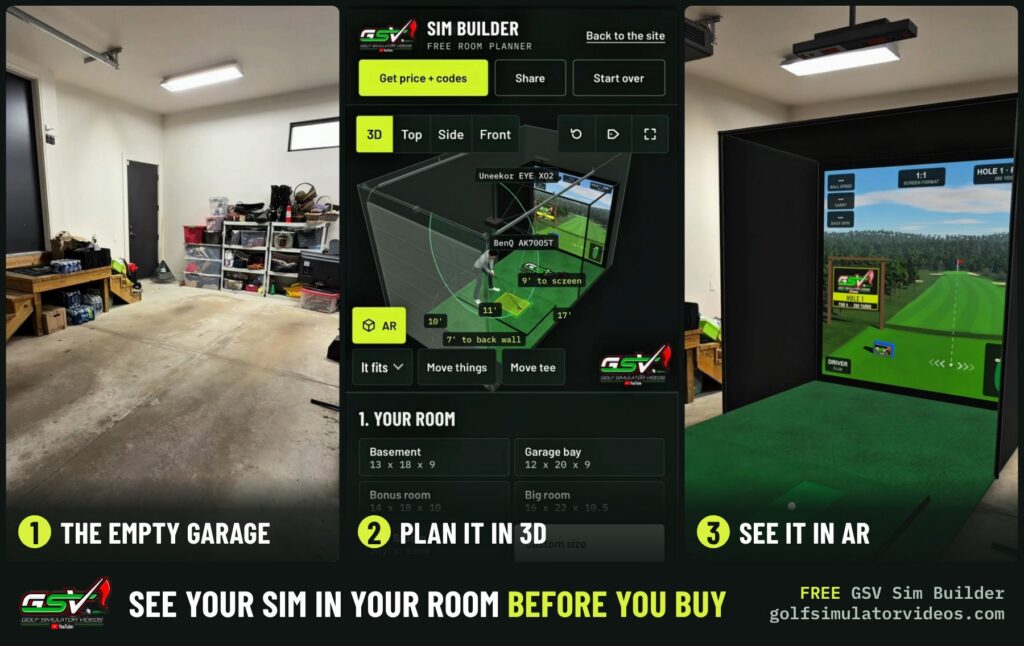
The video above goes through three steps in one garage: the empty room, the build planned in the Sim Builder with an Uneekor EYE XO2 on the ceiling and a BenQ AK700ST projector, and that build placed in the garage at true size.
1. Start with the empty room
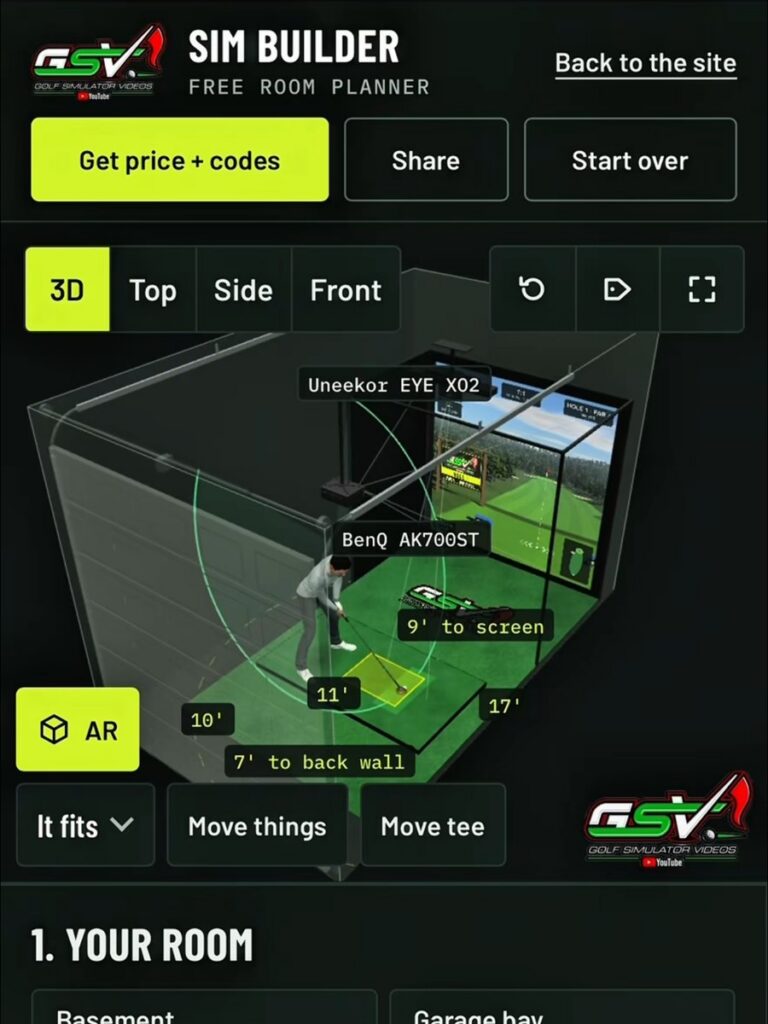
Measure the width, the length and the ceiling height, wall to wall and floor to ceiling, and note anything in the way: a beam, a duct, a garage door track or a light. GSV's rules for a 5 ft 9 in golfer are 10 ft from the tee to the screen, 8 ft at the least and 12 ft at the most, and 7 ft from the tee to the wall behind. The golf simulator room size calculator checks a room against every launch monitor at once.
2. Plan it in 3D
Open the GSV Sim Builder, enter the room, and pick the enclosure or screen, the launch monitor, the projector and the mat. The builder places the tee, hangs the projector at its height, checks the swing against the ceiling and the walls, and marks each distance on the 3D room. “It fits” means every check passed. Then open “See it in your room”: the button sits over the 3D room, next to “Move things”, and on a phone it is the yellow AR button with a cube. The window shows the build in 3D with its true size, for example 13 ft 0 in wide, 11 ft 1 in long and 10 ft 0 in to the top of the highest mount.
3. See it in AR
- Put it in the room. Tap the big yellow button under the 3D view, then stand at the back of the room, facing the wall the screen goes on, and point the phone at the floor.
- Move it into place. Drag it to move it and twist two fingers to turn it. It stays at true size. If it lands far away, drag it toward you.
- Line it up. Slide it until the screen meets your wall, then walk around it and stand on the mat where the golfer stands.
- Look up. The mounts are made to reach the ceiling height you entered. A mount that pokes through the ceiling, or stops short of it, means the ceiling number needs a second look.
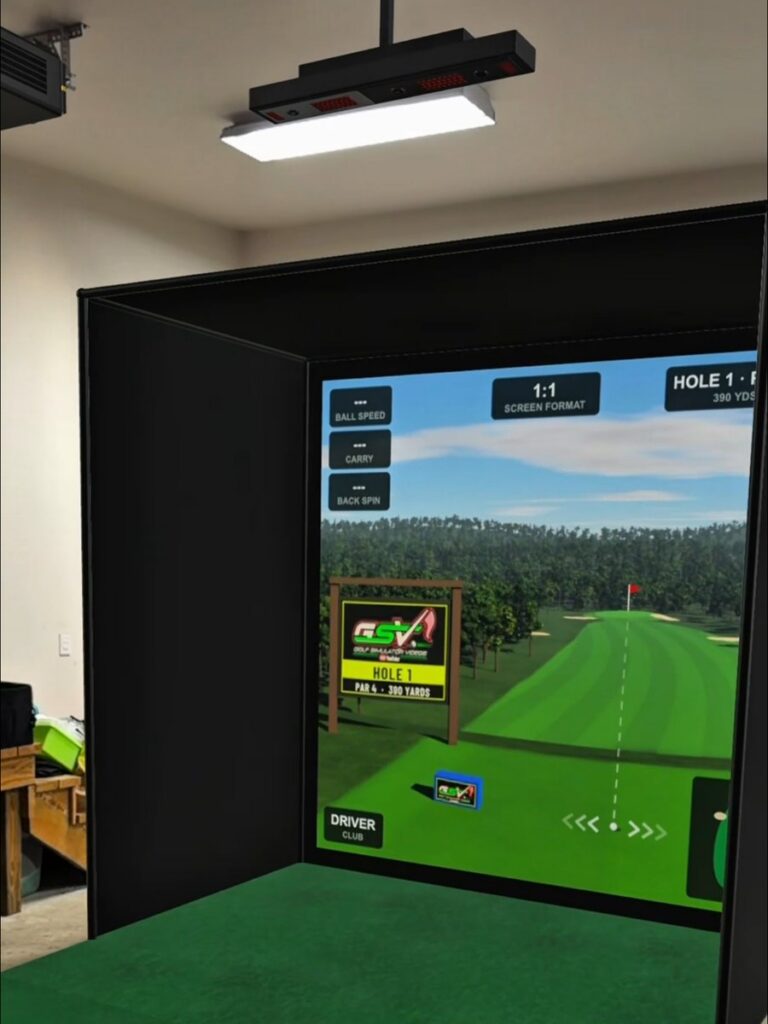
What goes into the room, and what doesn't
- In, at true size: the enclosure or screen with its padding or curtains, the picture on the screen, the turf or flooring, the mat, tee and ball, the launch monitor and the projector on their mounts, and the PC and touchscreens.
- Left out: the walls, the car, seating, the golfer, the swing, the measuring lines and the labels. The room is already there.
- Garage builds: a garage planned with the car parked goes in as it is to play, with the screen down.
Which phones work
| Phone and browser | What opens |
|---|---|
| iPhone or iPad, Safari | Apple's AR Quick Look, with the size locked |
| iPhone in Chrome, Firefox or Edge | Apple's AR Quick Look, from a copy of the build kept on the site for two days |
| Android, Chrome | Chrome's own AR, or Google's Scene Viewer, with the size locked |
| Instagram or Facebook's own browser | No AR: open the page in Safari or Chrome |
| A computer | The 3D view and a QR code to open it on a phone |
What AR can and can't check
AR shows size and placement: where the enclosure sits against the wall, how far the tee is from the back of the room, and whether the room feels right with a simulator in it. It cannot see the walls or the ceiling, so nothing snaps to the wall and nothing measures the ceiling. The mounts do that job, since they are built to the ceiling height entered in the builder.
The fit checks are the measurements. The Sim Builder checks the swing against the ceiling and the walls, the room behind the golfer and the distance to the screen, and the golf simulator room size calculator runs the same rules for every launch monitor at once. Measure the room first, then use AR to see it.
From the room to the build
Once the build looks right in the room, send it from the Sim Builder with “Send to Jay”. GSV's partner builders look it over for free and say what fits and what it costs before anything is bought. The how to build a golf simulator at home guide walks through each part in the order GSV builds, and the golf simulator cost calculator adds up the price.
Enclosures and complete packages
- Complete golf simulator packages$250 off at Shop Indoor Golf with code GSV250. On a first order over $5,000, GSV5OFF takes more: 5% off.SIG8, SIG10 and SIG12 enclosures and studios, DIY and commercial enclosures, G-TRAK screens, SIGPRO flooring and complete simulator packages.
- Golf simulator enclosures and screens$250 off at Shop Indoor Golf with code GSV250.
Buying through GSV's links and codes helps support the channel: GSV earns a small commission at no extra cost to you, and you still get every saving available.
Free consultation with GSV's partner builders
Seen it in your room and ready to plan the real thing? Jay works with official partners: master builders he hand-picked, who get on a call quickly and make sure the room, the launch monitor and the screen fit before you buy anything. They offer package deals on the whole build, DIY packages, full installation, and more. The consultation is free.
Golf simulator AR: questions
Can you see a golf simulator in your room before you buy it?
Yes. The GSV Sim Builder's "See it in your room" puts the build you planned in your room at true size through augmented reality on an iPhone, an iPad or an Android phone, free and with no app to download.
What phones work with the GSV Sim Builder's AR?
An iPhone or iPad in Safari, Chrome, Firefox or Edge opens Apple's AR Quick Look, and an Android phone in Chrome opens Chrome's own AR or Google's Scene Viewer. Instagram's and Facebook's own browsers have no AR. On a computer, scan the QR code to open the build on a phone.
Does the AR golf simulator show true size?
Yes. The enclosure or screen, turf, mat, launch monitor, projector, PC and touchscreens go into the room at their real size, and the size is locked so it cannot be stretched by mistake.
Can AR check the ceiling height for a golf simulator?
Not by itself, since AR cannot see the ceiling. The mounts are built to the ceiling height entered in the builder, so a mount that pokes through or stops short means that number needs a second look. The builder's fit checks and the room size calculator are the measurements.
Is the GSV Sim Builder free?
Yes. The 3D planner, the fit checks and the AR view are free on golfsimulatorvideos.com, and a finished build can be sent to Jay for a free look from GSV's partner builders.
Build the rest of your sim
- Enclosure and screen$250 off at Shop Indoor GolfShop
- Carl's Place enclosure5% off, code sent by emailShopGet the code
- Hitting mat$20 off at Shop Indoor Golf. GSV5OFF is more on a first order over $400Shop
- Projector5% off at Shop Indoor Golf. First-time buyersShop
- Simulator computerSurfThing: $100 off applied automatically, no codeShop
- TouchscreenGSV code for TouchscreenGuruShop
- Complete package$250 off at Shop Indoor Golf. GSV5OFF is more on a first order over $5,000Shop
GSV earns a small commission on these links, at no extra cost to you. Shop Indoor Golf takes one code per order.