The full guide: GSPro guide, 2026
GSPro version 4 is out as a public release, not a beta, and its headline is a new kind of course: HD courses, built with more of the tools Unity 6 gives course designers. Jay Lasco, host of Golf Simulator Videos, loaded it the day after it came out and went straight to the graphics: Glens Falls, Whispering Pines and a third HD course he had never played, with flyovers, shots placed with the mouse and close-ups of the grass, rough, bunkers, trees and water, on an RTX 5090 with the draw distance at its maximum. Most of it looks sharp. Two things did not look right to him: very tall, thin rough on two of the courses, and grass that only draws in close to the ball. The video is at the top of this page, and what GSV found is below.
GSPro is $250 a year from GSPro, and version 4 comes with it. It needs a Windows PC and a launch monitor that connects to it.
Launch monitors that work with GSPro
- Launch monitors5% off at Shop Indoor Golf with code GSV5OFF.First-time buyers only, one use. Not valid on a standalone Trackman, the Square Golf launch monitor or the ProTee VX.
Buying through GSV's links and codes helps support the channel: GSV earns a small commission at no extra cost to you, and you still get every saving available.
Plan your simulator in 3D GSPro guide
- Version 4.0Dated November 3, 2026, in GSPro's change log
- HDThe new label on courses built for version 4
- Unity 6The game engine version 4 moves to
- RTX 5090Jay's card, with the draw distance at 15,000
What is new in GSPro version 4
GSPro's change log dates version 4.0 November 3, 2026, and it carries no public beta label, unlike the releases before it. Its main points:
- Unity 6. GSPro moves to Unity 6 and supports all three of Unity's rendering setups, BIRP, URP and HDRP, which lets course designers build with more tools.
- HD courses. Courses built the new way show an HD label, and the course browser gets an HD collection filter.
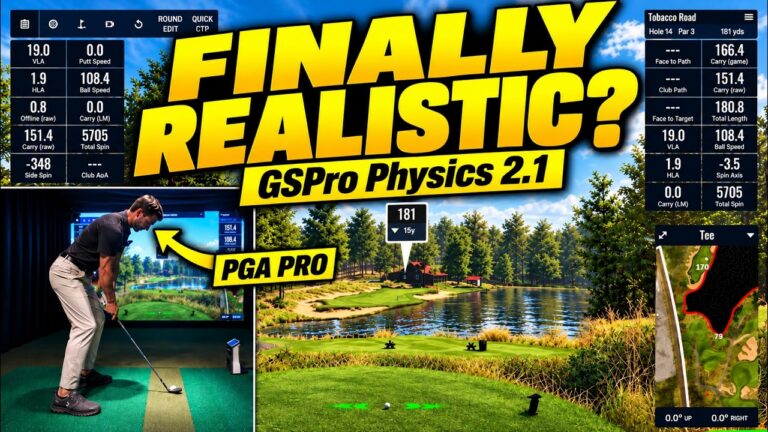
- GSPro Physics 2. The new physics and the course type settings, for bentgrass, Bermuda and links courses. GSV tested them in the Public Beta with a PGA Professional: GSPro Physics 2.1, tested.
- On Course Practice drills, new training drills inside On Course Practice.
- Graphics settings in the game, with one-click sky and lighting settings, and a refreshed interface.
From GSPro's change log at gsprogolf.com, read November 9, 2026. GSPro had not told GSV in detail what HD changes when Jay recorded, so what follows is what he saw on screen.
How to find the HD courses in GSPro
Open the course list, for a round or for On Course Practice, and sort it by newest. The HD courses show the HD label at the top of the list, and the new HD filter shows only them. Jay used On Course Practice, which lets you move the ball to any spot on any hole.
The short answer
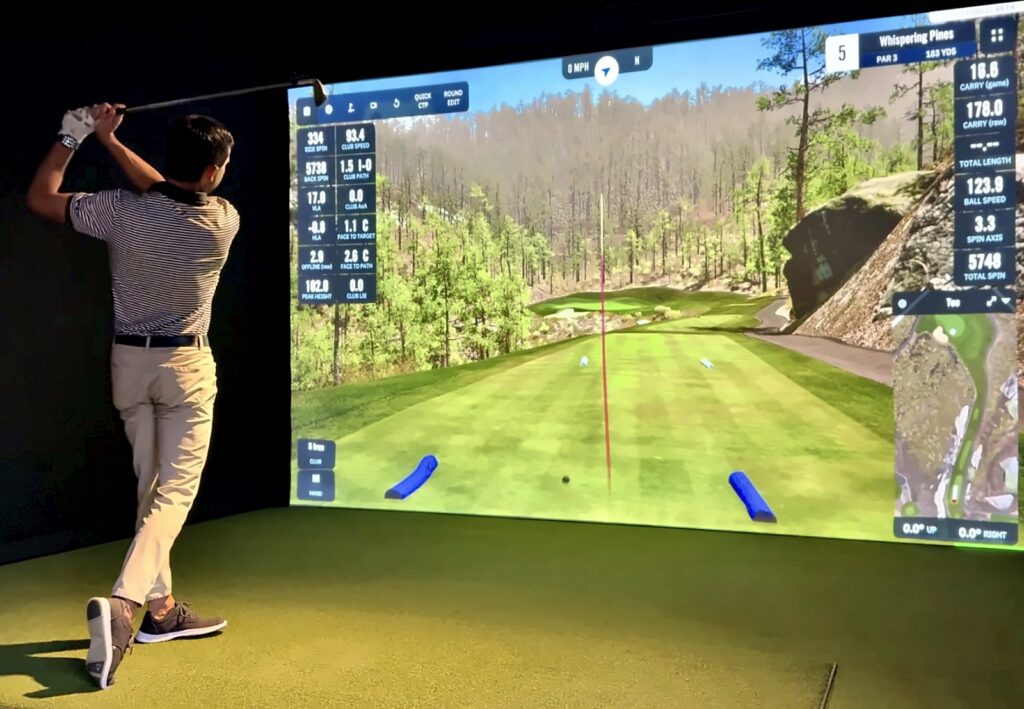
- The courses look sharper. Bark on the trees, leaves, fences and the sand in the bunkers all hold up close, and the trees look a step sharper than before.
- The rough looks off on two courses. At Glens Falls and Whispering Pines it is very tall and very thin, around 10 in tall to Jay's eye. He thinks it may be a bug.
- The grass draws in late. Even on an RTX 5090 with the draw distance at its maximum, grass a short way off often does not show until the ball lands or moves closer.
- Some things glow. Flagsticks, tee markers and the sky have more glow than Jay remembers.
- Lighting would not open. The lighting panel did not come up on an HD course.
- It is a first look. Jay recorded it the day after the release and is sending his feedback to GSPro.
The grass on the HD courses
| Course | What Jay saw |
|---|---|
| Glens Falls | The rough is tall and thin, on the tee box and around a greenside bunker. The sky and the trees look solid |
| Whispering Pines | The same tall, thin rough. From a distance, grass clumps look like bumps in the ground. The bunker sand has a lot of detail |
| A third HD course, played for the first time | A different grass: thicker and a normal length, with a slightly blurry look. Jay likes it better than the tall rough |
The grass is clearly 3D, and it differs from course to course, so it may come down to which grass texture a course designer picks. Whispering Pines has long been one of Jay's favorites on the channel, and apart from the grass it still feels like Whispering Pines.
Draw distance: grass that pops in
- It renders late. When a hole loads, the grass takes a moment to appear, which Jay had not seen before in GSPro.
- It thins out early. On a flyover at Glens Falls, the grass faded away at the end of the tee box.
- It waits for the ball. On the third course, grass close by and near the water did not draw until the ball landed or was moved nearer. On the closing flyover on the 18th, it did not draw at all.
- The setting was already at the top. Jay had the draw distance at its maximum, 15,000, on an RTX 5090. It looks as if the draw distance was turned down in this version.
The game also seemed to work a little harder: there was a short delay after pressing confirm on one hole.
Trees, bunkers, water and the sky
- Trees. Sharp up close, with bark and leaves that hold their detail, and a slightly enhanced look at Whispering Pines.
- Bunkers. A lot of detail in the sand.
- Fences and water. Detailed up close. Jay did not see a change in the water.
- The glow. Flagsticks, the tee markers and parts of the sky glow more than Jay remembers. He suspects the HD courses light the sky differently.
The lighting controls
Pressing L brings up GSPro's lighting panel. On an HD course it did not come up for Jay at all. GSPro's change log for version 4.0 says lighting controls for HDRP, one of the rendering setups the HD courses can use, are coming soon, which may be why. Jay is asking GSPro whether lighting is locked on HD courses for now.
Ball roll and mouse shots
With no launch monitor in this video, Jay placed his shots with the mouse, which mostly drew left. One shot at Whispering Pines rolled a long way back down a big hill. The shot showed zero total spin and a low launch angle, so the mouse shot itself is the likely cause rather than the course. Mouse shots also seemed to roll out a long way. This video is about the graphics. For how version 4's physics play with real shots, see GSPro Physics 2.1, tested with a PGA Professional, where the new physics was a big improvement.
Jay's PC and settings
| Part | Jay's setup in this video |
|---|---|
| Graphics card | NVIDIA GeForce RTX 5090 |
| Processor | Intel Core i9-14900 |
| Memory | 128 GB |
| Draw distance | 15,000, the maximum |
| Course settings | Firm Sawgrass, with the fairways and greens on medium |
That is far more PC than GSPro asks for: its minimum for 1080p is an RTX 3060 with 16 GB of memory, and for 4K it recommends an RTX 3080 or better with 32 GB. The GSPro guide has the full requirements, and GSV's best computer for a golf simulator guide covers the PCs.
What Jay is passing on to GSPro
- The tall, thin rough at Glens Falls and Whispering Pines.
- Grass that draws in late or not at all with the draw distance at its maximum.
- The glow on the flagsticks, the tee markers and the sky.
- The lighting panel not opening on an HD course.
Jay asked GSPro what HD changes and will share the answer. If you are playing version 4, what you see on your own PC is worth adding in the video's comments.
More GSPro from GSV
- GSPro golf simulator software: the price, the courses, the PC and the launch monitors
- GSPro Physics 2.1, tested with a PGA Professional: the three course profiles
- Launch monitors that work with GSPro
- Pureplay golf simulator software, with a Pureplay vs GSPro comparison
Free consultation with GSV's partner builders
Building a simulator to run GSPro? Jay works with official partners: master builders he hand-picked, who get on a call quickly and make sure you have the right fit before you buy anything. They offer package deals on the whole build, DIY packages to put together yourself, full installation, and more. The consultation is free.
Build the rest of your simulator
- Golf simulator enclosures and screens$250 off at Shop Indoor Golf with code GSV250.SIG8, SIG10 and SIG12 enclosures and studios, DIY and commercial enclosures, G-TRAK screens, SIGPRO flooring and complete simulator packages.
- Carl's Place enclosures and screens5% off at Carl's Place. GSV emails you the code.
- Golf hitting mats$20 off at Shop Indoor Golf with code GSVMAT. On a first order over $400, GSV5OFF takes more: 5% off.SIGPRO Softy, Super Softy, Softy Lite and Commercial Teeline mats.
GSPro version 4 questions
What is new in GSPro version 4?
GSPro's change log dates version 4.0 November 3, 2026. It moves GSPro to Unity 6, adds HD courses with an HD filter in the course list, brings in GSPro Physics 2 with course type settings for bentgrass, Bermuda and links courses, and adds On Course Practice drills and graphics settings in the game.
Is GSPro version 4 a beta?
No. Version 4 is a public release, and GSPro's change log carries no public beta label for it, unlike the releases before it.
What are HD courses in GSPro?
Courses built with the new tools version 4 opens up to course designers, on Unity 6. They show an HD label in the course list. GSPro had not detailed what HD changes when Jay recorded, and on screen the biggest difference was the grass.
Why does the grass look tall and thin in GSPro version 4?
At Glens Falls and Whispering Pines, Jay found the rough very tall and thin, around 10 in to his eye, while a third HD course had thicker grass of a normal length. It may come down to the grass a designer picks, or it may be a bug. Jay is passing it on to GSPro.
Why does grass pop in late in GSPro version 4?
On Jay's RTX 5090 with the draw distance at its maximum, 15,000, grass a short way off often drew in only when the ball landed or moved closer, and on a flyover it thinned out at the end of the tee box. It looks as if the draw distance was turned down in this version.
Why won't the lighting panel open on an HD course?
Pressing L did not bring up the lighting panel on an HD course for Jay. GSPro's change log says lighting controls for HDRP, one of the rendering setups HD courses can use, are coming soon, which may be why.
What PC do you need for GSPro version 4?
GSPro's minimum for 1080p is an RTX 3060 with 16 GB of memory, and for 4K it recommends an RTX 3080 or better with 32 GB. Jay ran version 4 on an RTX 5090, an Intel Core i9-14900 and 128 GB of memory.
How much does GSPro cost?
GSPro is $250 a year from GSPro, with updates such as version 4 included. It runs on a Windows PC and needs a launch monitor that connects to it.
More from GSV
Full video transcript
We are back today with the all-new GSPro version 4. So, this is not a beta. This is a release. And there's a reason I'm not on screen because I wanted to give you guys the full view. This is a graphic focused video. Let's dive right in. Now, I'm going to go to practice. We're going to do on-course practice. I'll even hit some shots for you using the mouse. But notice the top. So, if you sort by newest, all right, you're going to notice courses that now show up HD. So, that's really what version 4 is about is this new HD course ability. So, we've been on Unity 6 for a while now. I've shown all the latest beta releases and everything. Especially with the new physics. If you haven't seen that video, go down to the description and watch the physics video. We just did that. So, there's been a lot of updates, but this, you know, official release version 4, this is the big one. So, this has to do with the designers unlocking some more tools and abilities inside of these courses. So, I'm going to take you through some HD courses. Let's just load the first one up. Glens Falls. We'll just kind of leave all those settings alone. That's fine. Like I said, this is a focus on graphics. But we'll hit some shots. We'll do some flyovers, move the ball around on, you know, different courses, go to different you know, holes. And I want to hear your feedback because there's something I've noticed that I'm just not quite certain on. Now, one, you'll notice that it takes a second for things to render. You see how that grass kind of popped up? That that I'm not used to seeing. So, something is different going on there. And specifically with that grass, I've noticed something. So and this is a beast of a computer, you know, 5090. It's a it's a i9-14900 processor. You know, has 128 gigs of RAM. I mean, it's it's huge. But let's go up to the rough. This is something that I noticed right away. The grass is very tall now, and it's like thin, and I don't know if I like it. You guys tell me what you think. The overall graphic ability as far as like looking at the sky and the trees and everything looks solid, but I don't know what's going on with the grass. And this is not just on this course either. We'll go to some different courses, but let's go ahead and just shoot a shot up here with the mouse. That way you can kind of see a ball land and look at the different, you know, grass and everything. See how it kind of comes into render there. That was a pretty good shot. Should start playing with the mouse more often, huh? Let's go up into a greenside bunker really quick. See See that grass? I I just I don't quite understand what's going on with that. So, let's skip a couple holes here. Let's That way you can get a look at this course. That's a good example right there. Like, if you look on the tee box, like don't get me wrong, that grass is 3D as it gets, but it's just like too tall and too thin. I just don't quite understand what's going on there. But like look at the bark on the tree. Look at the leaves and everything. I mean you know I'm not seeing anything that's a a a change in a sense that I would be concerned with any of the other graphics other than for sure that grass. I mean look how thin that is right there. We'll go to some different ones. We could even do a fly over too. So let's just go up here and just do a fly over really quick and we'll see how that grass kind of see how it comes in. I had the draw on max as well. And like I said, this is a a beast of a computer. It's smooth. Everything seems to be rendering just fine when you look at like the trees and everything. I'm just I I I have to figure out this grass thing. Now, right there, it's not kind of quite rendering in when you're far enough away. See how it kind of dissipates right there? Right at the end of the tee box, even though the draw is on max. So we kind of have to just pay attention to that as well. And I can even see it here, the way it kind of disappears. The flag sticks seem to be like glowing a lot. Even the marker I'm getting a glow on. I don't remember if I've had that much of a glow on that stuff. So let's just do another one. I think if I just click up here, the distance is Oh, yeah. I I did not hit that straight, but that's okay. It's landing in the rough. We kind of want that. So, the grass does kind of like straight down up. Oh my gosh, I'm hooking everything with the mouse. See how it kind of comes in and it's just thin. There's something going on here. Let's go to another course. So, they released this yesterday. I asked for some details on exactly what HD does. I wasn't able to get that. So, I'm going to try to get that for you guys. Whispering Pines was always a favorite of mine, and you guys have seen it in the channel. So let's go ahead and and check out Whispering Pines. We'll pay attention to the grass, but I think it's doing the same thing on Whispering Pines. And we'll hit a shot off the tee box. I'm pretty bad with the mouse, though, huh? I think I just have to come down and go more to the right. Get this to load up here. Very interested in in and everyone's experiencing what I've I've seen. Well, that looked like a different course there for a second, but see how that grass came in? Yeah, look at that. I mean, that grass is like I got to turn this this volume down. Holy moly. Turn that down a little bit. There we go. I mean that grass is 10 inches tall, right? So, let's just shoot a shoot a ball down there. Yep. Everything's going left. And then, yeah, you can kind of see how it renders in. But that that is way too tall and thin of rough. I almost feel like that's got to be a bug or something. I'm hitting the space bar to speed this up. Man, that rolled eight miles back. Wow. I mean, that's a huge hill, but that seemed like it rolled a long way back, didn't it? I almost want to hit one more and see what happens. I wonder if that has to do with not having spin on the ball. Yeah, total spin zero. I bet you that's what it is. So, it acts kind of weird. Look how fast far it rolls back. I would think that's what it is. I know it says 3,000 spin, though. Let's go ahead and move a ball up into this bunker now. Yeah. See there? That's that grass. So, this is either a bug that they need to fix or this is what the HD grass now looks like. And I just have to be honest. I mean, I'm never going to not, you know, at least just share like what my feeling is. And I I don't try to push my opinion. But that grass doesn't look right to me. The bunker looks great. Look at the sand. Some great detail on the bunker. That's the thing that I've noticed is that the other textures and everything seem to be really good. But even like what are these bumps down here? So, let's go down there. That's grass. But from far away, look, it's like these humps or bumps. There has to be something going on with There we go. That one was kind of straight. There has to be something going on with the grass. But I wanted to show it. You know, it got got fully released to the public. So, this is this is version four that people are playing on. And I'm interested in what what you guys think. I mean, this course is is a is a really really cool course. The only thing that seems to have have changed the most is that grass. Like, if you look around at other stuff, this still feels like Whispering Pines, right? And it does have like an enhanced look kind of on the trees. Like they seem like they're pretty sharp. I like the look of of everything else for the most part. Let's go ahead and hit a shot down here. Yeah, I'm good with those little draws, aren't I? Just want to see how it kind of renders in as the ball's landing. It kind of renders in is what I'm noticing. Let's go ahead and move to another hole like this. Then we'll do another shot. I'm glad that it's, you know, it's landing in the rough, which I'm I'm paying attention to the most. Look at that ball roll out. I'm going to have to play a little bit and see if this has to do with mouse play or whatever on how how the roll out because it seems like the ball's rolling out a lot. I'm on medium Sawgrass. Cuz the physics overall that we tested where it was a huge improvement. Yeah, look at that grass over there. So, let's show you one more course. Let's go out here. And even this has slowed down just a little bit. Like I I hit confirm there and had a little bit of a delay. So I mean things seem to be working a little harder. Yeah. See I had both these I think on medium and that's Sawgrass which is their medium setting. The stimp was a little low but I don't know if mouse effects roll out. It had 3,000 backspin. So I would think that I guess the launch angle, you know, if it was low. All right, let's load this up. I have not been on this course yet. So, you're seeing it for the first time. I'm seeing it for the first time. And we'll see what See how the grass came in late there, but the grass is different on this course. But I think I might be getting something similar. So, see up on this tee box how it's kind of like I don't know what you want to call it, like not rendered in. So, if we move up there, now it's rendered in. So, the draw it's almost like the draw distance got turned down in this latest version. And this grass is totally different. So, I'm glad we showed another course. Because this looks completely different. So, I'm trying to Yeah, there's definitely something with the draw distance that I don't know if I'm a fan of because notice how it just kind of looks like kind of clumps here. I'd almost rather it not be rendering those clumps because then you look up here and it's the grass. This definitely doesn't have that weird looking tall grass though. I mean, this is this looks this looks like, you know, I don't know what style of grass that would be, but this looks like much more of a normal length. It looks thicker. Let's hit a shot here. Yeah, look at that launch angle. Vertical launch angle, too. That's why I'm probably getting such weird roll out. I wonder how you can raise the vertical launch angle. I might be doing it wrong, but that will give us an idea. See the rendering up by the green? How it's just kind of like that weird weird look. I think that that's probably something that they need to adjust, I would assume. Here's another one. You can see there's a glow going on up there. Again, like the pins and stuff have a little glow to them, but even here, see how close that is by the water? And that's not rendering. That should render my I mean, I have that that draw distance on on 15,000. Hey, I hit a straight shot. That that should be rendering. And you can see how late it came in right there. Like almost when the ball landed, the grass finally came in. So there's definitely changes. Obviously, these HD courses look different. You can definitely see that there's going to be some type of more capability with the different textures. The way I would assume it's focused on grass for the most part. I can move a ball up by a tree and you can see the details on the trees, the details on the fence, everything like that. I'm not seeing like Let's go by the water, too. Well, of course I did that. Sorry about that. I wanted to put you right by the water so you could see some water. Of course, it's not going to let me with the the bushes. What if I go down here? Well, let's go to a different hole. I just want you guys to be able to see some water. Five doesn't have water. I've never been on this course. So, here here I am skipping around. So, that looks interesting. I don't know if I'm a fan of that grass or not, cuz doesn't it almost look like it has like a a blurriness to it, this style of grass. I mean, it's it's definitely I like it better than the thin super super tall grass. There we go. There's some water. See if there's any difference to water at all. Yeah. I mean, if you put a ball in that grass like that, it gives you kind of an idea of what it looks like. It just almost has like a little blurriness to it, but it's definitely obviously a completely different texture than the other grass that we're looking at. So, depends on what, you know, texture you're picking, I guess, for grass on whatever course that you're building. But it definitely is a a much much, you know, different look for that that tall grass. But yeah, definitely this rendering doesn't matter what you're on. See how that's not rendered right there. It's that that draw distance, I guess, is the best way to describe it. See, even right here, that that's close and that's not that's not drawn in at all. And I mean, if you're running a 5090, you should be able to like see how that's not not drawn in. But watch, I'll move the ball and now it's drawn in. So, good feedback to share with them. Interested to see what you guys think. Hope I didn't make this too much of a marathon, but I wanted to skip around, show you guys different things. We'll kind of end on a fly over here on 18 just because it has, you know, so many trees and bushes and, you know, different things that you guys can see. So, I'm even noticing, you know, like notice up in the sky the glow. I'd say that the HD course has different lighting in sky, I would think, based on what I'm seeing. I really wish I would have got that detail from them on like, hey, pay attention to this, this, and this. These are the the major changes. But see how that's not drawing in even on a flyover. That grass isn't drawn in at all. So, there's some type of draw concern, I would think, going on. We can mess with the lighting just a little bit. I thought it was L, isn't it? Thought I hit L and it didn't come up. Let's go ahead and pull that up. Yeah, L is lighting. Can you not pull up lighting on an HD course? Because I'm hitting L and it's not coming up. Okay. Maybe hit it from here, but interesting. Okay. Well, I don't know why, but I can't bring up lighting. So, lighting will not come up. So, maybe another thing to share with them unless they're going to tell you, "Hey, we locked down lighting on HD courses." So, a lot going on here. This is my first first time trying it out. I mean, I always try to release things so you guys can see what's going on. This is a public release, so everyone that's loading GSPro that's downloading version 4 is is experiencing what I'm experiencing. So you know, you guys share the comments below what what you've seen so far. I'm going to share some feedback with them because I do think that there are some things that don't seem right. So let me know what you think. As always, stay tuned. There'll be a lot more coming soon.
Build the rest of your sim
- Enclosure and screen$250 off at Shop Indoor GolfShop
- Carl's Place enclosure5% off, code sent by emailShopGet the code
- Hitting mat$20 off at Shop Indoor Golf. GSV5OFF is more on a first order over $400Shop
- Projector5% off at Shop Indoor Golf. First-time buyersShop
- Simulator computerSurfThing: $100 off applied automatically, no codeShop
- TouchscreenGSV code for TouchscreenGuruShop
- Complete package$250 off at Shop Indoor Golf. GSV5OFF is more on a first order over $5,000Shop
GSV earns a small commission on these links, at no extra cost to you. Shop Indoor Golf takes one code per order.