
The full guide: Best golf simulator software, 2026
Pureplay is new golf simulator software built on Unreal Engine, with course play, practice, tournaments and online play in one program. Pureplay says Early Access opens November 6, 2026, as a yearly subscription for Windows PCs, and nine launch monitor brands are officially supported so far. Jay Lasco, host of Golf Simulator Videos, played six holes at Silvertip Golf Resort and hit shots on the range in the closed beta, using a GolfJoy Spica 3. This is a first look at an early beta build, not a review. Parts of it are unfinished, and this article says which.
- Nov 6, 2026Early Access opens, per Pureplay
- 40+courses planned for public beta
- 9launch monitor brands officially supported
- Unreal Enginegraphics engine
- RTX 3060minimum graphics card, 1080p
- Windows 10 or 11no Mac version at launch
What is Pureplay?
Pureplay (also written PurePlay or Pure Play) is third-party golf simulator software. It comes from a software company, not from a launch monitor maker, and it is built to run with many brands of launch monitor. That puts it up against GSPro and the other titles in GSV’s guide to the best golf simulator software.
This is what Pureplay says about itself on its website:
- Unreal Engine graphics in 4K, made with real-world photogrammetry.
- Its own physics engine, worked out for every shot and every lie, with the surface, the terrain, the weather and the lie all part of the result.
- Water physics. A ball can skip off water or sink. Pureplay calls this an industry first.
- Courses mapped by LiDAR drone and built by hand.
- One program for everything: practice, course play, tournaments, multiplayer and leagues.
- Development in public. The home page has a build log, with 14 updates when GSV read it.
Those are Pureplay’s claims. The rest of this article is what GSV saw on the screen. The developers told GSV they would sooner take the time to finish the software than rush it out, and they let GSV show it knowing it is not finished.

Pureplay at a glance
| Engine | Unreal Engine, with Pureplay’s own physics engine |
|---|---|
| Runs on | Windows 10 or 11 only. Pureplay says a Mac version is a project for after launch. |
| How it is sold | A yearly subscription for one PC. Pureplay has not published the price. |
| What the subscription covers | Course play on Pureplay’s own courses, practice tools, tournaments, multiplayer and leagues |
| Launch | Early Access opens November 6, 2026 at 5 PM Eastern. A closed beta ran before it. |
| Courses | 40 or more at public beta, with new courses planned every week |
| Launch monitors | Nine brands with official support built in, one more in progress, plus community-made connections |
| Stats | A phone app and a web app for rounds, practice and stats are in the works, included in the subscription |
From pureplaygolf.com and its FAQ, read on October 5, 2026, with the Early Access date and space needed read again on October 18, 2026. Pureplay marks its features, courses and timelines as preliminary and subject to change.
What GSV tested, and on what
- Build: the closed beta, which a small group of testers has. The menus are a beta design.
- Launch monitor: GolfJoy Spica 3, connected through Pureplay’s built-in connection.
- Computer: an RTX 5090 graphics card. Graphics preset Epic, frame rate capped at 120, ray tracing and the other graphics card extras left off.
- Course: Silvertip Golf Resort, holes 1 to 6.
- Round settings: stroke play, greens at 10 on the stimp, greens and fairways on normal firmness, sunny with a slight breeze, elevation set to the course’s own.
- Also: a few wedges on the floating island practice range.
What is in the beta today
The beta opens on a menu with an animated background and a QR code for a quick sign-in. Down the left side:
- Practice: range practice, course practice and a training center. Still being built: several tiles share one placeholder picture.
- Courses: a handful so far. GSV played Silvertip Golf Resort, and Cape Wickham is in the list.
- Minigames: Bullseye, Duck Hunt, Battleship and Platforms.
- Competitions: a pro tour, private leagues and public leagues.
- My Clubs: in the menu, not opened in this video.
- Online play: a round with a friend, player to player.
- Your Game: a section for stats.
The player’s profile, at the top of the screen, shows a level and XP. GSV did not play the minigames, the leagues or an online round for this video.
Which launch monitors work with Pureplay
Pureplay lists nine official integrations. Official means the launch monitor maker’s own connection is built into Pureplay under license: there is no separate connector program to install or keep running. In the beta that is how it worked. GSV picked GolfJoy from a list in the settings and the Spica 3 was connected.
| Launch monitor brand | Status on Pureplay’s site | On GSV | GSV code |
|---|---|---|---|
| GolfJoy | Official | GolfJoy Spica 3 review. The unit in this video. | JLASCO10, 10% off |
| Square Golf | Official | Square Golf review and Square Golf OMNI review | GSVSQUARE, 5% off |
| ProTee | Official. Pureplay’s FAQ names the ProTee VX. | ProTee VX | Email GSV |
| Garmin | Official. The page does not say which models. | Garmin R50 review | |
| Spectrum Element, VTrack, NVisage, Nova by OpenLaunch, Bullseye Golf Sims | Official | Not tested by GSV | |
| Rapsodo | In progress | Rapsodo MLM2PRO videos |
SkyTrak, FlightScope, Uneekor, Foresight, Bushnell, Trackman and Full Swing were not on the official list on October 5, 2026. Pureplay says it is adding brands by demand and that it also supports open community integrations, which are made by third parties and connect through separate software. Its FAQ has a picker with an answer for each brand. Check yours there before you buy a launch monitor for Pureplay.
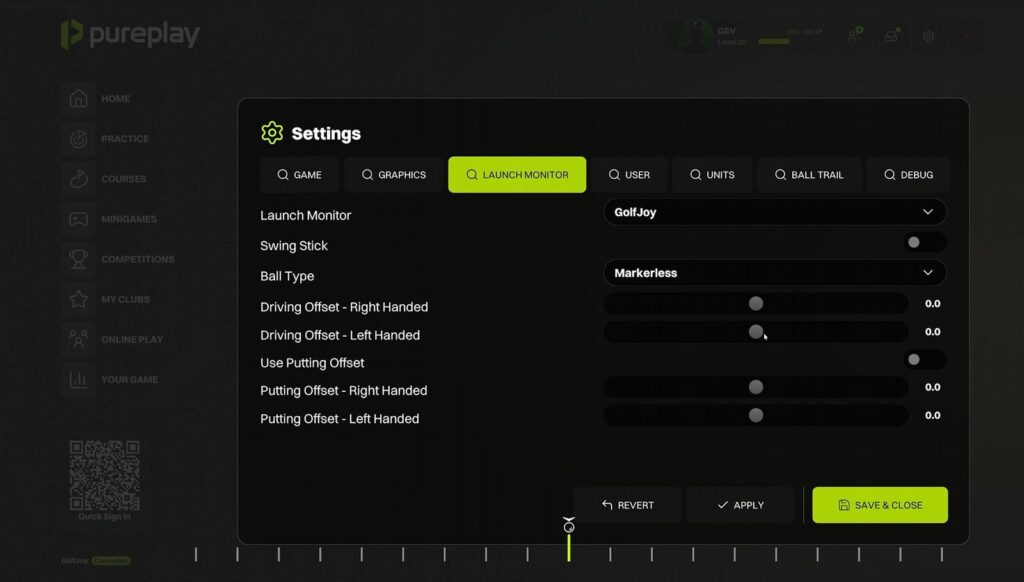
The launch monitor settings in the beta: a swing stick switch, the ball type (GSV used markerless), a driving offset for right-handed and for left-handed players, and a putting offset for each.
One thing to watch with the Spica 3. In this build there was a short delay between the strike and the ball leaving on screen. The Spica 3 is normally close to instant, so GSV is asking Pureplay whether the delay is in the connection.
The GSV code for the launch monitor in this video:
10% off at GolfJoy
GolfJoy Spica 3, $3,199 becomes $2,879.10.
Buying through GSV's links and codes helps support the channel: GSV earns a small commission at no extra cost to you, and you still get every saving available. Code last checked October 3, 2026.
And for Square Golf, which is also on Pureplay’s official list:
5% off at Square Golf
Square Golf launch monitor, $699 becomes $664.05.
Code last checked September 17, 2026.
Graphics: Silvertip Golf Resort in Unreal Engine
Silvertip Golf Resort is a real course in Canmore, Alberta, designed by Les Furber: par 72, with about 600 feet of elevation change across the round. It is a good test for new software because the round is full of uphill and downhill shots.
What stood out on the screen:
- Grass with depth. The first cut is not one flat layer: the blades are different lengths.
- Trees, rocks and plants. The pines hold their detail when the camera flies past them, and they throw shadows across the water.
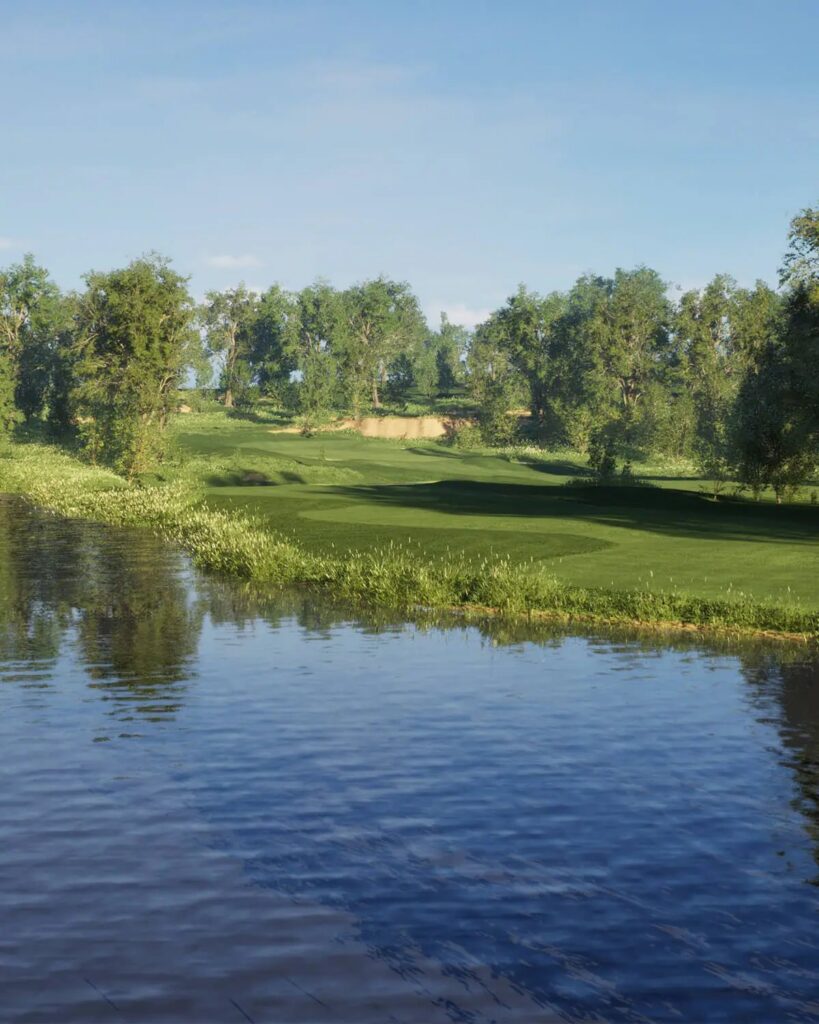
- Water. The pond on the sixth hole is tinted like a real reservoir, with rocks around its edge.
- Flyovers. One button on the mini map flies the hole. It ran smoothly on the Epic preset while GSV was recording.
- A higher view for blind shots. The 5 and 6 keys raise and lower the camera, which showed the green on a blind 182 yard approach.
- Loading. The course loaded faster the second time than the first. GSV did not time it, and Pureplay has not published load times.
Pureplay’s own course page lists Silvertip as licensed and in the build queue, so the course in the beta is work in progress. GSV saw one unfinished patch of ground beside the water on the fourth hole.
Ball flight and physics: what the shots did
Every figure here is from GSV’s session with the Spica 3. Six holes with one launch monitor is a look at how the ball behaves, not a physics test.
| Hole | Shot | What happened |
|---|---|---|
| 1 | Soft hybrid from the tee, downhill | Carried about 15 yards farther than that club normally does for GSV |
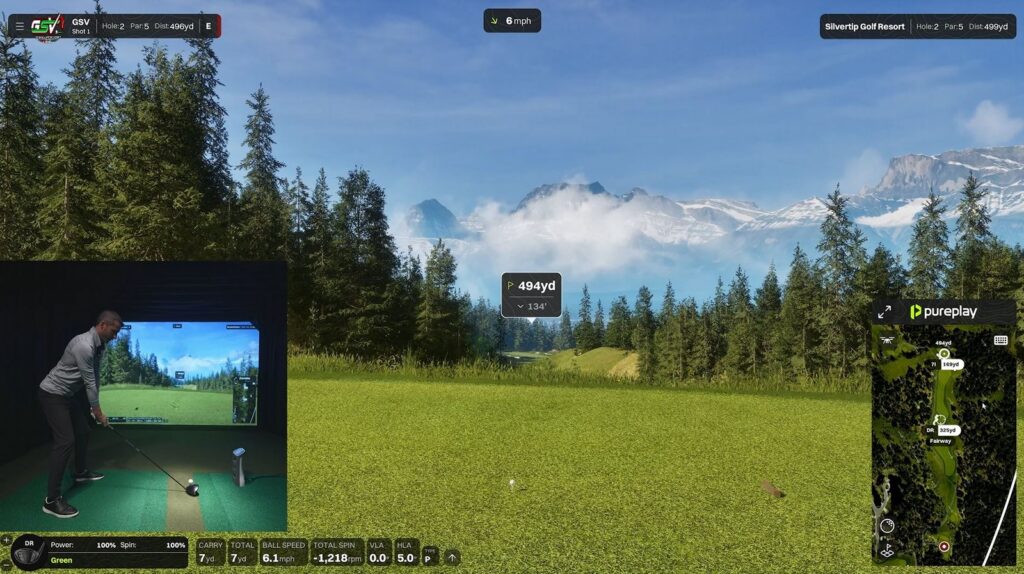
| 2 | Driver from a tee 134 ft above the fairway, 155 mph ball speed | About 330 yards |
| 3 | Out of deep rough, 27 yards, downhill | The ball clipped a tree on the way, with the sound of the hit. |
| 4 | Chip, 20 yards, 1,700 rpm | Bounced and rolled out. It did not check. |
| 5 | Wedge, 112 yards downhill, 9,645 rpm | Landed and came back a little |
| 5 | The same wedge again, 10,276 rpm | Came back a little more |
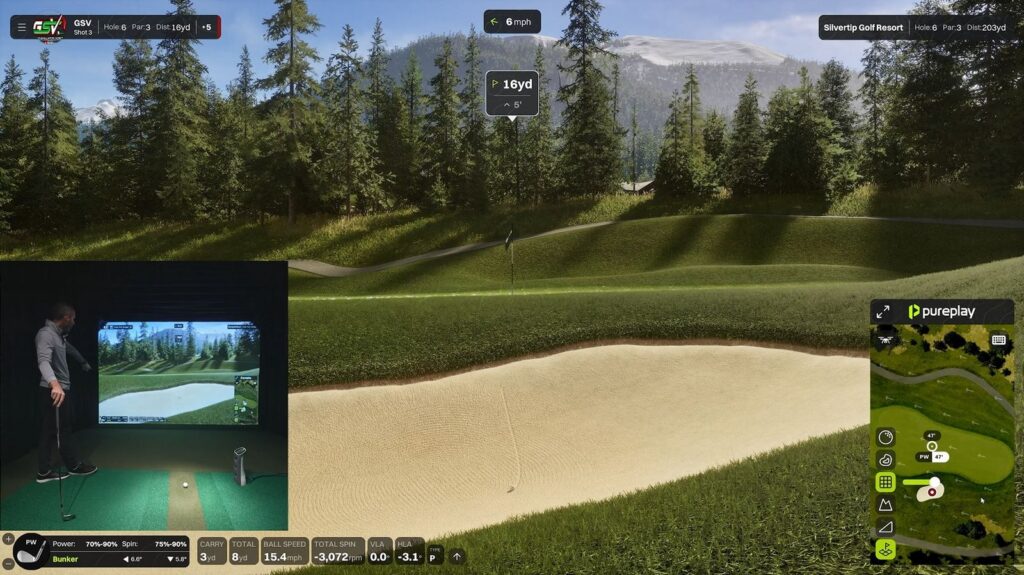
| 6 | Bunker shot, 16 yards, downhill lie | The lie readout showed power 70% to 90% and spin 75% to 90%. Sand flew out with the ball and landed on the grass. |
Elevation is in the numbers. The round was set to the course’s own elevation. Canmore’s town centre is 4,296 ft above sea level and Silvertip sits above the town, so a longer carry than at home is what a real round there would give too. GSV did not see a setting to use your own elevation in this build.
Spin on the greens. With the greens on normal firmness, a wedge near 10,000 rpm landed and came back a short way, and a 1,700 rpm chip released. That is close to what GSV expects from a real shot.
Water. Pureplay advertises balls that skip or sink. GSV hit one ball into the pond on the fourth hole to show the drop and did not test a skip.
Pureplay has posted a clip of its ball physics: watch it on Pureplay’s Facebook page.
Rough, bunkers and penalty drops
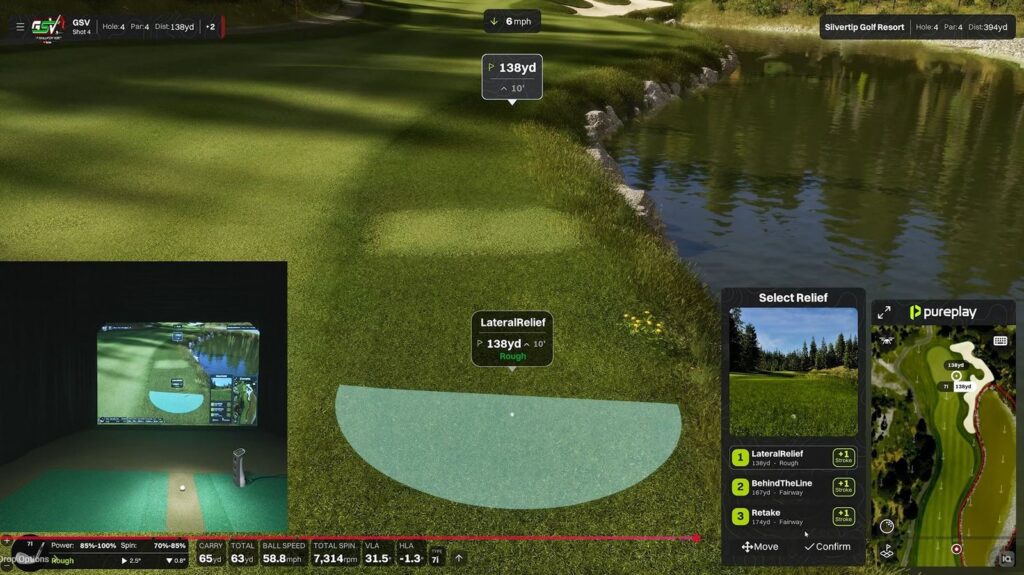
- Finding the ball. In deep rough behind a tree, Pureplay made the plants and part of the tree see-through so the ball and the line stayed in view. The tree was still drawn, and still in play.
- Lie readout. Every lie shows two ranges, power and spin. On the green both read 100%. The rough beside the fourth fairway read power 85% to 100% and spin 70% to 85%. The bunker on the sixth read power 70% to 90% and spin 75% to 90%. GSV reads them as the share of the shot’s power and spin that the lie lets through.
- Bunkers. The shot throws sand onto the grass and leaves a mark in the bunker. Both clear after a moment.
- Penalty drops. After the ball went in the water, Pureplay gave lateral relief by itself and offered two other choices: back on the line, or replay the shot. Each choice shows the distance left and the lie it gives, and each costs one stroke. The drop spot can be moved, with a preview, and the label changes between fairway and rough as it moves.
- Not there yet. GSV could not concede or skip a hole in this build.
Putting and the greens
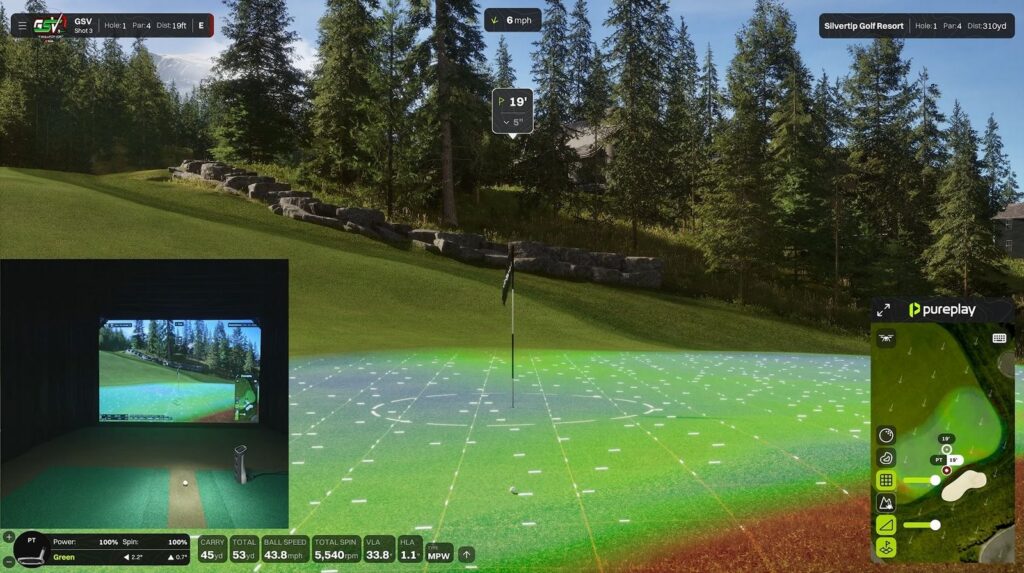
A flag button brings up the green aids at any time: a grid, two color overlays that GSV took to be slope and elevation, and contour lines. Each can be on or off, and the overlays have a strength setting, from barely there to dark. GSV played with the grid and a light overlay, and found the contour lines more than was needed.
The round used simulated putting with a 6 ft gimme circle. The greens were set to 10 on the stimp and felt closer to 11: a 7 ft putt hit a little too hard ran well past the hole. GSV is asking Pureplay whether the stimp setting is final.
The putting ring can spin slowly, at medium speed or fast, or be switched off.
The ball glows on screen until the launch monitor is ready for the next shot. Some testers have said they do not like the glow. GSV found it useful as a ready signal, and understands that options are coming.
Settings that matter in a simulator room
- Data tiles. The shot data bar can be moved, which matters when a camera or a mat covers part of the screen. Each number can be sized from extra small to extra large, hidden, or dragged into a new order.
- Camera. Three ball-follow styles (Pureplay, broadcast and static), a still or live shot preview, and field of view settings. GSV is asking the developers whether the field of view can be set up for a curved screen and whether a first-person view is planned.
- Graphics. Quality presets (GSV used Epic), plus saturation, contrast and color temperature.
- Frame rate. GSV left the cap at 120. Most simulator projectors show 60 frames a second, so a cap of 60 is enough for most rooms.
- Weather. Sunny, overcast, slight rain, heavy rain, dynamic weather and random storms, with wind strength and direction. Wind is drawn as arrows on the hole.
- Round setup. Tees for each player, mulligans, green speed, green and fairway firmness, and pin positions.
- Hazard rule. Lateral relief by itself, back on the line, or replay the shot.
- Family settings. A power boost for younger players, a mouse shot, and ball trails called dynamic, rocket, solid and sparkles, which can also show on chips and putts.
The practice range
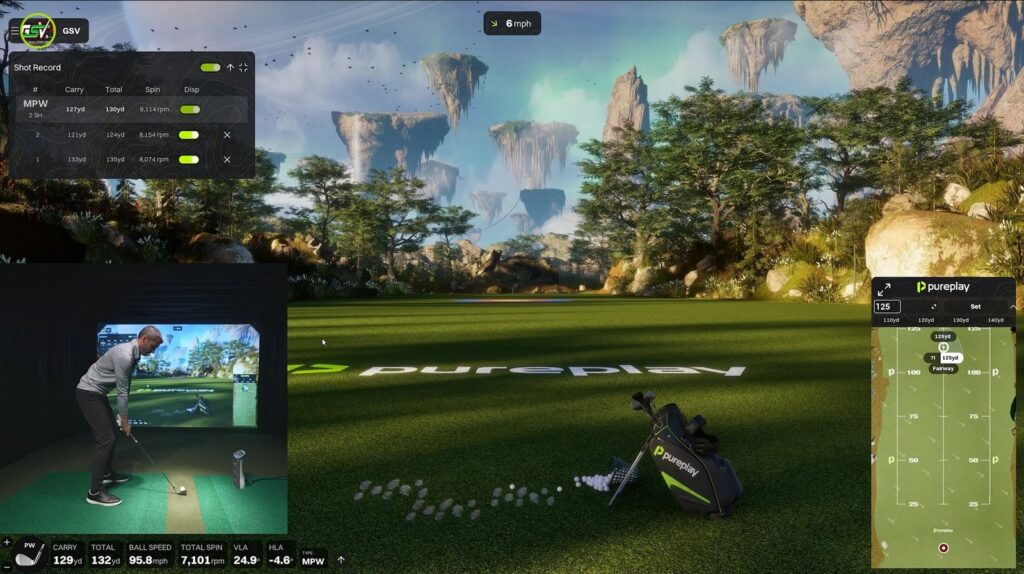
The range GSV opened is called Floating Island. You set a target green at a distance you choose, and GSV used 125 yards. A shot record lists the carry, total and spin of each ball. After a few shots Pureplay draws the dispersion as a shape that grows with each ball. Each shot has its own dispersion switch and a delete button, so a bad swing can be left out, and the list can be hidden for a clean view.
Pureplay PC requirements
Pureplay needs Windows 10 or 11, 50 GB of free space, an internet connection to activate it and at least once every 7 days, and TPM 2.0 switched on. TPM 2.0 is the security chip Windows 11 already requires, and on some PCs it is off in the BIOS. Pureplay’s graphics card tiers:
| Target | Graphics card | Memory |
|---|---|---|
| 1080p, minimum | RTX 3060 or RX 6750 XT | 16 GB |
| 1080p, great | RTX 3070, RTX 3060 Ti or RX 6800 | 16 GB |
| 4K | RTX 3080 or better | 32 GB |
| 4K, great | RTX 4070 or better | 32 GB |
From Pureplay’s FAQ, read on October 5, 2026. GSV ran the beta on an RTX 5090 at the Epic preset and has not tested the lower tiers.
Two things follow from that table. A PC bought for today’s simulator software may be short on memory for Pureplay in 4K, which asks for 32 GB. And 4K only reaches the screen through a 4K projector.
- Best computer for a golf simulator, and the SurfThing simulator PC review. SurfThing takes $100 off through the GSV link.
- Best golf simulator projectors, and the new BenQ AK800ST and AK900ST 4K projectors.
The GSV code for the BenQ golf projectors at Shop Indoor Golf:
5% off at Shop Indoor Golf
First-time buyers only, one use. Not valid on a standalone Trackman, the Square Golf launch monitor or the ProTee VX.
Code last checked October 9, 2026.
Pureplay price, beta and release date
- Price. Pureplay is a yearly subscription for one PC. Pureplay has not published the price and says you will see it, with any launch offer you qualify for, at checkout before you pay.
- Extras later. Pureplay plans to let community course designers sell their courses inside the software as a separate add-on.
- Beta. A closed beta ran with a small group of testers. GSV played it for this article.
- Early Access. Pureplay’s home page says Early Access opens November 6, 2026 at 5 PM Eastern. Pureplay calls its timelines preliminary and has not given a date for the full public release.
- Getting in. There is a waitlist at pureplaygolf.com. Pureplay says people on it hear first when access opens.
Pureplay courses
Pureplay is aiming for 40 or more courses at public beta and says it plans to release at least a few new courses of its own every week, with community-built courses to follow. It has not published the full list of names.
There is also a public course map where golfers vote for courses or request their own. A course moves from requested, to championed by someone who takes it to the course’s operator, to licensed, to built. Pureplay says it builds a licensed course at no cost to the course, and that a golfer who helps get a course signed gets a discount at launch. Pureplay also says votes guide the order but do not bind it.
What is not finished, and what GSV has not tested
What stood out
- The launch monitor connects inside the software, with no connector to run
- Grass, trees and water with real detail, and smooth flyovers
- Spin and rollout on the greens that looked like real shots
- Penalty drops with three choices and a drop spot you can move
- Data tiles you can size, hide, reorder and move
- A lot is already in an early beta: leagues, minigames, weather, a range
Not finished or not tested
- Beta menus, and practice modes still being built
- A short shot delay with the Spica 3 in this build
- Greens that felt faster than the stimp setting
- No way to concede or skip a hole yet
- No setting seen for your own elevation
- Not tested by GSV: online play, leagues, minigames, a full round, other launch monitors, and PCs below an RTX 5090
GSV will play nine and eighteen holes, and show online play, when Pureplay is close to its release build.
Planning a simulator for Pureplay
Pureplay changes the shopping list in two places: the launch monitor has to be one Pureplay supports, and the PC has to meet the table above. The room still decides everything else. Start there.
The free GSV Sim Builder lays out your room in 3D and checks that the launch monitor, the enclosure and the projector fit, with room to swing. The GolfJoy Spica 3, Square Golf, the ProTee VX and the Garmin R50 are all in its list.
Build your room in the GSV Sim Builder
When the build looks right, press “Get price + codes” in the builder. It sends the build to GSV for a package deal on the whole room, with the discount codes for the gear you picked. It is free to ask.
GSV codes for the rest of the room:
- Shop Indoor Golf discount codes: enclosures, screens, mats and complete packages.
- Carl’s Place discount code, sent to your email.
- Square Golf discount code.
- TouchscreenGuru 4K touchscreen review, with the GSV code.
$250 off at Shop Indoor Golf
SIG8, SIG10 and SIG12 enclosures and studios, DIY and commercial enclosures, G-TRAK screens, SIGPRO flooring and complete simulator packages.
Code last checked August 19, 2026.
Pureplay questions
What is Pureplay golf simulator software?
Pureplay is golf simulator software for Windows PCs, built on Unreal Engine with its own physics engine. It combines course play, practice, tournaments, multiplayer and leagues in one program and works with launch monitors from several makers. Pureplay says Early Access opens November 6, 2026.
When does Pureplay come out?
Pureplay’s website says Early Access opens November 6, 2026 at 5 PM Eastern, and calls its timelines preliminary. Before that, a closed beta ran with a small group of testers. Pureplay has not given a date for the full public release.
How much does Pureplay cost?
Pureplay is a yearly subscription for one PC. Pureplay had not published the price on October 18, 2026 and says the price, with any launch offer, is shown at checkout before you pay. Courses made by community designers are planned as a separate paid add-on.
Which launch monitors work with Pureplay?
Pureplay lists nine official integrations: Square Golf, ProTee, GolfJoy, VTrack, NVisage, Nova by OpenLaunch, Spectrum Element, Bullseye Golf Sims and Garmin. Rapsodo is listed as in progress. Pureplay also supports community-made connections that run through separate software.
What PC do you need for Pureplay?
Pureplay needs Windows 10 or 11, 50 GB of free space, an internet connection and TPM 2.0. For 1080p the minimum is an RTX 3060 or RX 6750 XT with 16 GB of memory. For 4K Pureplay lists an RTX 3080 or better with 32 GB of memory.
Does Pureplay work on Mac?
No. Pureplay is Windows only for now, on Windows 10 or 11. Pureplay says a Mac version is a project for after its launch.
How many courses does Pureplay have?
Pureplay is aiming for 40 or more courses at public beta and plans to add at least a few new courses every week. The courses are mapped by LiDAR drone. Pureplay has not published the full list of course names.
Does Pureplay work with the GolfJoy Spica 3?
Yes. GolfJoy is one of Pureplay’s official integrations, and GSV played the closed beta with a Spica 3 connected inside the software, with no separate connector. In that beta build there was a short delay before the shot showed on screen.
More golf simulator software on GSV
- Best golf simulator software 2026
- Foresight Sports Premier software preview
- Infinite Tees 4K simulator software
- GolfJoy Spica 3 review and discount code
- Best golf simulators 2026
- GSV Sim Builder: check what fits your room
Shop for your golf simulator
Launch monitors and complete simulator packages at Shop Indoor Golf, through GSV's links and with GSV's codes.
- Launch monitors5% off at Shop Indoor Golf with code GSV5OFF.First-time buyers only, one use. Not valid on a standalone Trackman, the Square Golf launch monitor or the ProTee VX.
- Complete golf simulator packages$250 off at Shop Indoor Golf with code GSV250. On a first order over $5,000, GSV5OFF takes more: 5% off.SIG8, SIG10 and SIG12 enclosures and studios, DIY and commercial enclosures, G-TRAK screens, SIGPRO flooring and complete simulator packages.
Free consultation. GSV's partner master builders, hand-picked by Jay, get on a call quickly and make sure everything fits, with package deals, DIY packages, full installation and more.
Get a free consultationPrices are on the shop's page. Codes last checked August 19, 2026.
Full video transcript
This is the all-new Pureplay golf simulator software. And I'm sure many of you have probably heard about it just based on my inbox alone asking when I'm going to be able to show this software. Well, today's the day. You're going to have a first look. Now, I do want to keep in mind that this is in kind of like a closed beta. So there's just a handful of people that are testing it.
I think they're going to open up that closed beta to more users and get feedback. But one thing I can appreciate talking to these developers is they want a precision level of detail. So they really are taking their time. They're trying not to rush things. They want to come up with a product that is going to be, you know, finished and more polished by the time it gets out to, you know, regular users. So, I just want to make sure that it's very, very clear that this is an early beta.
They actually have a lot of things that they can implement now, but they're still tweaking. And we'll talk about that as we walk over to the software. So, I'll take my camera down just so we can kind of look at this together. Now this is a beta UI. They have a lot of polishing left to go on this, and it's the same thing for the settings when I show you the settings. So, let's just take a look at the UI.
Some things that I recognized right away that I thought were really cool. One, there's kind of like this interactive background. So, I just think that's modern and, you know, kind of fluid and cool. There is a QR code, so you can do a quick sign-in. So, I think that's awesome that they're going to have that quick QR code sign-in ability. Down here in the lower left, you'll see I have that GolfJoy Spica 3 unit connected.
This actually has built-in launch monitor connectivity. I think that is really nice. No extra connectors or anything. And they have a bunch of official integrated launch monitors already. I'll show you that here in just a second. Let's take you through the list over on the left really quick.
First the home. You'll see obviously, yes, it's beta UI, so you're just kind of getting a feel for what it's going to look like and they're going to, you know, have some polishing coming to that practice. You're going to have range practice, course practice, and a training center. Those are still being worked on as well. As you can kind of see, the, you know, thumbnails are the same picture. Courses.
I'm going to show you a special course today, but they have a few courses that they've released so far. I know that Joe did like a full 18 holes out on this Cape Wickham right here. Looked really, really nice. I thought that was a great video that he did. Mini games. So, you got Bullseye, Duck Hunt, Battleship, and Platforms.
If that's in beta, I'm assuming that they're going to have a bunch of them. So, I'll have to talk to them kind of what the plans are, but I think that there's a mini games being inside of here is a big bonus to people. I know people are always looking for games for the kids, family, friends alike, you know. Now under competitions, you can see there's like a pro tour, private leagues, and public leagues. So, if you look in the upper right, there's kind of like a little point system under the user. You can customize you know, your own profile.
You can see it's like I want to say that's going to be like what friends are online and it like it even says like my clubs under here. So I think that they're really going to allow users to kind of host their own stuff inside of here. So there'll be their own Pureplay league, but there's going to be private leagues and public leagues that people are going to be able to create. So I think there's going to be a lot of user interaction going on, which is cool. And then there is, of course, just basic online play. If you're trying to, you know, just play with a friend, there's going to be a peer-to-peer network on here.
And then your game, I think they're going to have a whole stats dashboard in here. Plus, it might be cloud. We'll have to talk to them about that. The fact that you have like a quick sign-in, I think that whole username is going to live into a cloud. So, you're going to be able to track stats and everything, which is awesome. Now, let's just take you through the settings menu really quick.
You have game, which is the ball follow modes under here. There's like a broadcast and a static ability. I'm going to leave it on Pureplay, which is kind of like their follow ball, which is pretty cool. There's a slight delay on that by default. We'll leave that. I kind I like having a little you know slight delay.
Now for a shot preview, you can have still or live. I haven't messed with this. So those are the type of things that we're probably going to have to dive into in another video. That way this isn't a 2-hour marathon because I wanted to give you guys a first look at this this course. So now regular camera view, field of views, all these different field of view settings that has me actually it's piqued my interest and I want to talk to the developers about this. Are you going to have a first-person view available?
Is the ball gonna kind of take off where it hits on the screen? Are you going to be able to customize the field of view and actually adjust for a curved screen? That's something I haven't seen yet. You know, with curved screens being out, if you haven't seen that BenQ video I just dropped it it rather than just bending an image. That really doesn't do it for me. I mean, yes, it looks proper.
It's not distorted, but you're really just bending the image. That's not what you would see if that curved screen was there. I wonder if they're going to have the ability to do that inside here. Now, buried down at the bottom here, you see it says putting ring rotation. Now, I did some early testing on the software, and you might have seen, I think in Joe's video that that ring like spins. So it it can spin slow, medium, or fast.
You can turn it off. Now, I'm not a gamified type of person. I kind of like that true real look. I don't like a bunch of LED lights in my studio or anything. I just I don't know. I'm a little more traditional in that sense.
But the fact that you can turn it on and make it gamified, whether you're playing with the kids or you're just that's your type of style, I think it's cool they give that ability. Now, under graphics, you'll see I have this set to epic. We're playing with a 5090. It's a stacked CPU, RAM, and everything. So, we'll see how this performs. Now, I do record at a very high bit rate, trying to give you guys a good image.
Yes, YouTube steps on it no matter what. But we'll see how that can kind of keep up. I mean, it's a powerful computer, but at some point, as these, you know simulator softwares get so powerful, I might have to do some external recording. So, we'll see. I'm going to leave all this standard, but you can adjust things like saturation, contrast, even temperature and stuff. I'm also not going to use any of the AI built-in GPU stuff like ray tracing or anything.
Now, if the developers say you should turn this on, I'm actually seeing like a really good enhancement from this. We'll do that. And then I have the frame rate limit set at 120. Most of the time people are at like 60 FPS because that's the you know FPS of what a projector really is. It's like 60 Hz. So we could actually set that to 60.
It's probably the proper way to go. So we'll leave that alone. And then I do want to show you launch monitor that is built in. I hit save and close. I meant to hit apply. I apologize on that.
Launch monitor is this built-in connector. So you can see I just selected GolfJoy in here and there's a bunch of other ones that are already officially supported. So it's really cool to see that that's actually built in. You can select things like if you're playing with a marker or markerless ball, if that launch monitor has that type of thing, like even a swing stick and things like that. Offset built in for right-handed or left-handed. Use putting offset and then under user, this is where you'd select like club handedness for different users.
There is a mouse ability shot inside of here, I think. I haven't messed with it at all. Just want to let you know. Power boost. So, if you're playing with kids, you want to boost up their shot. I think that's really cool.
They have that ability. Now, the green that says height map is what it is, but there's like height map, contours, heat maps. I want to make sure if that's it's it's a heat map, but they call it a height map. It's it's the same thing, I think. So you can default those on or default those off. And I'll show you how that looks and you can adjust that when we're out on the software.
You can also take like the different slopes and graphics and have an opacity where it darker darkens that image on the green or you can make it to where you can barely see it, which is pretty cool. And then hazard rule following. So, auto lateral relief behind the line or retake shot. Now, I would I would assume that you're going to do like lateral relief and then you know, kind of have an adjustment from there. I'm sure I'll hit a bad shot and we'll probably be using that at some point. Haha.
All right. So units essentially what it is. Everybody knows what it is whether you know you're metric or imperial. Ball trail though. This is pretty cool. They have like dynamic, rocket, solid, sparkles.
So, if you're like me and you're traditional, you can do dynamic. But if you want to have some fun, you want to have sparkles flying with your ball, you can do that. And there's even opacity and sizing options and stuff if you want to turn that off on chips and putts or have it on. So, if you want the ball, you know, putting with sparkles for your kids, you could do that, you know. Flyover speed set at one. Looks like you can slow it down if you want to.
And we'll show you guys what flyover looks like as well. So, that's kind of it in a nutshell. I didn't want to go through like too much, but I wanted to show you guys enough. Let's go ahead and go to courses and find the course that I'm going to show you, which is Silvertip Golf Resort. Now, here's the thing. Silvertip is at an elevation, I believe.
Now, I've only kind of like hit a couple balls in the first tee box just to kind of mess around with it. I haven't played the course, so I don't know how exactly this is going to work. So, I like showing things, you know, for the first time with you guys. So, that's what we're going to do. Now this is where you're going to set up your different players. You could add more players, set individual players as far as like tee boxes go.
Listen, I haven't been smashing the ball. I think 6600 yards is probably enough to just go out here and play a fun round. If if I should have been at 7,000, I'm sorry. So game mode, standard classic stroke. Mulligans will leave at unlimited, especially if you want to like show things, you know, over and over. We'll do sim putting and I don't think that we want to make it too too big of a of a circle.
Like we'll try to like balance it in the middle. Don't want it to be super slow for you guys, but you know want to be able to show you some putts. So six feet I think is enough to kind of show you what a short putt looks like. Course stimp, I'm going to leave it at a 10. And that's just based on like when I talk to people that are playing sim software and everywhere and and you know they don't play on 11 or 12 that often even though it makes it tougher which is a good thing. So, we'll leave it on 10 just to see what it looks like.
My turf in the sim rolls like in between a 10 and 11. So, we'll see how that flows at a 10. Green firmness normal, fairway normal, elevation will be course. So I think you could change that to where the elevation could be your local elevation. And I don't see that ability yet, so I'm assuming that's probably just because of beta. You can change the weather.
We're going to do sunny, but look at overcast, slight rain, heavy rain, dynamic weather, random storms can flow through. We'll do a slight breeze and just at this default direction. Now, if you wanted to set the pins for everyone, you could do that here as well. And we're going to play a handful of holes and I think I might even show you the range after if we have time as well. So let this load up here and I think we will be good to go. Now, I've loaded this course before, and I will say that between the first time I loaded it and this time I saw that go quite fast.
And look, I'm completely loaded now. So, check out these graphics. So, let's just pause for one second and let's just appreciate a couple of the details that I noticed right away and see if you guys notice the same thing. So, like, look at this first cut right here. I really like how the textures. It's not just like a flat level of grass.
Like there's different lengths and everything. We have the details on the rocks. Really like the plants. Like what I'm seeing over here with the trees and everything. Let's do a quick fly over. All right.
So, I hit that flyover button in the mini map and hopefully it's smooth. I'm, you know, I'm recording at the high bit rate. It looks like it's recording it nice and smooth. I mean, in person on the 4K monitor, it's fantastic. And I hit a couple balls on this hole, but I haven't seen this whole course. So, we're going to play, you know, a couple holes together.
And you're going to be able to kind of see this for the first time with me. So, this course looks wild. I think it's going to be honestly a little tough because there's so much elevation and everything. And you know, maybe I could have played the the massive tees at 7700 because I was looking on here and I was hitting like a three hybrid a couple times just kind of warming up. And I think that's probably going to be the right play because look, I mean, it's it's way downhill. Like you're going to want to aim like what down here and between downhill tiny bit downwind.
You have some elevation. I mean that's pretty crazy. I do want to show you guys one thing before we get started so I don't forget. See the data down here in the bottom? I put that there because my camera would cover it up if I had it here. So it's movable.
But if you go into the menu, there's actually a data tile settings section. So you can yes move it here. But look at the level of detail with every single data point you can change. So notice the type of club. All right. If I change that to XL, I could make it huge if I wanted to.
I could make it small. I can do whatever I want with that. I could hide it. All right. So, there's all kinds of different things. Now, the carry I made just a little bit larger.
I can make that bigger. The only thing that I've noticed a little bit is that see how they're moving around kind of on their own over there as I change the sizing. I think the sizing kind of changes where they move. And so I'll have to ask them if it's like easy to arrange them. Like if I hit save right now, can I move the I don't think you can click and drag here. So I'll have to ask them how the arrangement works in these.
But look how customizable they are. I mean, it's crazy. So, like if I hide the that and I hide the type, I wonder if it then if I take the horizontal angle and bring it back up and the type down to extra small. Yeah. So, it's like almost automatically arranging them in some way. Now, if I move it down to the bottom of the screen, it's going to arrange them just like I had them.
So, we'll have to mess with that a little bit. I'll have to ask him. But, you can click and drag right here. So, if you wanted like carry down below total, you can do that. Very simple to do all of the you know, rearranging. So, I'll have to ask him how it stacks them.
All right. So, we'll kind of learn together there. All right. So, let's add our camera back up and let's grab a golf club. There we go. Studio cameras up.
You can see how it's not blocking. And it also allows for power and lie angle and everything so you guys can see that. All right. But yeah, I hit a couple shots just to kind of, you know, warm up. And I hit a driver one time. I I'm not even hitting driver far right now.
And it like was in the trees. So, I think that between the downwind, downhill, or whatever, we're going to have to, you know, adjust a little bit, but that that'll be fun. We'll we'll experiment. Who knows how this is going to go. We'll play a few holes. I think I might even show you guys the range really quick.
Because it's pretty cool as well. All right, let's hit a hybrid down there.
Just a nice little soft hybrid. See if that plays well. Look at this. Ho ho. I guess those warm-up shots work. I didn't even hit one that that well in warm-up.
I'll take that. But look at the crazy carry distance. I mean, I hit a very light hybrid that was a 20, you know, 5 yard hybrid. And what does it do? It carries, you know, 15 yards further than a normal three hybrid for me. So obviously we're going to be into an elevation experience here.
Now, I know that I've seen chatter in the groups that people don't really like the the glowing golf ball. That's an indicator for when it locks in. So, I think they're going to offer some options, it sounded like. But, I really don't mind it because it's kind of like alerting you, saying, "Hey, you're not ready yet, you know, and then when it locks in, it's there." So, I don't know. I mean, I like the gamification and things that you can change. And that one actually feels like I don't know, it could say not ready, you know, if you don't like glowing golf ball.
So, some different things. I love the view in the back, though. That's really This course is crazy. I wonder what the true elevation is. I should have looked it up. 48 yards, 19 ft downhill.
Now, your elevation doesn't come into play too much on a short shot, but 19 ft downhill is a lot.
Was that the right correction? Stop. Didn't have a lot of spin on that 5500. So, the grid automatically turned on for me. You can see I have that light opacity for the heat map. And you can really do I should have shown you this on the fly over.
So when you hit this little flag, okay, you can pull this up at any point in time. So if I wanted to turn on like the the, you know, green elevation, I think is what they called it. I can turn that on. I can turn it off if I don't want any like this is kind of almost like see the difference here. I really want to get a proper answer from them. One shows like they look very similar though, don't they?
I mean, one almost is like slope and one's elevation, I think, is what it would be. So, slope and elevation. And if you don't want any of that, I don't even know if it's really necessary when you have the grid on. And you can turn the grid off if you want to make it really challenging. You can have contours turn on. Check out the contours.
That's pretty cool. Let's leave those on for a minute. That's the thing. I want to take the time to like show you guys options and everything. It's not about my my golf, you know but I want to show everything, show you different various shots and stuff like that. So, we can hit mulligan and things like that.
You know, and show you different things. So, this is breaking pretty hard right to left. 5 in downhill. So, I mean, this is going to really be a slippery putt. I mean, I'm going to play it for 13 or 14. I think it's 10 stims, so it shouldn't be too fast.
How's that? Yeah, I think I needed to play that further right. I mean, that's It wasn't bad speed, honestly. But that thing was moving pretty hard right to left. And if I look down at what my launch angle or launch direction was, it was 5°. Now, you could probably aim inside the sim, too.
I'm sorry. Aim inside the software, not the sim. I'm kind of like an aim and sim person. So we'll mess with both, maybe. All right. Holy moly.
134 ft. I told you I haven't played this course yet. We have to do a flyover. 134 ft. This reminds me of Oh, what's that one course that I used to play back in the day on E6? Oh, why can't I think of the name of it?
We were just talking about it at the BenQ show. It's the first tee box is like hundreds of feet downhill. It's it's absolutely sanctuary. Sanctuary. That course is this is like the first tee box at Sanctuary. I mean I'm not even hitting driver that far right now cuz I'm I mean I have like a little pinch in my neck.
So I'm trying to take it easy. I I believe it or not, I won a putter in a long drive competition at the BenQ event cold off of an airplane. Made a swing and and it was really good with a random driver that's not even fit for me, but I swear swinging like hard those couple times. Like I think that I like pinched something, you know? We were joking about it, but I I think I did. So we'll just kind of try to steer drivers today.
This is crazy. This is way downhill.
Notice there's just that little shot delay in the Spica 3. Is this going to be like a perfect drive? I didn't even swing hard at all. Like 155. Slowing it down is working right now. My, you know, spin was fair, launch angle fair, everything like that.
Fair. Oh man, that worked out great. That worked out fantastic. But I'm going to have to check with them. Is this the GolfJoy connection that has that just little little slight delay? And we'll have to talk to them about that.
Because usually pretty instantaneous. I'm assuming it's probably the API connection. They might need to adjust something. I I mean I don't even know if there's been much testing done with Spica 3 on the software. I just had it ready. That's why we connected it.
So 17 ft downhill, 148. Do you do like a chippy 9? It's a little into the wind. I like the arrows. See the arrows that show the wind? And then it's 6 m per hour up there.
So, like, do you do a chippy nine because you don't gain as much distance on on, you know, a shorter shot versus like a driver. So, I feel like I could almost do a chippy nine. It's pretty far. Let's try a chippy nine just to see. If we sky over the green, then it's perfect because we get to show you chipping anyway. Pushed it just a tiny bit.
I was trying to hit that little cut nine. Oh, nothing wrong with that. I'll take it. I thought that was a pretty pretty good way to play it versus swinging, you know, a hard pitching wedge and not quite sure how, you know, the ball is going to get affected. So, it leaves my default setting. It looks like from the contour lines.
See, I think this is enough for me. I mean, if you're a precision player and you're looking at exactly where you're going to land the ball to where it's going to roll and everything, I mean, in tournaments and stuff like that, I get it. It's important. But, you know, like I said, I'm kind of like this purist that just likes it'd be a little more traditional. I'd probably even turn the contouring off or only contouring and not the lines. That'd be interesting, too.
29 ft, 6 in uphill. So now we have an uphill putt and it almost goes a tad right at the cup, but it it just kicks left right out of the gate. All right. So about 35 ft. I'm going to aim not too far right cuz it's just just a little bit of the putt. 30 35 ft.
Yeah. That doesn't quite go as far right at the cup as I thought, but that's a birdie. Well, that was kind of an easy birdie, though. I mean, I hit a soft soft driver and the thing went went 330 yards or whatever. I mean, this is a cool course. I really like the detail of these pine trees.
I don't know if you guys noticed that or not. I really want to get into like some on-course practice and like throw a ball in a bunker. We'll do a bunch of bunker shots and everything. This is a first look video. You know, and I know that they kind of like rushed. The the developer, Greg, is awesome.
He's he's he's great to talk to. He really prides himself in like wanting something to be ready. And so, I was patient like, listen, I'm not trying to rush anything. You be ready. And I I I feel like if I would have told him, hey, you work on this for the next month and make sure it's perfect. He would have done that versus like, hey, go ahead and show it.
It's, you know, just remember it's it's early beta. You know, I think that's awesome. And I think this like the fact that this is kind of like rushed to show it. It's insane. I mean, it looks really, really good. 182 yards, 7 ft uphill.
Can I get a seven iron there? This is totally blind. Totally blind. I wonder if they're going to have that. Let's go to keyboard shortcuts really quick. You can just hit that in the upper mini mini map.
And I wonder if they have camera free look go to ball camera flyover camera fly to ball.
And that's like six and five. I wonder what those do. So does that Oh, okay. Cuz that gives me the look. That's the look I was looking for. And then you can fly up.
Oh, nice. That's really cool. So you would use like five and six. That's super smooth, too. Oh, it gives us the detail on that pine tree, man. I mean, this is this is looking really really good.
Really, really good. All right, let's see if we can I'm going to need a new hitting mat here eventually. I've been running this one into the ground, but it is literally has like a a recessed part in the middle. And so like I'm hitting an iron, I usually move it over here because I don't want the ball sitting in like a a divot. Essentially, I have a divot that's forming. All right, let's see if we can hit a seven iron.
If that's enough,
You guys will notice that I am taking my time on this video. I don't want to rush it because I just feel like, man, that worked out pretty well. I'm not trying to sit here and and and play a million shots. And I think that you should go watch Joe's video if you haven't seen it. Because he played, I think, like a full 18 holes and so I I'm trying to focus a little more on like taking it in and like looking at details and everything. So, a little little bit of slow play.
But it's on purpose. I mean, I really want to just kind of be focused on graphics and options and everything. This is my first time kind of seeing it all. So, there'll be a lot more and there'll be a lot more once updates happen and everything. So, oh, let's see here. 38 ft 6 in uphill and it's just gone after the pin.
I mean, just gone. So, you want to hit this one sensitive. But, you know what I almost want to do, though? I almost want to like get it over and like show you guys some chipping. Like, should we just like blast it over here or chip it over here? I'm going to blast it over here.
I want to show you guys some chipping.
So, is that going to go deep in the rough? Yeah. Perfect. One, we get to see the ball. And I actually in one of my test rounds in another course, I should really get it up into some weeds for you guys because what it does is it has like this transparent ability to take away the weeds or just there's like a 10% opacity. I think it's all adjustable.
I was showing you guys all those settings. What it does is it allows you to see the ball. So there could be a rock in front of it, you know, and without that ability of kind of like taking the weeds away. And it automatically does it. So, if we wanted to, we could actually, now that it's there, I could aim up here and hit like a 32 yard shot up into the weeds. And I'll show you guys exactly what that looks like.
Hopefully, that's enough into the weeds. Yep. That's going to So, let's say you really don't know what's going on here. Now, you could change the opacity, but look, it's actually going through the tree, through the weeds to give you enough to see what the shot is, but it doesn't take away like the whole tree. It shows you, yes, there's a tree there. Like, you're you're going to potentially hit this tree.
And I could go I could use the five and six button, too. So, I think I'm going to have the tree to deal with here, right? I think so. That's the only thing that it's It's awesome that it's transparent. And I might even bring up the idea that you move back just a little bit to see because I think this hits that tree. Let's see what happens.
27 yards downhill. And what's that deducting? 50 to 84%.
Yeah. So, it kind of went through all of that. You could hear it hit it. And that was a little too much. And now we'll be able to do a little tiny chip for you guys. So, we're kind of testing a lot here on what hole is this, hole three.
But, this is what I want to do. I want you guys to kind of see all these different different shots and what it looks like. All right. So, this is only eight yards. Just a short little chip. Let it roll in there.
Perfect. You got to see a little chip. You got to see one out of the weeds. We got a triple bogey. I actually met Ben, another guy that does videos at the BenQ event that he runs that triple bogey channel. Nice guy.
Met a lot of great great people there actually that I haven't had a chance to really talk to. It was it was fun. We had a lot of fun. If you haven't seen that BenQ video, make sure you check it out. They have some really cool things coming. So like I mean driver's suicide here.
Like you would you would never hit driver on this. There's no way because you only have 150 yard shot in. So, you really could play the 7700 you know, tee box and it's not going to be crazy on this course. I just I saw the number and was like, "Yeah, right." but yeah, I mean, man, I I got to stop again for a second. Just look at like the the grass and the weeds and everything. I I love the detail.
Love the detail. We are thick in the woods. We have water to the right. I almost should purposely hit it in the water and that way you guys can see how a drop works. So, we'll just we'll hit this normal. If I fan it, I fan it.
If not, maybe we hit hit one in the water.
It should be like fair. Yeah, that's short of the water down there. Oh, look at the water. It looks awesome. Yeah, I think I'm going to hit one in the water and then be able to show you guys how the relief works because I've seen it before. So, like you go right in on this edge and then we should get relief behind that.
So, let's say that we hit driver or I really whacked that ball and it goes in there and so it's going to give us relief after that. Look at the shadow from like a pine tree up there. That's a shadow coming into the water. That's a riot. And so here's my I can edit my location. Looks like there's a little patch here of something.
And that's, you know, and that's one of those things where you got to appreciate that they're allowing us to show this, but that they're obviously trying to, you know, get all these courses complete. So, check this out. So, you get to edit your relief. So, it auto it auto relieved me to a lateral relief. Now, you could go behind the line and go onto the fairway if you wanted to, which might be something that I would probably consider because I'm going to get the spin and everything from there. Or you could retake your shot from where it was.
So, it's giving you all the different options. I really like this preview right here, how you can see it. And then I should be able to move it forward if I wanted to. Yeah, look. Right to the edge. And the only thing is, oh yeah, it says fairway.
So, if I move this forward, that should change to rough. So, right on the edge of the fairway is your lateral relief. And you could hit it from here. I like it. I like it a lot. All right.
So, we're stacking up the strokes again here, trying to show you guys all the different features and options. 156 yards, 10 ft uphill. Hopefully, this isn't too much club. I grabbed an eight iron and I'm just worried about the elevation. So, we'll try to go soft.
Little tug. Little tug.
Kick. Right. You get to see chipping again. I just tried to hit a nice little soft eight iron and you know sometimes ends up being a little little too much of a closed face when I swing like that. That was a 9 iron. I think that if you're taking your time, you know it's a 9 iron.
20 yards. Almost looks like the contour comes a little in the grass, doesn't it? If you were to turn off like these. Yeah. See, it's the contours that come up into the grass a little bit. I don't know if the contours are necessary.
It's like So, I mean, it's like one or the other, right? You could almost play only heat map if you wanted to. Be tough. All right, let's see how this little chip works. I'm going to try to hit more of like a little bump and run kind of. So, 20 yards, foot downhill,
Low roll. Oh, the hill got me. I'm going to be able to show you a short putt hopefully. I do like how that kind of bounced though and rolled out because look at the spin. It was 1,700. I don't want to see that ball check.
That's for sure. All right. See if we can make a short little putt. It's only 7 ft. Just a little right. Got to get used to this putting.
That was way too hard, wasn't it? Go out. Way too hard. And you know, on 10 stimp, that ball rolled what, 9 or 10 ft, and this rolls faster. So I'm just going to have to, I think, get used to speed. I was, you know, kind I'm kind of putting through thinking it's going to be slower and probably going to have to hit some putts at 10 and 11 and see what it's like.
All right. So, what is this video going on? It's 22 minutes. Let's let's keep playing. Let's Let's play another hole. I want to show you guys the range, though, and not make it I mean, I I really didn't want to make it more than 30 minutes long.
I could have done a live stream at that point. Let's hit a drive, though. We'll try to wrap one around the corner there. See if I can make another decent swing. So, this is only 24 ft downhill, but we should still get some elevation bonus from this.
I do want to look up the elevation of course.
Not the best strike in the world, that's for sure. But I think it's going to work out. It was kind of like a little heely. Maybe even a little low on the face. I mean, it worked out just fine. Look at the Look at the ball speed.
You know, that was a steered drive right there. But like I said, I'm really kind of being timid with this little pinch in my my neck. I really hope that I didn't I mean, I swung like as hard as I could at that long drive. Hey, I won an Evnroll putter. It was worth it. I'm excited about the Evnroll putter.
I mean, I I'll tell you what, it's it's not it's not lie balanced. It's reverse reverse something balanced. I don't know. I didn't even look look into it. I was I just thought it was pretty cool. I have to you know show you guys that putter when I get it.
But 112 yards downhill. So I mean this is like what a full 54 because I'm going to get elevation and downhill. And I think this if I hit this well hopefully I'll try to hit like a little cut shot. And if we have a ton of spin on the shot hopefully we see some green reaction. I can hit mulligan too if we need to. We'll hit some shots into the green.
So, that was 9645 on the spin. I did not get my cut like I wanted to. Oh, yeah. See it come back just a little bit. Let's hit one more of those. Let's hit one more.
Yeah, I want to show you guys physics. I mean, everyone always seems to be talking about physics. So I think it's important to show some reaction here. I launched that 0.5 right and did not cut across it enough. So, we need to we need to, you know, try to cut this. I'm going to try to spin it higher if I can.
There we go. 10,276 with just a little cut. And it spins back just a little bit more. Not a ton of spin, but I'd expect that from a real shot. Now, keep in mind it's coming downhill a little bit. We had the greens on normal, not soft.
I like that. I thought that was You guys have to let me know what you think on on the physics. I think that's pretty realistic. Yeah, I've had a lot of physics talks lately. So we'll have more coming on that. Let's see here.
19 ft 3 in downhill.
I got to I mean, I got to work on this. So, I don't know if the 10 is as slow as I thought it was. So, and normally this would be 16, right? But I'm going to hit it maybe just a little bit short of that.
But that was still H. No, that was probably it. I just think I needed to aim a little further left, right? I think that was probably it. Oh, look at this. Let's do a fly over.
We've got water. Oh, look at how the water actually almost has like a a green tint like a pond. That's interesting. Yeah, look at that. Cuz it's like a reservoir with rocks. So, it's almost like a bluish water.
Wow. What a hole. I mean, this is cool. Let's hit five and six just to kind of get those views. And we'll even go up above. Look at the water.
That is sweet. That is so cool. That is so cool. All right, what I want to do, it's 27 minutes, guys. We've played a lot, you know. Let's let's let's play one more.
Let's play one more. I mean, I was going to play like a full nine holes. I just wanted to show you guys the range. Is that like a It's got to be like a a six iron, right? Because it's downhill with the elevation. I don't think it'd be more than a six iron.
Wouldn't think so.
Oh, it's supposed to draw a little bit. It's drawing, just not as much as I wanted. Oh, we could hit one out of the sand, though. That'd be cool. I think that we need to chip one into the sand. And that'll kind of officially show you guys everything that way, too.
Look at the detail in the trees and stuff. I just I really like what I'm seeing in the graphics. It's the thing is is I love it when software is unique. So if everyone was building like the best of the best and it all looked the same, like no one would get a different experience. And so I just think that it's cool that we're seeing a different experience. So it's only eight yards down there.
It's like a little chip. I'm in the sand, right? Okay, perfect. And look, it it I kind of like chipped it off the green. Yeah. Look, because the vertical launch angle I don't think is supposed to apply when you're putting.
But what's cool is is look, it rolled off and gave us like a ball trail down to the sand, which the sand is 70 to 90%. I do like that I'm seeing 70 to 5 to 90% spin because I can spin a ball pretty well out of the sand. Usually it depends on the lie and I don't know if they have like fried eggs and stuff or not. We'll have to mess with that more too. But yeah, you should lose a little power but you should be able to spin the ball. Now this is left 6.6 down 5.8.
Now why is that down 5.8? Cuz I feel like it's an uphill bunker. So that means that we just can't quite see. But I think it rolled all the way down and it's on this like hill. We could hit five or six and look. Five's up, right?
So, I'm kind of in like the middle, but you can see the bunker detail above. Isn't that cool? I wonder if they'll let you like zoom in from here. Wouldn't that be cool? We'll have to mess with that. I know there was like free fly.
Man, you should see that on my 4K monitor. The detail of the sand. It looks It looks really good. All right, let's try to hit this splash shot. Downhill lie, though. So, I really want to kind of I mean, it's going left.
Splash it to the right. Really bring it up 16 yards. Yep. Hit my ceiling. Oh, I love the sand splash. Do you see that?
It did take off really far left and I hit probably just a little too much power. Let's do a mulligan and see if we can mulligan. Oh my gosh, look at the sand on the grass. That's sweet. So, when you mulligan, it leaves the sand and stuff from the previous shot. And you can see like my divot, you know, I don't even want to call that the, you know, mark in the the bunker.
It's a divot, I guess. Oh, and then it disappears after a second. Get out of here. Hey, you raked the bunker, right? So, if you were on the green right now and you saw that sand, it's going to disappear after a second, I think. And then it's going to go back to normal.
It wouldn't it be sick if there was like fresh rake marks after you hit it out of the sand? So, if like someone else was hitting a shot, it looked like you just raked yours. That'd be crazy. That'd be next level. There's your next idea, Greg. All right.
16 yards. I got to go further right. Distance was a little too much. But I wanted to get it high. It hit the ceiling. That's high.
Is it too much still? I don't think so. Oh, it's just so tough. Yeah, because you have to get it up and over and you're not going to really generate a ton of spin. That's pretty cool. That's pretty cool cuz Yeah.
See, I carried at 18 yards and then it takes off that little deduction. So, if you had a worse lie, you'd be able to hit it faster. All right. Let's finish off really quick here and then I'm going to take you guys out to the range and I just want to kind of just show you a quick preview of kind of what it looks like cuz I think it's pretty cool the way they're doing like dispersion and stuff. I haven't messed with it a ton, but it'll be enough to show you. All right, so pretty heavy left to right from what I can see.
I've been I've been underplaying the break, I think.
And I hit that a little lighter.
Yeah. See, for a 10 stimp, I I feel like it's fast. And I And who knows, maybe the stimp's not even finished yet. I'll have to ask Greg. But for a 10, that felt like kind of 11 to me. And it's beta.
I don't The default might be 11. We'll have to ask that question. So, keep that in mind. And I'm sure Greg might even jump in on the comments and answer some questions and stuff. So, you know, ask questions. I'll give you one more fly over here of this hole and then maybe we'll even give you a fly over of eight and nine and then go out to the range.
This is a marathon video. I apologize guys. 32 minutes. But it's it's worth it in my opinion. I mean, I'm getting to, you know can I skip this hole? I don't know if I can.
That's the only problem. Yeah. So, you're just going to get a fly over this one because I don't Yeah, conceded's not an option yet in beta. So, let's check out the range really quick. I usually don't do videos that are this long unless we're going to like do like a live stream or something because the the file alone is just so massive. What did I do?
Practice course practice range practice. Yeah, we just want to do range practice. Is that the Is that that the range? It says floating island, though. I just want to make sure this is the range. Got to remember I'm not a master at this.
Oh, yeah. Floating island. Yeah, I forgot. So, see all the crazy floating floating things up there? Now, it's on a T and I'm not going to hit I'm just going to hit like some wedges really quick for you. So, we'll just hit like some pitching wedges or whatever.
And you you can see you can set like a an island down there or green or whatever you want to call it at 120 yards. We can actually change it to like one 125. Whoops. I just did 150. One 125. They probably need to get that white set.
There we go. It goes well, not white, but like a different color when you click in there. But you can see now I have a target down here to go towards. I do have a little bit of wind. I could turn that off, of course. It takes my my driver tee down normal.
And then what I wanted to do is just hit a couple pitching wedges for you guys really quick just to kind of show you how the data looks at the range and like the tiles and stuff.
Little pitching wedge down there. What was that? 127. So I might have Yeah, probably should have set it maybe just a little bit further because the total carry was 133. 127 on the launch monitor. So, am I at elevation?
I must be at elevation. I've got to be. So, we'll have to ask about that, too. So, another one down there.
That should be a little right. I don't want every ball to be perfect. And I'm going to probably tug one left, too, because I want to show you guys what the dispersion looks like once. Now, see how it says DISP. Once you start hitting these, you can turn and turn dispersion on and off. It's It's really cool.
That's way left.
That'll give us like a a pretty pretty big oval that way of kind of just what the dispersion looks like out on the range. See how the dispersion is growing? So now after you have so many shots, if you're looking at your dispersion and you're like, "Well, that was that was a mistake and I tugged that." Well, there you go. There's the two-shot dispersion. And if I wanted to delete a shot, I can just delete it out of here. You don't have to have shot record on.
You could look, it says group shot records. You can turn that off. You can minimize that altogether if you wanted it just clean. So you can see where they're going from the you know, with this. I think that it's pretty cool. I'll hit one more for you
And then you'll watch that expand. That was just left side of the green. Boop. Perfect circle. So, just wanted to give you guys an idea of what this looks like. So and I would assume that there's probably a lot more coming.
I mean, if we already have all of this in an early beta you know, it's cool. I mean, I I think that the bag's cool, the divots are cool. I was I was really excited to see that kind of sand come out and land on the grass and everything. So, first look at Pureplay Golf Simulator software. I hope this is what you guys were looking for. I mean, this is this was fun for me, so I hope it was fun for you.
Cuz I wanted to make it more of like a testing thing. I wanted like a first look video, you know, let's hit shots out of different spots, show you what it looks like. I mean, I I feel like we went over a lot. Don't get me wrong, once this gets, you know, polished to where, you know, Greg and the team likes it and they're, you know, they they're like, "Hey, this is like, you know, almost a release version." I think we go out and we play nine holes, we play 18 holes, we do different things. We'll show you peer-to-peer and stuff like that. But I was really excited to give a first look.
I appreciate them allowing me to do this. Just keep in mind there's a lot more coming soon, so stay tuned.
Build the rest of your sim
- Enclosure and screen$250 off at Shop Indoor GolfShop
- Carl's Place enclosure5% off, code sent by emailShopGet the code
- Hitting mat$20 off at Shop Indoor Golf. GSV5OFF is more on a first order over $400Shop
- Projector5% off at Shop Indoor Golf. First-time buyersShop
- Simulator computerSurfThing: $100 off applied automatically, no codeShop
- TouchscreenGSV code for TouchscreenGuruShop
- Complete package$250 off at Shop Indoor Golf. GSV5OFF is more on a first order over $5,000Shop
GSV earns a small commission on these links, at no extra cost to you. Shop Indoor Golf takes one code per order.