
ShotForge Review: The $7 App That Turns Your Golf Simulator Into a Practice Machine
Your simulator is built for playing courses — not for getting better. ShotForge is the missing piece: structured practice, real launch monitor data, and AI swing feedback for about the price of a bucket of balls.
By Jay — Host of Golf Simulator Videos, the world’s largest dedicated golf simulator channel. I’ve personally built and tested every major launch monitor and simulator on the market.
Quick buy: ShotForge
- ShotForge25% off at ShotForge with code GSV25OFF.
Buying through GSV's links and codes helps support the channel: GSV earns a small commission at no extra cost to you, and you still get every saving available.
If you own a golf simulator, you already know the feeling. You fire it up, play a few holes, hit some drives, and an hour disappears. It’s fun. But months go by and your handicap hasn’t moved. That’s not a you problem — it’s a software problem. Almost every golf simulator platform, from GSPro to E6 Connect, is built to help you play golf indoors, not to help you practice with a plan.
ShotForge is built for the other half of the equation. It’s a dedicated practice app that plugs into the launch monitor you already own, reads your real ball data, and wraps it in structured practice modes, dispersion tracking, and AI swing feedback — the kind of purposeful training that actually lowers scores. At $6.99 a month, it’s one of the cheapest upgrades you can make to a simulator setup that probably cost you thousands. Here’s my honest review, how it works, whether it’ll connect to your monitor, and where it still falls short.
Your Simulator Is Great at Golf. It’s Terrible at Making You Better.
A simulator gives you unlimited golf and instant ball data, and that alone feels like progress. But hitting drivers on the range and playing casual rounds is what golfers call “beating balls” — volume without purpose. Research on skill development is clear that random, targeted, feedback-driven practice builds skill far faster than repetitive range sessions.
The problem is that structured practice takes effort to design. You have to invent your own skills tests, track your dispersion by hand, set distance targets, and remember what you did last week. Almost nobody does it, because the software doesn’t do it for you. ShotForge exists to close that gap — it turns the launch monitor you already own into a coach-style practice system, automatically.
What ShotForge Actually Does
ShotForge is a standalone practice app built by TheGolfBoy, a well-known GSPro course designer. It doesn’t replace your simulator software — it runs alongside it, reading real shot data from your launch monitor and turning every session into structured, measurable training. Here’s what you get.
Structured Practice Modes
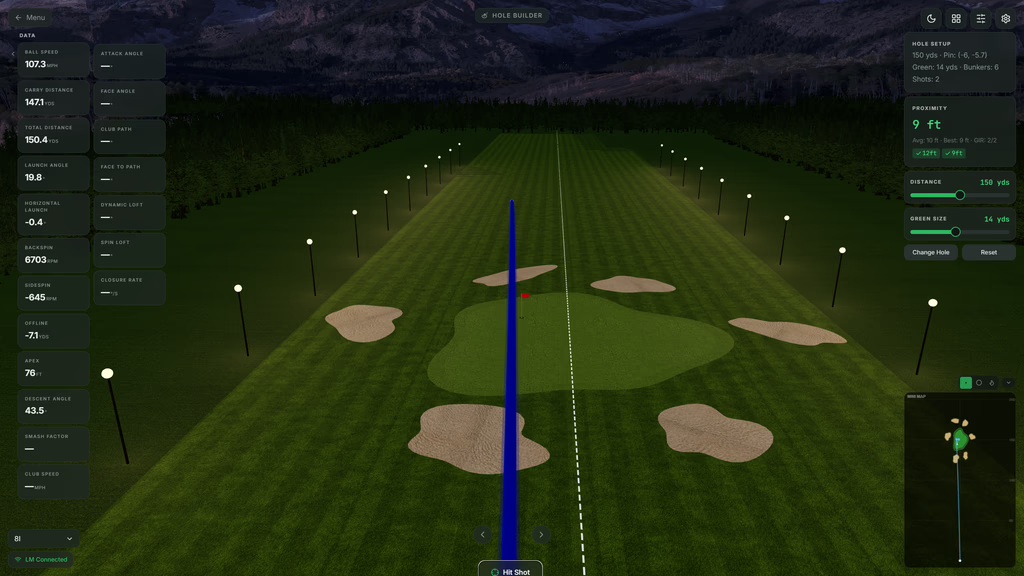
Driving Range, Skills Challenge, Combine, Shot Shaping, Wedge Distance Control, and Fairway & Green practice — each designed to test a specific part of your game under pressure instead of aimless ball-beating.
Real Data, Automatically
Once connected, ShotForge pulls your ball data straight from the launch monitor. Shot tracking, dispersion patterns, tendencies, and session summaries are logged for you — no manual entry.
Dispersion & Tendencies
Visual shot grouping shows where your misses really go and how tight your patterns are — the single most useful data point most golfers never look at.
Progress Tracking
Every session, score, and personal best is saved so you can see trends over weeks and months. Improvement you can actually measure, not just feel.
AI Swing Analysis
Add one or two swing cameras and ShotForge analyzes shoulder turn, head movement, hip sway, spine angle, and swing tendencies, then flags patterns to work on.
Priced Like a Bucket of Balls
$6.99/month or $59.99/year with a free trial, on a simulator setup that likely cost thousands. It’s the cheapest performance upgrade in the room.
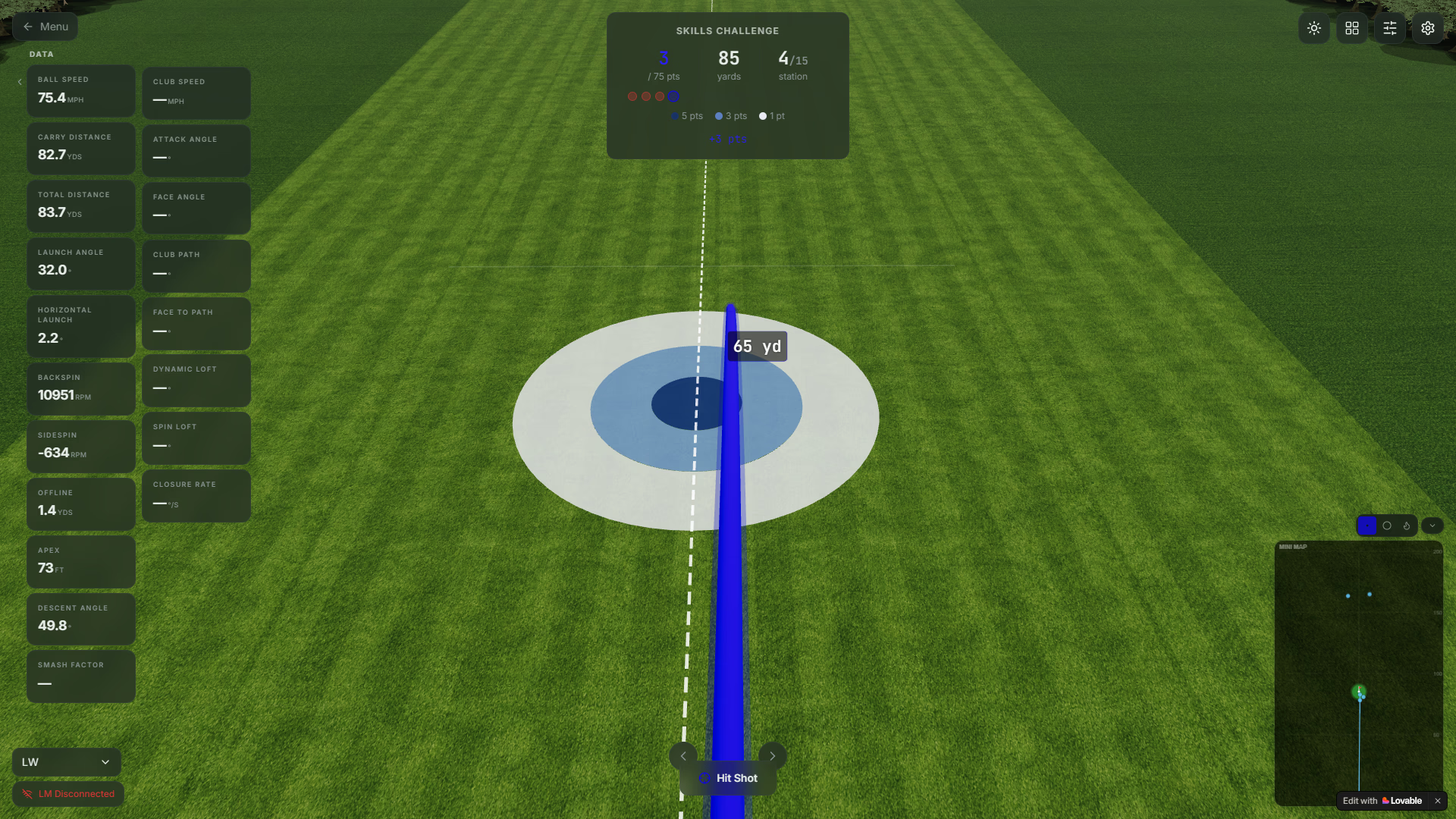
See Your Practice, Not Just Your Score
Every shot you hit flows straight into ShotForge and becomes something you can act on. Instead of a number that vanishes the moment the ball lands, you get a running picture of the whole session — shot-by-shot data, live dispersion, and the tendencies quietly shaping your misses. It’s the difference between beating balls and actually training.
How To Practice on a Golf Simulator (And Where ShotForge Fits)
You don’t need an app to practice well — but you do need a plan, and most of us won’t build one from scratch every session. These are the practice principles that actually move your handicap, and how ShotForge automates each one.
1. Chase dispersion, not one good shot
One flushed 7-iron proves nothing. A tight group of them proves a repeatable swing. ShotForge maps your dispersion automatically so you’re training consistency, not chasing a single hero shot.
2. Add pressure with skills tests
Random, scored challenges force focus the way a real round does. Skills Challenge and Combine modes give you a number to beat every session, which is what makes practice stick.
3. Own your wedge distances
Scoring lives inside 120 yards. Wedge Distance Control builds a reliable gap chart so you stop guessing on partial shots — often the fastest way to drop strokes.
4. Practice shot shaping on purpose
Learning to move the ball both ways on command turns range time into course skill. Shot Shaping mode gives you targets and instant feedback on curvature.
5. Track trends over time
Improvement is invisible session to session and obvious month to month. Saved sessions and personal bests show whether your practice is actually working.
6. Get feedback on the swing itself
Data tells you what the ball did; the AI swing analysis helps explain why. Together they close the loop between cause and result — the whole point of practice.
Watch The Trends, Beat Your Best
Skills Challenges and Combines give every session a score to chase, and ShotForge remembers all of it — personal bests, patterns, and progress over weeks and months. That long view is what turns a $7 app into real improvement: you can finally see whether the thing you’re working on is actually working.
Launch Monitor & Device Compatibility
ShotForge uses a “bring your own connector” model. If your launch monitor can already send data to third-party or open software — the same way it connects to GSPro or E6 Connect — there’s a strong chance it works with ShotForge through a small connector app. Setup is designed to take a few minutes: run the connector if your monitor needs one, start ShotForge, and start hitting. From there it’s automatic.
Good news for most GSV setups: the monitors I test and recommend generally support open connections. If you run any of these, you’re very likely covered — here’s how each one connects:
- FlightScope Mevo Gen 2 — connects through its free GSPro connector, so it should feed ShotForge the same way. See my Mevo Gen 2 breakdown.
- Square Golf HE & OMNI — free GSPro connector, no subscription to connect. Square HE vs OMNI comparison.
- ProTee VX — open, subscription-free software with a free GSPro connector. ProTee VX vs Uneekor EYE XO2.
- SkyTrak ST MAX — officially supports GSPro and E6 Connect, so third-party data output is built in.
- Garmin Approach R10 — the R10’s GSPro link is a community workaround, not an official integration, so treat ShotForge compatibility as likely-but-verify and test it during the free trial. More on getting better with Garmin data.
One important note on devices: ShotForge currently runs on Windows. Mac support is planned and iPhone/iPad is being explored, but they aren’t available yet — so if your bay runs off a Mac or an iPad today, hold off until those land. It’s built to run efficiently and doesn’t require a high-end gaming PC.
What It Costs — And How To Save 25%
ShotForge is $6.99/month or $59.99/year, and there’s a free trial so you can test it with your own launch monitor before paying anything. The yearly plan works out to right around $5 a month — genuinely less than a single bucket of balls at most ranges.
Use code GSV25OFF to take 25% off.
That drops the monthly plan to about $5.24 and the yearly plan to roughly $45 — under $4 a month for structured practice on the setup you already own.
Try ShotForge free, then save 25% with code GSV25OFF.
Start Free Trial →Where ShotForge Still Falls Short
I don’t recommend anything without telling you where it’s weak. ShotForge is early and improving fast, but a few things are worth knowing before you commit:
- Windows only, for now. No Mac or mobile app yet. If your simulator runs off a Mac or iPad, this is a wait-and-see.
- You need a compatible launch monitor. It reads real data, so a monitor with an open or third-party connector is required — it isn’t a swing app you can run off your phone alone.
- Ball data is the focus. Club-specific data isn’t a core feature yet, so if you rely heavily on club path and face numbers from your monitor, know that ShotForge is built around ball flight and outcomes.
- The AI is feedback, not a coach. To its credit, ShotForge says this plainly. The AI is strong at spotting patterns like head movement and hip sway, but it isn’t a replacement for real lessons.
- Trial length and refund terms aren’t published. The free trial exists and you can cancel anytime, but check the current terms at checkout before you subscribe.
Jay’s Take: If you’re on Windows with a launch monitor that already talks to GSPro or E6, ShotForge is close to a no-brainer at $7 — it fills the exact hole every simulator has. Start with the free trial, confirm it connects to your monitor, run a Combine a few times, and see if your numbers move. For the price of one range visit, it’s worth finding out.
ShotForge FAQ
Do I need a launch monitor to use ShotForge?
Yes. ShotForge reads real shot data, so it needs a launch monitor that can send data through an open or compatible connector.
Which launch monitors work with ShotForge?
Any monitor that supports open or third-party connections — the same ones that work with GSPro or E6 Connect. ShotForge doesn’t publish a model list, but if your monitor already runs third-party sim software, it will very likely work through a small connector app.
Do I need GSPro or E6 to run it?
No. ShotForge is a standalone practice app. It runs on its own and does not require GSPro or any other simulator software.
What devices does ShotForge run on?
Windows today. Mac support is planned and iPhone/iPad support is being explored, but neither is available yet. It doesn’t require a high-end gaming PC.
Do I need a camera?
Only for the AI swing analysis. The practice modes and shot data work without a camera; the AI swing feedback needs one or two swing cameras.
How much does ShotForge cost, and is there a discount?
$6.99 per month or $59.99 per year, with a free trial. Use code GSV25OFF to save 25%, which brings the yearly plan to around $45.
Does it replace a coach or lessons?
No, and it doesn’t claim to. The AI is good at spotting patterns like head movement, hip sway, and shoulder turn, but it’s practice feedback, not a substitute for a qualified coach.
Can I cancel anytime?
Yes. Both the monthly and yearly plans can be cancelled anytime, and a free trial lets you test it first.
More From Golf Simulator Videos
Best Golf Simulator Software 2026
GSPro, E6, FSX and more — the course-play software that pairs with ShotForge.
Best Golf Simulators 2026
My complete guide after testing every major launch monitor and simulator.
Free Golf Swing Analyzer
Check your swing positions free, right in your browser — no app required.
Disclosure: Some links and discount codes on this page are affiliate links that help support the Golf Simulator Videos channel at no additional cost to you.
Build the rest of your sim
- Enclosure and screen$250 off at Shop Indoor GolfShop
- Carl's Place enclosure5% off, code sent by emailShopGet the code
- Hitting mat$20 off at Shop Indoor Golf. GSV5OFF is more on a first order over $400Shop
- Projector5% off at Shop Indoor Golf. First-time buyersShop
- Simulator computerSurfThing: $100 off applied automatically, no codeShop
- TouchscreenGSV code for TouchscreenGuruShop
- Complete package$250 off at Shop Indoor Golf. GSV5OFF is more on a first order over $5,000Shop
GSV earns a small commission on these links, at no extra cost to you. Shop Indoor Golf takes one code per order.