
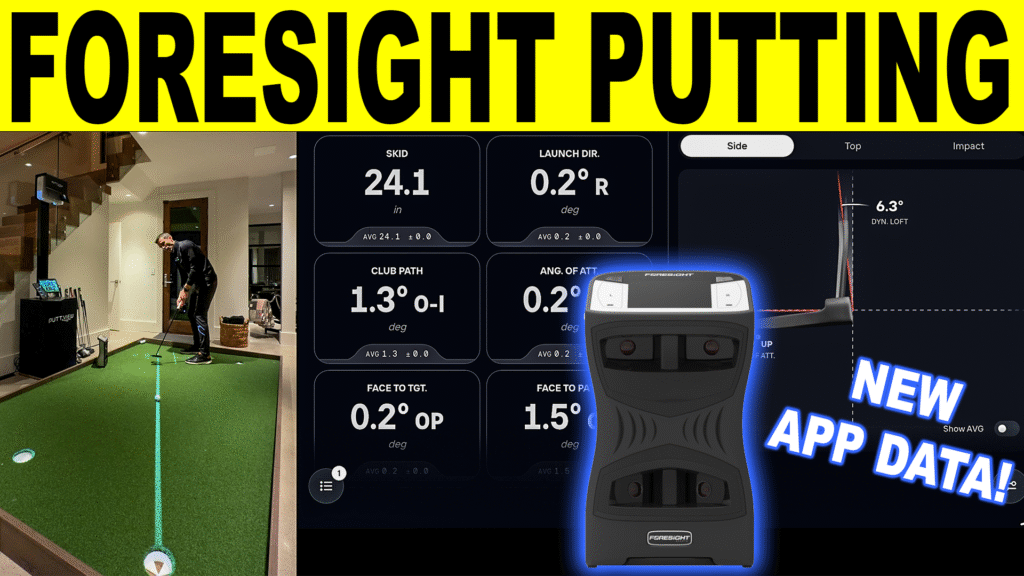
If you’re building a home golf simulator and want your putting practice to feel as data-driven as your full swing, the newest Foresight mobile app update is a real step forward. In today’s video, I test Foresight Putting Analysis on GCQuad using the latest Foresight Sports app features—so you can see what putting metrics you actually get, how Split View looks on a tablet, and how this fits into a complete golf simulator training routine.
Quick buy
- Foresight GCQuad5% off at Shop Indoor Golf with code GSV5OFF.First-time buyers only, one use. Not valid on a standalone Trackman, the Square Golf launch monitor or the ProTee VX.
- Foresight QuadMAX5% off at Shop Indoor Golf with code GSV5OFF, first-time buyers.
Will it fit? See each in your room in the free GSV Sim Builder, in 3D: GCQuad, QuadMAX.
Buying through GSV's links and codes helps support the channel: GSV earns a small commission at no extra cost to you, and you still get every saving available.
For anyone running a Foresight golf simulator (or considering one), this update makes it easier to practice putting with measurable feedback, without needing to jump into desktop software every time.
Watch the video
What’s new in the Foresight app update?
The most important change for GCQuad owners is the improved Putting Shot Analysis session flow in the app, designed specifically for GCQuad and QuadMAX users. That means better organization of putting sessions and a cleaner experience whether you’re practicing in a studio, at the range, or inside your home golf simulator.
The second update is Split View on tablets, which lets you display two visualizations at once. If you’ve ever felt like you’re bouncing between screens trying to compare face angle, start line attaching it to roll/skid data, this is the feature that makes the app feel more “coach-like.”
What is Essential Putting Analysis on GCQuad?
Essential Putting Analysis is a Foresight add-on that unlocks deeper putting measurement on the GCQuad or QuadMax —including roll behavior and key delivery metrics (some values require clubhead measurement). This is particularly valuable for a home golf simulator because indoor practice exposes how consistent (or inconsistent) your roll really is.
Foresight’s current listing shows Essential Putting Analysis for GCQuad priced at $2,500 (activation timing noted on the product listing).
If you’re running a full foresight sports golf simulator setup, this add-on is one of the clearest ways to make your simulator practice more “scoreable,” not just entertaining.
The putting metrics you get (and what matters most in a golf simulator)
One of the big wins for a golf simulator environment is that putting becomes measurable. No guessing. You can work backwards from results to causes.
Here are the putting metrics Foresight lists for GCQuad Putting Analysis (some require clubhead measurement):
Ball / roll performance (the “results”)
- Ball Velocity (distance control foundation)
- Horizontal Launch Direction (start line)
- Vertical Launch Angle (launch up/down)
- Launch Spin
- Skid Distance
- Time to Full Roll
- Roll Spin (RPM at True Roll)
What to focus on first (especially in a home golf simulator):
- Ball Velocity consistency (pace dispersion kills scoring)
- Horizontal Launch Direction (start it where you intend)
- Skid Distance + Time to Full Roll (roll quality = predictability)
Those three categories alone can make your putting feel dramatically more consistent indoors.
Club delivery metrics (the “why”)
Foresight notes these require clubhead measurement:
- Impact Face Angle
- Club Path
- Angle of Attack
- Impact Lie Angle
- Impact Location
This is what makes a Foresight golf simulator so useful for putting practice: instead of saying “I pushed it,” you can see if it was face angle, path, or a strike issue.
Why skid distance and time to full roll matter for simulator putting
A lot of golfers use a home golf simulator mainly for full swing and treat putting as an afterthought. But roll metrics are where indoor putting gets valuable:
- If your ball skids too long, it can wobble and “hunt” early in the roll
- If you get to true roll faster, the putt behaves more predictably
That’s why Skid Distance and Time to Full Roll are two of the most underrated metrics in any foresight sports golf simulator setup.
How to use Split View like a coach (tablet users)
Split View is perfect for a golf-sim practice routine because you can compare cause vs. effect quickly.
Try pairing:
- Start line + face angle (direction control)
- Ball velocity + skid/time to roll (distance + roll quality)
This is exactly the kind of workflow that helps you get better faster in a golf simulator, because you’re not relying on feel alone.
Can you use this in FSX Play too?
If your home golf simulator runs FSX Play, Foresight’s change log indicates Essential Putting Analysis support in the FSX Play version history.
So you can:
- run quick putting sessions in the Foresight app, or
- integrate putting practice into your full foresight golf simulator flow using FSX Play.
Who this is for (and who can skip it)
Ideal for:
- GCQuad owners building a home golf simulator who want measurable putting improvement
- Golfers who struggle with pace and want to train Ball Velocity consistency
- Anyone who wants roll metrics like Skid Distance and Time to Full Roll in their Foresight Sports golf simulator practice routine
You might skip it if:
- You don’t practice putting much indoors
- You mainly want full-swing data and don’t plan to use putting metrics consistently
A simple 10-minute putting session for your home golf simulator
- Hit 10 putts from the same distance
- Track Ball Velocity dispersion
- Hit 10 more focusing on Horizontal Launch Direction
- Hit 10 experimenting with setup/strike while watching Skid Distance and Time to Full Roll
This structure is easy, repeatable, and ideal for home golf simulator practice where you want clear improvement from session to session.
Where to buy
- Foresight GCQuad5% off at Shop Indoor Golf with code GSV5OFF.First-time buyers only, one use. Not valid on a standalone Trackman, the Square Golf launch monitor or the ProTee VX.
- Foresight QuadMAX5% off at Shop Indoor Golf with code GSV5OFF, first-time buyers.
Free consultation. GSV's partner master builders, hand-picked by Jay, get on a call quickly and make sure everything fits, with package deals, DIY packages, full installation and more.
Get a free consultationPrices are on the shop's page. Codes last checked October 9, 2026.
Build the rest of your sim
- Enclosure and screen$250 off at Shop Indoor GolfShop
- Carl's Place enclosure5% off, code sent by emailShopGet the code
- Hitting mat$20 off at Shop Indoor Golf. GSV5OFF is more on a first order over $400Shop
- Projector5% off at Shop Indoor Golf. First-time buyersShop
- Simulator computerSurfThing: $100 off applied automatically, no codeShop
- TouchscreenGSV code for TouchscreenGuruShop
- Complete package$250 off at Shop Indoor Golf. GSV5OFF is more on a first order over $5,000Shop
GSV earns a small commission on these links, at no extra cost to you. Shop Indoor Golf takes one code per order.