
The best computer for a golf simulator is the one that meets your software's own list for the screen you play on, with some room to spare. The launch monitor reads the shot, but the PC draws the course, so a card that is too small shows up as stutter, low detail or a course that will not run. This guide puts each major software maker's published requirements side by side, from their own pages as of October 2026, then matches them to the PCs that GSV's partner SurfThing builds for simulators. Jay Lasco, host of Golf Simulator Videos, tested SurfThing's RTX 5080 build in a 4K simulator in GSV's review below.
- RTX 3060GSPro's 1080p minimum, with 16GB of RAM
- RTX 3080+GSPro's 4K card, with 32GB of RAM
- RTX 4070 TiWhere Trackman's list starts, with 32GB
- WindowsGSPro, Trackman and Foresight run on a Windows PC only
Golf simulator PCs from SurfThing
- SurfThing simulator PCsSurfThing: $100 off applied automatically, no code.
Buying through GSV's links and codes helps support the channel: GSV earns a small commission at no extra cost to you, and you still get every saving available.
The short answer
- Start from your software. Requirements range from integrated graphics for Awesome Golf to an RTX 4070 Ti or 5070 Ti for Trackman. Check the list for the software you will actually play.
- Then pick the screen. 4K has four times the pixels of 1080p, and every maker that publishes a 4K tier asks for a bigger card; GSPro, Trackman and Foresight Premier also ask for 32GB of RAM.
- The graphics card matters most, then memory. 32GB is the safe choice for any new simulator PC: Trackman and Uneekor's help center list it, and GSPro recommends it for 4K.
- Buy NVIDIA unless your software says otherwise. Trackman and Foresight do not support AMD, and Uneekor's Launcher and VIEW requirements page says an NVIDIA card is required.
- A desktop is the safer choice for a permanent simulator. Laptops can work, with limits covered below.
Golf simulator software PC requirements
Each maker's own minimum for 1080p play, from its own requirements page. Where a maker publishes a recommended tier, it is in the same cell.
| Software | Graphics card | Memory |
|---|---|---|
| GSPro | RTX 3060 minimum; RTX 3070 or 3060 Ti for great 1080p | 16GB |
| Trackman (TPS) | RTX 4070 Ti, 4070 Ti Super or 5070 Ti | 32GB |
| Foresight Premier | RTX 4060 8GB for 1080p Low; RTX 5070 for Medium, 5070 Ti for High | 16GB minimum, 32GB recommended |
| Foresight FSX Play and FSX Pro | GTX 1060 or RTX 2060; RTX 3070 Ti or newer recommended | 8GB minimum, 16GB recommended |
| Uneekor | RTX 4070 Ti or equivalent | 32GB |
| E6 (2026), E6 APEX | RTX 3060 with 12GB | 16GB on the download page, 24GB on the product page |
| SkyTrak+ app 5.0 and later | GTX 1650 or Radeon RX 580 | 8GB minimum, 16GB recommended |
| Infinite Tees | RTX 3070 or equivalent | 16GB |
| Awesome Golf | Integrated graphics work | 4GB |
GSPro's page writes its minimum card as a "GTX 3060", a card that does not exist; it is the RTX 3060. Uneekor publishes several requirement pages that disagree, and the figures above are from its help center page; its support pages let Uneekor's own software run on a GTX 1060. Foresight's support site also gives a different FSX minimum, an RTX 3060, from its help center's. Rapsodo's MLM2XPRO page says Rapsodo Studios runs on a PC but lists no requirements, and Garmin's Home Tee Hero runs on a phone, or on the Approach R50 itself, with no PC.
What 4K takes
A 4K projector puts four times as many pixels on the screen as a 1080p one, and the card has to draw every one of them for each frame. These are the makers that publish a 4K tier:
| Software | Graphics card for 4K | Memory |
|---|---|---|
| GSPro | RTX 3080 or better | 32GB |
| Trackman (TPS) | RTX 4080, 4080 Super, 4090, 5080 or 5090 | 32GB |
| Foresight Premier | RTX 5080 16GB, with an Intel Core Ultra 9 | 32GB |
| SkyTrak+ app | RTX 2060 or Radeon RX 6600, with 8GB of graphics memory | 16GB or more |
Uneekor says GameDay and VIEW are 4K ready but gives no separate card for it. E6 markets 4K and gives no 4K hardware. Most simulator projectors are 1080p or 4K; the golf simulator software guide covers what each platform looks like at each.
Windows, Mac and NVIDIA
| Software | System | Graphics and processor |
|---|---|---|
| GSPro | Windows 10 or 11; no Mac | Names NVIDIA cards only |
| Trackman (TPS) | Windows 11, 64-bit | Intel processors and NVIDIA cards only; no AMD, no Intel Iris Xe |
| Foresight | Windows; Premier has no Mac version | AMD processors and cards not supported |
| Uneekor | Windows 11 by its help center, Windows 10 or 11 by its Launcher page; no Mac or Linux | An NVIDIA card is required, by its Launcher and VIEW page |
| SkyTrak+ app | Windows 10 or 11, or a Mac with an M1 chip or newer | NVIDIA or AMD |
| Awesome Golf | Windows 10 or later, or a Mac with Apple silicon | Integrated graphics work |
Trackman also asks for an 800 watt power supply, a 1TB SSD and two Ethernet ports for the Trackman iO and Duo. A PC below Trackman's list shows an alert in its Golf Portal.
Do you need a gaming PC for GSPro?
Yes, in practice. GSPro runs on Windows only and lists a dedicated NVIDIA card at every tier: an RTX 3060 and 16GB for 1080p, an RTX 3070 or 3060 Ti for great 1080p, and an RTX 3080 or better with 32GB for 4K, with 10 to 20GB of free storage. An office PC with integrated graphics does not meet its minimum. GSPro does not list a processor. The GSPro compatible launch monitors page covers which units connect and how.
SurfThing golf simulator PCs
SurfThing builds desktops for golf simulators and tests them with the most popular simulator software. Every desktop below comes with Windows 11 Home, 2.5G Ethernet plus a second network card that can be swapped for a camera card, WiFi 6E, Bluetooth 5.3 and a 2-year limited warranty. SurfThing can preinstall and activate simulator software and help with the first setup.
| SurfThing model | Graphics card | Processor, memory, storage |
|---|---|---|
| SG3-5602 | RTX 5060 8GB | Core Ultra 5 225F, 16GB, 1TB |
| SG3-5702 | RTX 5070 12GB | Core Ultra 5 225F, 32GB, 2TB |
| SG3-5702Ti | RTX 5070 Ti 16GB | Core Ultra 5 225F, 32GB, 2TB |
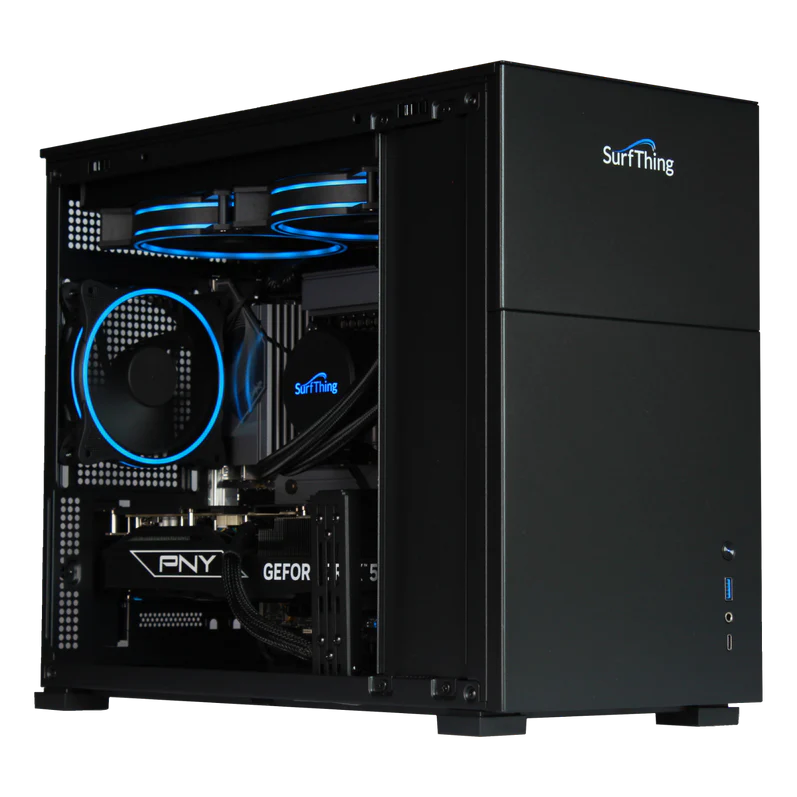
| SG3-5802 | RTX 5080 16GB | Core Ultra 7 265F, liquid cooled, 32GB, 2TB |
| M3H laptop | RTX 5070 Laptop | Core Ultra 9 275HX, 32GB, 2TB |
Specs from SurfThing's own pages and NVIDIA's for the memory on each card, October 2026. SurfThing pitches the SG3-5602 for 1080p, the SG3-5702 as an entry to 4K, the SG3-5702Ti for better 4K, the SG3-5802 for any software at 4K and the M3H laptop for 1080p.
How these four desktops actually run GSPro, E6 Apex, FSX Play, Uneekor GameDay and Trackman, in frames a second at 1080p and in 4K, is charted from SurfThing's own tests on the golf simulator PC benchmarks page.
Matching a SurfThing model to your software
- 1080p with GSPro, FSX Play, SkyTrak+ or Awesome Golf: the SG3-5602 meets their 1080p minimums. The SG3-5702 adds 32GB and more room for later.
- E6: it asks for a card with 12GB of its own memory and up to 24GB of RAM, so the SG3-5702 is the first model with both. E6 also lists an Intel Core i7 10th gen or newer, and the SG3-5702 has a Core Ultra 5.
- Foresight Premier at 1080p: the SG3-5602 meets Premier's 1080p Low list. For Medium and High, Foresight lists a Core Ultra 7 with an RTX 5070 or 5070 Ti and 32GB, so the SG3-5802 is the first full match.
- Trackman or Uneekor: their lists start at an RTX 4070 Ti or 5070 Ti, 32GB and a Core i7 or Core Ultra 7. The SG3-5702Ti has the card and the memory but a Core Ultra 5, so the SG3-5802 is the first full match. SurfThing does not list power supplies, so ask it about Trackman's 800 watts.
- 4K with GSPro: GSPro's FAQ asks for an RTX 3080 or better and 32GB, and its knowledge base starts its 4K Ultra tier at the RTX 5070, so the SG3-5702 and up; the SG3-5702Ti and SG3-5802 leave more room.
- 4K with Trackman or Foresight Premier: the SG3-5802, with the RTX 5080 both list for 4K. Foresight pairs it with a Core Ultra 9, a step above the SG3-5802's Core Ultra 7.
GSV's RTX 5080 test
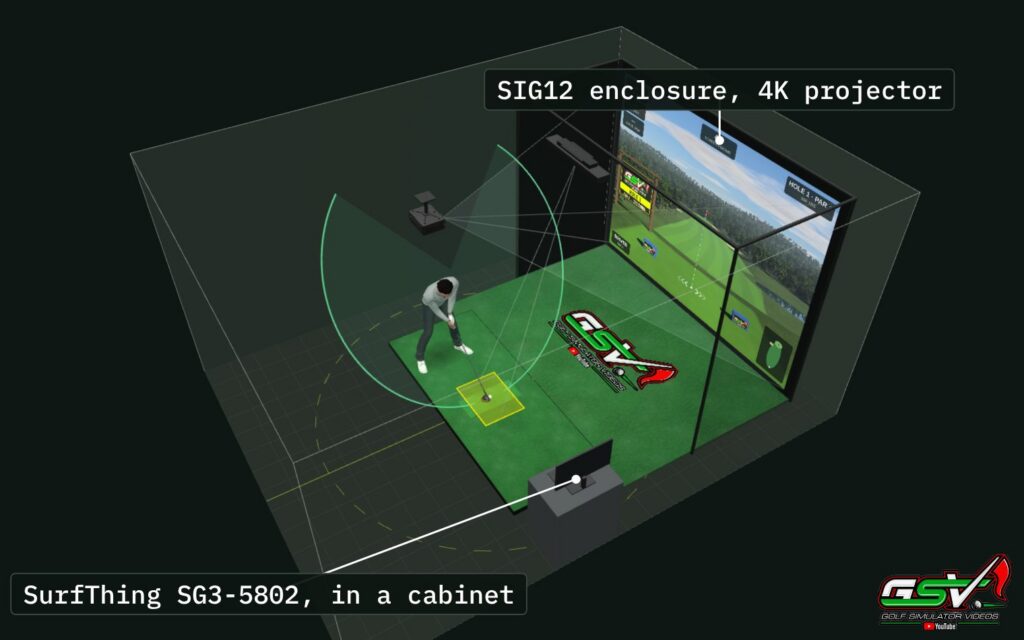
GSV ran the SurfThing SG3-5802 with GSPro at Ultra settings and Trackman Virtual Golf 3, with two 4K displays, a third monitor and recording running. GSPro held 60 frames a second, apart from a moment as each flyover starts, using about half to three quarters of the card; Trackman ran its flyovers at about 120 frames a second and dropped to 30 on the tee. The readings are in the SurfThing RTX 5080 benchmarks, and more on SurfThing in the SurfThing golf simulator PC review.
What to look for in a simulator PC
- Graphics card: the part that decides how the course looks and how smooth it runs. Cards with 12 to 16GB of their own memory leave room for 4K and later updates.
- Memory: 32GB for any new build. Recording with OBS, swing cameras and a launch monitor app running alongside all add to it, and Trackman says its AI Motion Analysis needs 16GB by itself.
- Processor: a recent Intel Core i7 or Core Ultra 7 covers every 1080p list above, and Foresight Premier asks for a Core Ultra 9 at 4K. Trackman and Foresight want Intel.
- Storage: an NVMe SSD, 1TB or more. Courses add up: Foresight puts each Premier course at about 1.7GB.
- Network ports: overhead and camera units often connect by Ethernet, so check how many ports your launch monitor needs.
- Cooling: a simulator PC runs for hours at a time in a closed room. Good airflow or liquid cooling keeps it from slowing down.
Laptop or desktop?
A desktop is the better fit for a permanent simulator: a bigger card for the same money, better cooling and room to upgrade. A laptop can work. Foresight says a laptop is fine if it meets its recommended list and runs on its NVIDIA card, with a cooling pad; its Premier requirements are written for desktop parts. Awesome Golf runs on most Windows laptops. SurfThing's M3H laptop, with an RTX 5070 Laptop card, is aimed at 1080p. GSPro, Trackman and Uneekor say nothing about laptops, so match their lists, and expect a laptop card to do less than the desktop card of the same name.
Before you buy: software makers update their lists, often with each major release. Check the current page for your software before you order a PC, and leave room above the minimum.
Discount codes
The SurfThing row above takes GSV viewers to SurfThing's simulator PCs. For the launch monitor, the software and the rest of the build, every GSV code is on the golf simulator discount codes page.
Free consultation with GSV's partner builders
Not sure which PC fits your software, projector and launch monitor? Jay works with official partners: master builders he hand-picked, who get on a call quickly and make sure you have the right fit before you buy anything. They offer package deals on the whole build, DIY packages to put together yourself, full installation, and more. The consultation is free.
Golf simulator PC questions
What is the best computer for a golf simulator?
The one that meets your software's own requirements for the screen you play on, with room to spare. For 1080p, an RTX 5060 or 5070 class desktop meets most lists; Trackman and Uneekor start at an RTX 4070 Ti or 5070 Ti with 32GB and a Core i7 or Core Ultra 7; for 4K, GSPro asks for an RTX 3080 or better and Trackman and Foresight Premier list an RTX 5080 class card.
Do you need a gaming PC for GSPro?
Yes, in practice. GSPro runs on Windows only and lists a dedicated NVIDIA card at every tier: an RTX 3060 and 16GB for 1080p, an RTX 3070 or 3060 Ti for great 1080p, and an RTX 3080 or better with 32GB for 4K.
What graphics card does Trackman need?
Trackman lists an RTX 4070 Ti, 4070 Ti Super or 5070 Ti, with 32GB of RAM, Windows 11 and an Intel processor. For 4K it lists an RTX 4080, 4080 Super, 4090, 5080 or 5090. It does not support AMD processors or cards.
Is an RTX 4070 enough for a golf simulator?
For 1080p with GSPro, E6, FSX Play or SkyTrak+, yes: it is above their minimums. It is below Trackman's and Uneekor's lists, which start at an RTX 4070 Ti. For 4K, GSPro asks for an RTX 3080 or better, and a 4070 sits near that with little room to spare.
How much RAM does a golf simulator PC need?
32GB for a new build. GSPro and Foresight run on 16GB at 1080p, but Trackman, Uneekor and 4K GSPro ask for 32GB, and recording, swing cameras and a launch monitor app running alongside all use more.
Can a laptop run golf simulator software?
Some can. Foresight says a laptop works if it meets its recommended list and runs on its NVIDIA card, with a cooling pad. Awesome Golf runs on most Windows laptops. A desktop is the better fit for a permanent simulator, with a bigger card for the money and better cooling.
Can golf simulator software run on a Mac?
GSPro, Trackman and Foresight Premier run on Windows only. The SkyTrak+ app runs on a Mac with an M1 chip or newer, and Awesome Golf runs on a Mac with Apple silicon.
Does an AMD graphics card work for a golf simulator?
It depends on the software. Trackman and Foresight do not support AMD, and Uneekor's Launcher and VIEW page says an NVIDIA card is required. The SkyTrak+ app lists AMD cards, and Awesome Golf runs on integrated graphics.
Windows 10 or Windows 11 for a golf simulator PC?
Windows 11. Trackman requires it and Uneekor's help center asks for it, and GSPro, Foresight and SkyTrak+ run on either.
Which SurfThing PC is best for a golf simulator?
It depends on the software and the screen. The SG3-5602 is SurfThing's 1080p model, and the RTX 5080 SG3-5802 is the first that fully matches Trackman's and Uneekor's lists, processor included, and the one for 4K with any software, which GSV tested in a 4K simulator.
More from GSV
Build the rest of your sim
- Enclosure and screen$250 off at Shop Indoor GolfShop
- Carl's Place enclosure5% off, code sent by emailShopGet the code
- Hitting mat$20 off at Shop Indoor Golf. GSV5OFF is more on a first order over $400Shop
- Projector5% off at Shop Indoor Golf. First-time buyersShop
- TouchscreenGSV code for TouchscreenGuruShop
- Complete package$250 off at Shop Indoor Golf. GSV5OFF is more on a first order over $5,000Shop
GSV earns a small commission on these links, at no extra cost to you. Shop Indoor Golf takes one code per order.