
The full guide: SkyTrak golf simulator guide, 2026
Plans and what each one includes: GSV's SkyTrak membership plans guide.
SkyTrak 6.2 Update: 35+ New Features for Your SkyTrak Golf Simulator
New ground and green physics, a rebuilt Club Workshop, a Wi-Fi connection hub, new pin positions, tournament mode and more. We tested the SkyTrak 6.2 software on the SkyTrak ST MAX and hit real wedge shots so you can see what changed.
By Jay, Golf Simulator Videos — host of the largest dedicated home golf simulator channel on YouTube. Tested on our own SkyTrak ST MAX with an Elite membership.
SkyTrak discount code: GOLFSIMULATORVIDEOS — our link applies it automatically at checkout.
Shop SkyTrak With CodeAffiliate disclosure: Some links and discount codes on this page are affiliate links. If you buy through them, Golf Simulator Videos may earn a commission at no additional cost to you. It helps support the channel and never changes how we test or what we say.
SkyTrak 6.2 Software Update Video
The Short Version
- 35+ new features, gameplay enhancements and fixes in SkyTrak software 6.2
- New ground and green physics — wedges check, release and bounce off slopes more realistically
- Rebuilt Club Workshop — map just part of your bag and keep only your best shots
- Connection hub — the ST MAX and your device can both join your home Wi-Fi
- Manage courses without the unit connected — download or offload while it charges
Who This Update Matters Most For
- Current SkyTrak ST MAX and SkyTrak+ owners using native SkyTrak software
- Anyone shopping for a home golf simulator that is set-it-down-and-play simple
- Players who use SkyTrak course play on an iPad or phone, not just a PC
- Golfers who want TrackMan and Foresight course maps under one membership
What’s New in the SkyTrak 6.2 Software Update
SkyTrak lists more than 35 changes in 6.2. We did not try to cover every line item. These are the ones that change how a SkyTrak golf simulator actually feels to use day to day, grouped by where you will find them.
Course Play and Gameplay
- New scorecard
- Redesigned drop options
- New pin positions and new tee markers
- Tournament mode
- Add or remove players during a round
- Smoother play controls
Physics
- Updated ground physics
- Updated green physics
- Altitude setting so shots fly like your home course
- Expected distance panel on screen (can be hidden)
Club Workshop and My Bag
- Improved My Bag and bag mapping
- Map a partial set, like just your wedges
- Choose shots per club and how many best shots count
- Adjustable gap tolerance and intended gap
- Club recommendations tied to your mapping
Connection and Devices
- New connection wizard and connection hub
- ST MAX wireless network connection over home Wi-Fi
- Device settings show tilt, roll and software version
- Tutorials and support built into the app
Courses and Downloads
- Auto-updated courses
- Manage courses without the unit connected
- Sort by newest, oldest, largest or smallest
- Offload courses to free up storage
Profile, Stats and Settings
- New profile area
- Recent activity experience
- Stats: shot history, shots hit, completed rounds, Shot Score
- In-app notifications
- Custom measurement settings and new hotkeys
GSV Take: None of these are flashy on their own. Together they cut clicks everywhere. Mapping your wedges, dragging the ball to a bunker and changing players mid-round all got faster, and that simplicity is exactly why people buy a SkyTrak in the first place.
SkyTrak 6.2 Ground and Green Physics: Real Wedge Shots on the ST MAX
To test the new physics we used On-Course Practice at Pebble Beach on the TrackMan course map, set altitude to our location, and hit a 54 degree wedge into the same green. We did not hit perfect shots on purpose. Mishits, double crosses and draws show you far more about ground reaction than ten identical swings.
| Shot | What We Tried | What the ST MAX Showed | Ground / Green Reaction |
|---|---|---|---|
| 1 | Stock 54 degree | Caught it heavy, lower backspin | Landed short, bounced on the slope and kicked back |
| 2 | Stock 54 degree | 8,615 rpm backspin, steep descent angle | Hit and spun back a little |
| 3 | Cut | Path 2.8 out-to-in, face 3.9 closed | Double cross, as called before the ball landed |
| 4 | Cut | Face not closed enough, more spin | Pushed long, clear ground reaction |
| 5 | Cut | About 9,000 rpm, path 1.9 out-to-in, face 0.9 closed | Slight cut, checked and spun back |
| 6 | Cut | Nearly 10,000 rpm, path and face to target read 0 | Almost dunked it; ball hit dead center on the screen |
| 7 | Draw | Thin strike, path 6.8 in-to-out | Drew, less spin than we wanted |
| 8 | Draw | Path 4.1 in-to-out, face 1.2 open to target | Right on the back of the green, spinning back |
What stood out: the club data matched what we felt. When the face was closed to the path, the ST MAX said so. When the strike was pure, the numbers went to zero and the ball hit the center of the impact screen. That is useful validation for a unit at this price.
The ST MAX captures club head speed, smash factor, club path, face angle and face-to-path alongside ball data like ball speed, back spin, side spin, launch angle, descent angle and carry, per SkyTrak. For a deeper look at accuracy, see our full SkyTrak ST MAX review.
Smarter Bag Mapping in SkyTrak 6.2
You no longer have to map your entire bag to learn your gaps. In the new Club Workshop you can map just your wedges, pick how many shots to hit per club, then tell SkyTrak how many of the best shots to keep.
- Best 3 of 10 tells you your gaps on good swings
- Best 5 of 10 gives you a truer average
- Set gap tolerance and intended gap, hit Apply, and it drops you straight onto the range
- When you finish, repeat the mapping or start a new one without backing out through menus
One heads-up: session tracking now asks you to select a club first so the data lands on the right club.
Easier SkyTrak ST MAX Wi-Fi Setup
The new connection wizard lets you choose the ST MAX and a wireless network connection. Instead of pairing directly, the unit joins your local Wi-Fi and the SkyTrak software joins the same network. It is a simpler setup, and it is the method we prefer in our own simulator.
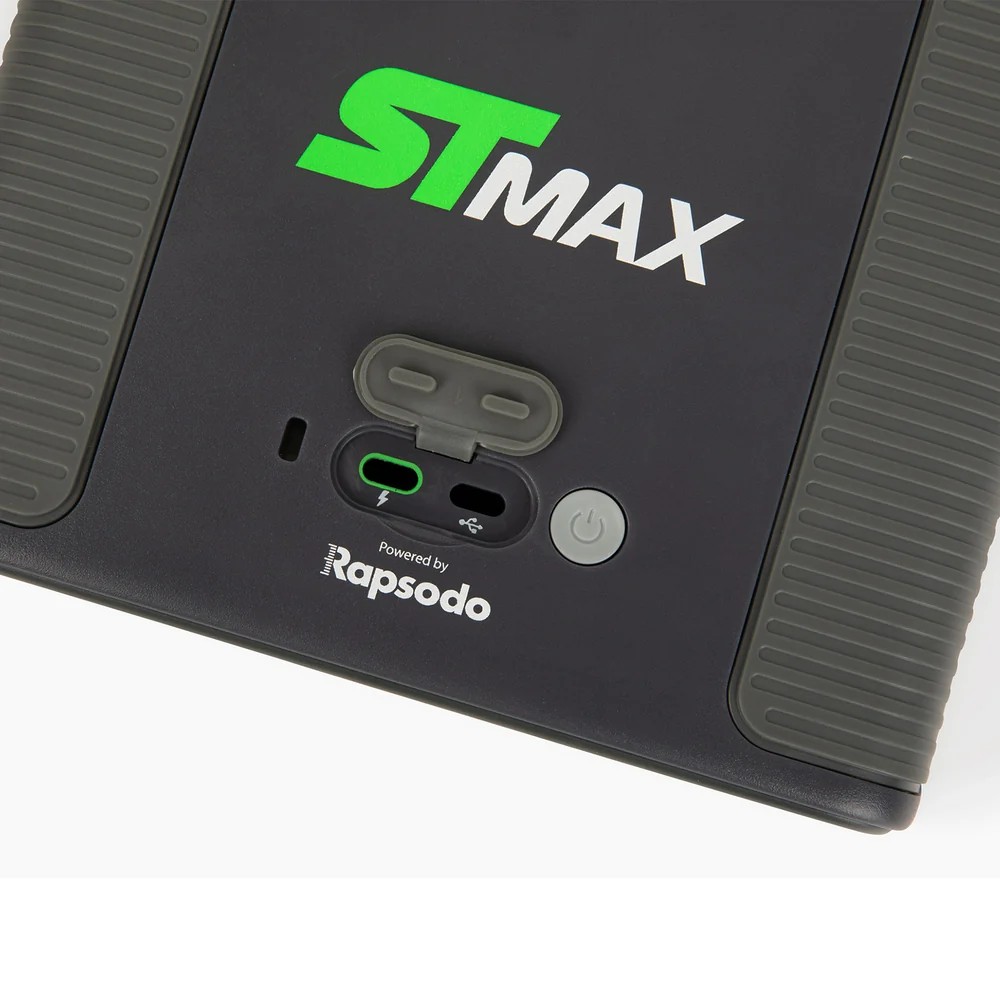
Around back, the ST MAX has dual USB-C ports. Per SkyTrak, they allow simultaneous charging and data transfer, so a permanent simulator install can stay plugged in while you play.
Manage SkyTrak Courses Without the Unit
Downloads now live in their own area. Sort courses and ranges by newest, oldest, largest or smallest, offload courses you are not playing to free space, and download new ones while the launch monitor is off charging. Courses also auto-update.
On-Course Practice tip: tap the gear icon and you can click and drag the ball anywhere on the hole. Want 20 bunker shots in a row? Drag it to the bunker. It worked smoothly on both desktop and iPad.
What SkyTrak 6.2 Still Needs to Fix
No update is perfect, and SkyTrak hardware has limits software cannot change. Here is what we noticed and passed along to SkyTrak.
Software Feedback
- No 50 degree wedge option when adding a club. We had to label ours as a gap wedge.
- Expected distance panel can be moved in course play but not in practice, and it can cover the ball. SkyTrak said they liked the feedback, so we expect a fix.
Hardware Realities
- Smaller hitting area than overhead or premium camera units, so ball placement matters.
- Slight shot delay before the ball flies on screen. Many owners stop noticing it. Some never like it. Players who look up at a monitor after impact often do not mind at all.
Ready for a SkyTrak golf simulator? Use code GOLFSIMULATORVIDEOS — our link applies it for you.
Get the SkyTrak DealIs SkyTrak a Good Home Golf Simulator?
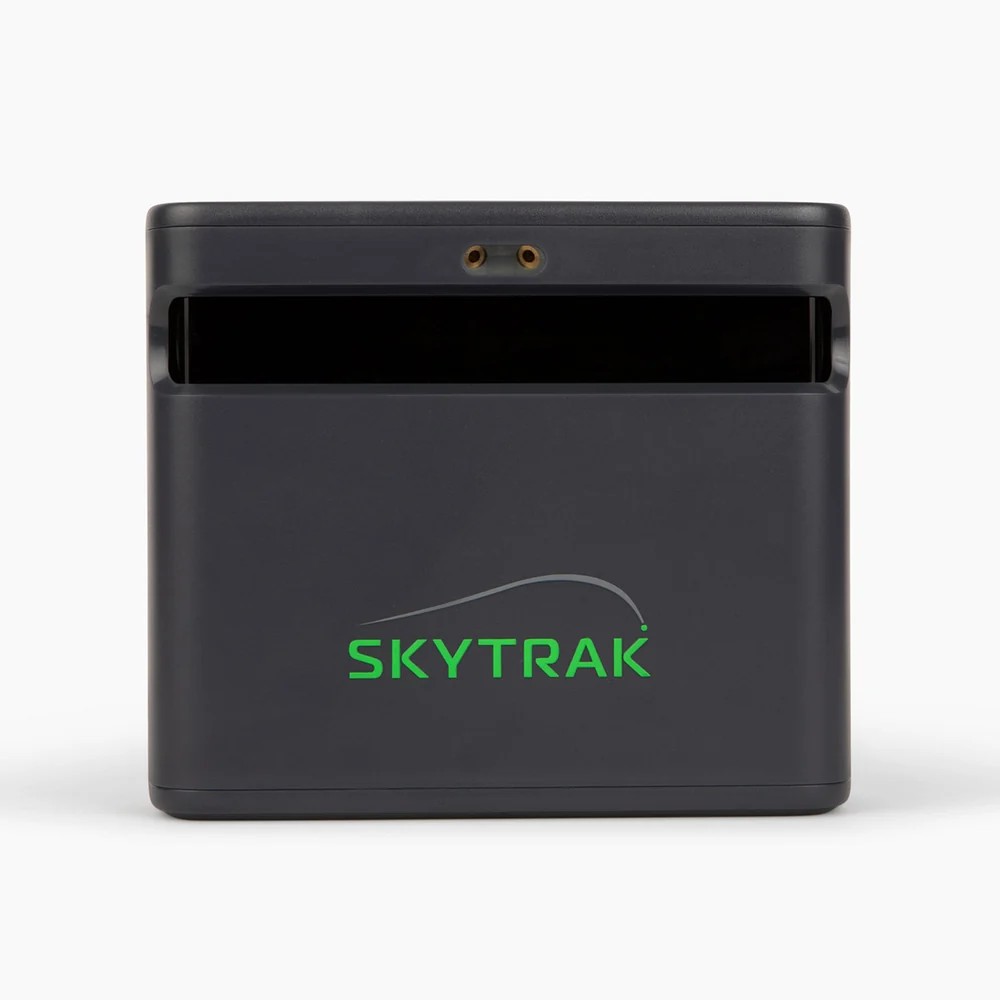
For the right golfer, yes. SkyTrak is a set-it-down-and-play launch monitor. It sits beside the ball on the floor with a footprint of about 4 by 4 inches, it runs on a rechargeable battery, and the native SkyTrak app does the rest. We keep meeting simulator buyers who choose it for two reasons: price and simplicity. The 6.2 update leans into the second one.
Great Fit If You Want
- A simple home golf simulator the whole family can use
- Strong mobile course play on iPad or phone
- TrackMan and Foresight course maps in one app
- Club path and face data at a mid-range price
- GOLFTEC Speed Training (exclusive to ST MAX)
Look Elsewhere If You Need
- The largest possible hitting zone
- Near-instant ball flight on screen
- A clear floor with an overhead unit — see ProTee VX vs Uneekor EYE XO2
- Third-party sim software as your main platform
Compare Before You Buy
Building a DIY Golf Simulator Around SkyTrak
Because SkyTrak is portable and floor-based, it is one of the easiest launch monitors to build a DIY golf simulator around, whether that is a spare bedroom, basement or garage golf simulator. Here is the checklist we walk people through.
1. Launch Monitor + Membership
SkyTrak ST MAX plus the membership that matches how you play. Course play needs Core or Elite (details below).
2. Screen or Enclosure
A net for pure practice, or an impact screen and enclosure for course play. See our Carl’s Place enclosure review.
3. Hitting Mat
A quality mat protects your joints and keeps the ball in SkyTrak’s hitting area. Mark your ball position.
4. Projector or TV
A short throw projector for an impact screen, or simply a TV or monitor behind a net for a budget build.
5. Device
A Windows PC, Mac with Apple M1 or newer, iPad or Android device. SkyTrak publishes minimum specs for each.
6. Room Check
Confirm ceiling height for a full driver swing and SkyTrak’s current setup guidance before you buy materials.
SkyTrak Home Golf Simulator Studio Assembly
Not ready to source every part yourself? SkyTrak also sells complete ST MAX simulator studio packages with the enclosure, screen and hardware together. This clip shows an example SkyTrak studio going together, so you can see the space and steps involved before you commit. At the time of writing, SkyTrak lists its ST MAX Standard, Premium and Ultimate Studio packages on sale from $4,195, $4,695 and $5,195.
Watch a real build: our SkyTrak kit garage build and eight other setups are on the garage golf simulator page. Planning a build? Email Email Jay for free advice and package pricing.
Which SkyTrak Membership Unlocks the 6.2 Features?
The 6.2 software update is the app everyone uses, but course play, course maps and some modes depend on your membership. We tested with Elite, which includes everything. Pricing below is from SkyTrak’s membership page at the time of writing; all plans are billed annually.
| Plan | Price | Course Play | Highlights |
|---|---|---|---|
| Essential | $99.99/yr | No | Driving range, Sim Club, PinSeeker, practice ranges, game evaluations, challenges |
| Core: Foresight | $299.99/yr | 49 Foresight courses | Everything in Essential, Course Play Practice, 1 new course monthly |
| Core: TrackMan | $349.99/yr | 51 TrackMan courses | Everything in Essential, Course Play Practice, full Pebble Beach Resort pack, 1 new course monthly |
| Elite | $599.99/yr | Foresight + TrackMan packs | Everything, 2 new courses monthly, 10% off SkyTrak shop and GOLFTEC services, free GOLFTEC Game Evaluation |
Full breakdown: SkyTrak membership plans explained.
SkyTrak ST MAX Price and Discount Code
At the time of writing (September 2026), SkyTrak lists the ST MAX at $1,695, down from a regular price of $2,995, with a year of Core membership included during its current sale. Sale pricing changes, so check the live price at checkout.
Use discount code GOLFSIMULATORVIDEOS for the best price available through Golf Simulator Videos. Our link below applies the code automatically, so there is nothing to copy and paste. It also supports the channel at no extra cost to you.
Disclosure: the SkyTrak link and code GOLFSIMULATORVIDEOS are affiliate partnerships. We may earn a commission at no additional cost to you.
SkyTrak 6.2 Update FAQ
What is new in the SkyTrak 6.2 update?
SkyTrak 6.2 adds more than 35 new features, gameplay enhancements and fixes, including new ground and green physics, a new scorecard, redesigned drop options, new pin positions and tee markers, tournament mode, adding or removing players mid-round, an improved Club Workshop and My Bag, a new connection wizard, a stats and profile area, custom measurement settings, new hotkeys, auto-updated courses and course management without the unit connected.
Does the SkyTrak 6.2 update work with the SkyTrak ST MAX?
Yes. We tested SkyTrak software 6.2 on the SkyTrak ST MAX, including the new wireless network connection in the connection hub and the updated physics in On-Course Practice.
How do I update my SkyTrak software?
Open the SkyTrak app on your PC, Mac, iPad or mobile device and install the latest version when prompted, or download it from SkyTrak’s official downloads page. Your current software version is shown under device settings.
Can I download SkyTrak courses without the launch monitor connected?
Yes. With 6.2 you can download, sort and offload courses and ranges without being connected to your SkyTrak, so you can manage courses while the unit is charging.
Is SkyTrak a good home golf simulator?
SkyTrak is a strong home golf simulator for golfers who value simplicity and price. It is a portable, set-it-down-and-play unit with excellent native and mobile software. The tradeoffs are a smaller hitting area and a slight delay before ball flight appears on screen.
Can I build a DIY golf simulator with SkyTrak?
Yes. SkyTrak is one of the easiest launch monitors to build a DIY golf simulator around. You need the launch monitor and a membership, a net or impact screen and enclosure, a hitting mat, a projector or TV, and a compatible PC, Mac, tablet or phone.
Which SkyTrak membership do I need for course play?
Course play requires a Core membership (Foresight or TrackMan course pack) or Elite, which includes both course packs. Essential covers the driving range, practice and game improvement features but not course play.
Is there a SkyTrak discount code or promo code?
Yes. Use SkyTrak discount code GOLFSIMULATORVIDEOS. The Golf Simulator Videos link applies the coupon code automatically at checkout on SkyTrak’s store.
SkyTrak 6.2 Update Video Transcript
Lightly edited for readability.
Read the full transcript
We’re back today with the SkyTrak ST MAX, but more importantly, the SkyTrak 6.2 software update. This is bringing 35-plus new features to the SkyTrak software. As I’ve mentioned in the past, SkyTrak is one of those set-it-down-and-play devices. It does have some limitations I’ve pointed out, like a smaller hitting area and a little shot delay, but I continue to find customers who gravitate toward this unit, one because of the price and two because of the simplicity, and that has to do with software as well. They have powerful desktop software, which we’ll use today, but they also have mobile device software that is one of the best mobile course play options out there, and it includes TrackMan mapping and Foresight Sports mapping.
So, 35-plus new features, gameplay enhancements and fixes. I’ll go over the important stuff. There’s a whole new profile area, a connection wizard, an improved My Bag, a recent activity experience, and an improved gameplay experience that includes a new scorecard, ground physics, green physics and redesigned drop options. There are club recommendations as part of the mapping experience in My Bag, new pin positions along with new tee markers, and more options like tournament mode and the ability to add and remove players during a round. There are smoother play controls, dozens of refinements, custom measurement settings, new hotkeys and auto-updated courses. You can now even manage your courses without being connected to your device, so you can download courses while your unit is charging.
In settings, I have an Elite membership that includes everything: the range, the Sim Club membership, PinSeeker access, practice ranges, game evaluations, and all the Foresight and TrackMan courses. You can set your language, temperature, speeds and elevation. Notifications are now inside the app, which I believe is new. Stats is a new way of looking at your shot history, shots hit and completed rounds, including average Shot Score. Downloads let you manage courses and ranges, sort newest to oldest or largest to smallest, and offload courses if you don’t have enough room on your computer. Device settings let you make sure your tilt and roll aren’t too far off and show your software version, and support is built right in with tutorials.
The new connection hub: when you select ST MAX and wireless, it allows a network connection. The unit connects to your local Wi-Fi, the software connects to the local Wi-Fi, and it’s that easy. It’s a more simplistic way to go through it, and I like the local connection.
In the Workshop you can easily edit your bag: driver, three-wood, three hybrid, four iron through nine iron, pitching wedge, gap wedge. My gap wedge is actually 50 degrees, and they don’t have a 50 degree option, so that’s some feedback for them. For a simple mapping, let’s say you only want to map your wedges. I like that it has this ability; you don’t have to map your entire bag. I select my 50, 54 and 58, choose how many shots per club, and how many of the best shots are selected. If I hit 10 and take the best three, I know my gaps on my best shots. Taking five is more of an average. You can see the gap tolerances, and the intended gap can be modified. Hit apply and it takes you right out to the range. When you exit, you can do a new mapping, repeat the mapping or exit, so it’s fewer clicks.
For course play, I used On-Course Practice at Pebble Beach on the TrackMan map so I could hit multiple shots into the green and show the updated physics. I really like the TrackMan maps, and the Foresight maps have some unique courses too. SkyTrak puts its own twist on everything. I set altitude to my location so you’re playing to what you’d expect at your local course. It asks you to select a club for the session so it tracks data for that club. Expected distance is on the right, which I like, and you can hide it. I told them you can move it in course play but not practice, and I don’t like the ball being covered up. They said they liked that feedback. With the gear icon you can change holes or click and drag the ball anywhere, like the bunker. It’s seamless and fast, and it worked on my iPad too.
First shot with a normal 54 degree wedge, I hit it a little heavy. It came up short, bounced on the hill and kicked back, a good first look at the ground physics, with lower backspin. The next normal swing had 8,615 rpm of spin, hit and spun back a little, with a higher descent angle because I tend to flight my wedges up. Trying to cut one, I double crossed it: 2.8 out-to-in with the face 3.9 closed, so over a degree closed versus my path. The next one I pushed too far and spun more, and we got to see more ground reaction. I want to hit misses, because it’s real life. Then a cut with about 9,000 rpm, 1.9 out-to-in and 0.9 closed, that spun back a little. Another cut jumped up to almost 10,000 rpm and nearly dunked in the cup. The path and face to target read zero; it was hit really well, and it hit dead center on the screen. The ST MAX especially does a really good job with club data.
On draws, the first was a little thin with 6.8 in-to-out and not quite as much spin as I’d like. The next was 4.1 in-to-out and 1.2 open to target, right on the back of the green and spinning back. A lot of people play into a net, and there’s that little shot delay you almost don’t notice once you play enough with SkyTrak. Some hate it, some don’t mind it at all, and some love it because they look over at a monitor and the ball is already flying. A final cut shot was struck well, just left of the pin.
That’s the SkyTrak 6.2 software update with the SkyTrak ST MAX. Let me know what you think in the comments, and if you’re looking for a discount on a SkyTrak, I have an affiliate link and discount code that gets you the best pricing and helps support the channel.
SkyTrak discount code GOLFSIMULATORVIDEOS — applied automatically with our link.
Shop SkyTrak NowDisclosure: Some links and discount codes on this page are affiliate links that help support the Golf Simulator Videos channel at no additional cost to you.