
There are three ways to putt on a home simulator, and they are very different things. A camera putting simulator such as the ExPutt RG reads putts on a flat mat in front of a TV. A projected green such as PuttView puts the line, the break and games onto a real, contoured green. And most golf simulators putt through the launch monitor and the simulator software, on the turf in front of the screen, or skip the putt with a gimme. This guide sets out all three with the makers' own figures: what each needs in the room, which launch monitors read putts and which do not, how putting works in GSPro, E6, Trackman and FSX Play, and what each costs to run. Jay Lasco, host of Golf Simulator Videos, has reviewed the ExPutt and the PuttView P7 Plus on camera and putted with launch monitors from the Trackman 4 and GCQuad to the Garmin R50 and Rapsodo MLM2XPRO.
- 3 waysA camera on a mat, a projected green, or the launch monitor
- 5 to 50 ftPutts on the ExPutt RG, from a mat about 44 in long
- 10 x 6 ftThe PuttView P7's contoured green, under a 7 ft ceiling or more
- 8 ftOf flat roll FlightScope asks for to putt with the Mevo Gen2
Plan the room in the GSV Sim Builder
Putting greens and launch monitors that putt
- PuttViewSpecial PuttView pricing and discounts for GSV viewers, through Jay. Email Jay before you order.
- Rapsodo MLM2XPRO5% off at Shop Indoor Golf with code GSV5OFF.First-time buyers only, one use. Not valid on a standalone Trackman, the Square Golf launch monitor or the ProTee VX.
- Garmin Approach R505% off at Shop Indoor Golf with code GSV5OFF, first-time buyers.
- Uneekor EYE MINI5% off at Shop Indoor Golf with code GSV5OFF, first-time buyers.
- Square Golf OMNI5% off at Square Golf with code GSVSQUARE.
- Foresight GCQuad5% off at Shop Indoor Golf with code GSV5OFF, first-time buyers.
Buying through GSV's links and codes helps support the channel: GSV earns a small commission at no extra cost to you, and you still get every saving available.
The short answer
- For putting practice on its own, a camera putting simulator is the smallest and lowest cost: the ExPutt RG is a camera, a mat and a TV, with putts from 5 to 50 ft and virtual slopes. The mat itself is flat.
- For real break and real cups, a projected green. The PuttView P7 is a contoured green 10 ft long with a projector and a ball tracking camera over it. With Foresight, PuttView also plays the putt from the simulator's course on its green.
- For a golf simulator, check the launch monitor. The Trackman 4, Foresight's GCQuad and QuadMAX with their putting add-on, the Uneekor EYE MINI, the Rapsodo MLM2XPRO, the Garmin R50, the Mevo Gen2, Square Golf and SkyTrak all have a putting mode of some kind. Garmin says the R10's putting is not compatible with third-party software, and the MLM2PRO has no putting.
- Every simulator program can skip the putt. Gimmes and auto putting in GSPro, E6, Trackman and FSX Play keep a round moving when the launch monitor or the room is not made for putting.
Three ways to putt at home
| Way | What it is | Suits |
|---|---|---|
| Camera putting simulator | The ExPutt RG: a high-speed camera reads the putter and the ball on a flat mat, and the putt plays out on a TV | Putting practice in a living room or an office, on its own or beside a simulator |
| Projected putting green | PuttView: a projector and a tracking camera over a real, contoured green, showing the line, the speed and games | A golfer who wants real break, real cups and green reading, in a room set aside for it |
| Launch monitor and software | The simulator's own launch monitor reads the putt on the turf, and the software rolls it on the course's green | Playing full rounds on a simulator, holing out on every green |
The ExPutt RG: a camera on a mat
ExPutt's RG, model EX500D, is a camera putting simulator for a TV. ExPutt says its high-speed camera reads the ball speed, the putter's direction and the face angle, and that setting up is a matter of rolling out the mat and plugging in the camera. From ExPutt's manual:
- In the box: the camera, a tripod, a holder to fix it to a TV, an HDMI cable, a remote and a putting mat 13 3/8 x 44 1/8 in. The camera has no speaker, and it plays through the TV over HDMI.
- Where the camera goes: between about 2 ft 4 in and 5 ft 7 in off the floor, with the mat no more than about 5 ft 11 in from it.
- What it plays: green speeds from 8 to 14 in seven steps, putts from 5 to 50 ft, and slopes up to 2 degrees each way, up and down and left and right. The slope is virtual: the mat stays flat, and the camera works out how the putt would have broken.
- Modes: practice, challenges and nine holes for up to four players, online play, and an explorer mode with holes on course greens. It connects over Wi-Fi for updates and to save each player's history.
ExPutt's own store lists the RG at $469. GSV reviewed the first ExPutt in 2020 and the RG in 2021.
PuttView: a projected putting green
PuttView builds a real green and projects onto it. From PuttView's pages for its home green, the P7 and P7 Plus:
- The green: 10 ft long and 6 ft wide, 8 ft wide with the tower, physically contoured, so the break is real. It weighs 330 lbs and needs a ceiling of at least 7 ft. Buyers put it together themselves.
- How it works: a projector shows every part of the putt on the green, and a ball tracking camera above it follows the ball. The software draws contour lines, the ideal line, an aiming line and a speed corridor, and runs games.
- P7 or P7 Plus: the P7 has a touchscreen, three real holes and one projected; the P7 Plus has a tablet, three real holes and unlimited projected ones, with PuttView's advanced software.
PuttView's own shop lists the P7 at $14,579 and the P7 Plus at $17,729, shipping included, with the first year of software included and $180 or $1,495 a year after that. GSV viewers get special PuttView pricing through Jay: email before ordering. Jay has had a P7 Plus at home since 2020 and has filmed its updates, including a putting test in 2024. The PuttView cost page has every PuttView model and price.
PuttView with Foresight
Foresight and PuttView join a simulator to a real green: the simulator sends the putt's distance, slope and green to PuttView, which projects the same putt onto its milled green, and sends the number of putts back to the round. Foresight's SIM IN A BOX PuttView Edition comes with a QuadMAX, GCQuad or Falcon, a 13 ft wide enclosure, the PuttView green, a computer, two projectors and FSX Play, and needs professional installation. Foresight lists it from $42,499 MSRP with a GCQuad, and the PuttView software is included for the first year, then $1,495 a year. PuttView's own S10 green for simulators starts at $19,980, before installation, shipping and tax, with up to six real cups and a stimp of 10 to 12.
PuttView and Foresight
- PuttViewSpecial PuttView pricing and discounts for GSV viewers, through Jay. Email Jay before you order.
- Foresight launch monitors and packages5% off at Shop Indoor Golf with code GSV5OFF.First-time buyers only, one use. Not valid on a standalone Trackman, the Square Golf launch monitor or the ProTee VX.
The PuttView app is not a putting simulator
PuttView's iPhone app, shown at the 2026 PGA Show, reads real greens with the LiDAR in a Pro iPhone from 2020 on, and draws the line and the contours over the camera's picture. PuttView says plainly that the app is not a simulator: it is for real greens, indoors or out. The basic app is free, and PuttView Pro is $9.99 a month or $79.99 a year. GSV's first look is from the show.
Launch monitors that read putts
A launch monitor that putts lets a simulator round hole out on every green. Not all of them do, and those that do read different things. From each maker's own pages:
| Launch monitor | Putting | What the maker says |
|---|---|---|
| Trackman 4 | Yes | Performance putting and simulator putting, from stroke length, tempo, path and face angle to skid distance, roll speed, break and the green's stimp and slope |
| Trackman iO | Yes | Simulator putting |
| Foresight GCQuad and QuadMAX | With an add-on | Essential Putting Analysis, $2,500 from Foresight, with 14 putting measurements, five of them needing Foresight's club head measurement. Putting sessions came to the Foresight app in December 2025 |
| Uneekor EYE MINI | Yes | Built-in putting analysis for distance control, start line and consistency, in a putting mode |
| Rapsodo MLM2XPRO | Yes, with Core | Putting in simulation on all 30,000 Rapsodo courses, with a Core membership at $199.99 a year |
| Rapsodo MLM2PRO | No | No putting on Rapsodo's MLM2PRO page, and no plans at this time to add it, as GSV's MLM2XPRO review reports |
| Garmin Approach R50 | In Home Tee Hero | Putting in Garmin's Home Tee Hero, with a gimme distance. Club data is not recorded on putts, and putting is off in weekly tournaments |
| Garmin Approach R10 | Not in third-party software | Garmin says the putting features on compatible third-party platforms are not compatible with the R10 |
| FlightScope Mevo Gen2 | Yes | 5 ft from the unit to the ball and at least 8 ft of flat roll, with launch speed, total distance and ball direction |
| Square Golf | Yes | Putting practice and a putting green in the Square Golf app |
| SkyTrak and SkyTrak+ | Yes | A putting mode in the SkyTrak app, with a hotkey to switch to it |
| GolfJoy Spica 3 | GolfJoy says yes | GolfJoy says the Spica 3 captures chips and putts |
From Trackman's tech specs, Foresight's add-on pages and app notes, Uneekor's EYE MINI page and manual, Rapsodo's MLM2XPRO page and GSV's MLM2XPRO review, Garmin's R50 manual and blog and Garmin's staff on its forum, FlightScope's Mevo Gen2 page, Square Golf's and SkyTrak's app notes, and GolfJoy's Spica 3 page. Whether a putting mode carries into GSPro or E6 differs by launch monitor and by update, so check the launch monitor's own notes for the software you use. The Foresight putting analysis page covers the GCQuad's putting in detail.
Launch monitors with a putting mode
- Rapsodo MLM2XPRO5% off at Shop Indoor Golf with code GSV5OFF.First-time buyers only, one use. Not valid on a standalone Trackman, the Square Golf launch monitor or the ProTee VX.
- Garmin Approach R505% off at Shop Indoor Golf with code GSV5OFF, first-time buyers.
- Uneekor EYE MINI5% off at Shop Indoor Golf with code GSV5OFF, first-time buyers.
- Foresight GCQuad5% off at Shop Indoor Golf with code GSV5OFF, first-time buyers.
- Foresight QuadMAX5% off at Shop Indoor Golf with code GSV5OFF, first-time buyers.
- FlightScope Mevo Gen25% off at FlightScope with code GSVMEVO.
- Square Golf OMNI5% off at Square Golf with code GSVSQUARE.
- SkyTrak launch monitorsGSV code for SkyTrak: GOLFSIMULATORVIDEOS.Applied automatically through the GSV link.
- GolfJoy Spica 310% off at GolfJoy with code JLASCO10.
Putting in simulator software
Each simulator program decides how much putting a round asks for. The settings that matter, from each maker's guide:
- GSPro: a gimme distance, or auto-putt, fixed or random; a putt grid of rolling dots that shows the break; putt assist, which semi-corrects the ball's start line; an aiming stick; the stimp; and a putt mode, since some launch monitors need telling that the golfer is putting.
- E6Golf: a gimme range from 2 to 10 ft; the player or the computer decides; auto score, which counts one putt under 5 ft, two from 5 to 35 ft and three from 35 to 75 ft; or putting out every hole.
- Trackman Virtual Golf: auto putting by the player's Trackman handicap, by tour statistics, two putts outside the gimme, or fixed: one putt inside 10 ft, two inside 65 ft and three beyond. Manual putting is an option too.
- FSX Play: a gimme distance with a zone shown round the hole; auto putt, a set number of putts once on the green; fast putting, which adds a tenth of a stroke for every foot left; manual putting, where the player enters the putts; and a green grid that shows the contours.
The screen is the other limit. Uneekor's advice for a putt that breaks: either putt straight at the screen and move the start line on the screen, or leave the pin straight ahead and play the break.
The surface under the ball
A launch monitor reads the putt; the turf decides how it feels. Carl's Place notes that putting turf is usually lower than general simulator turf, for a smoother roll, and a flat mat gives a straight putt every time unless the software adds the break.
- SIGPRO golf simulator flooring rolls between 9 and 10 on the stimpmeter, with four real cups, and an undulations kit adds slope. SIG's landing pads are putting turf that can double as a putting surface.
- Carl's Place turf for its DIY enclosures comes with precut holes and foam break pads to set under it for breaking putts.
- Room to roll. A launch monitor behind the ball needs the roll in front of it: FlightScope asks for at least 8 ft of flat roll for the Mevo Gen2.
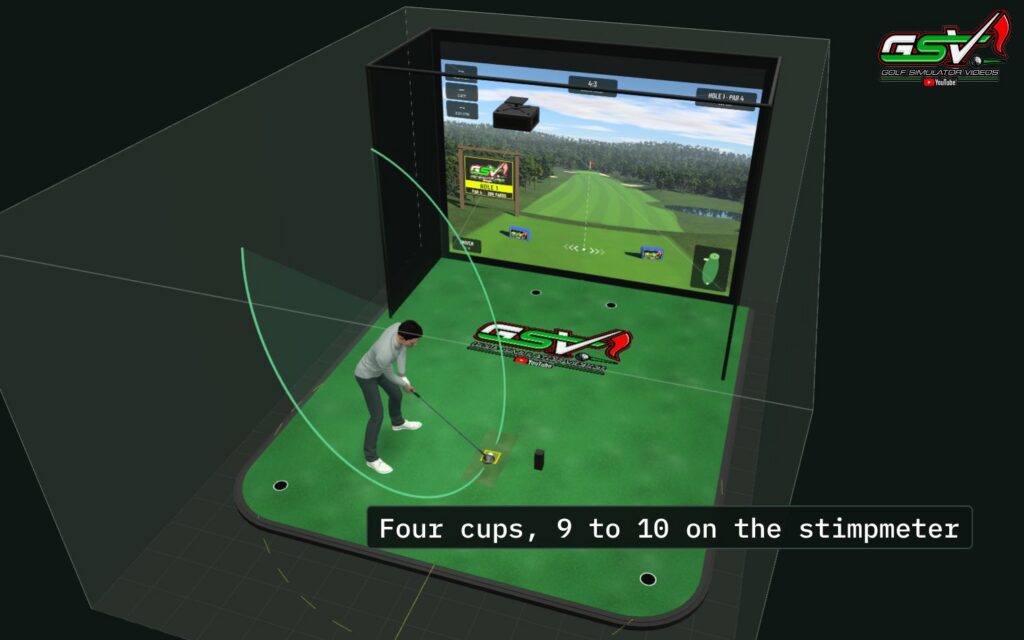
The golf simulator flooring guide covers the turf, the cups and setting the mat level.
The room each one needs
| System | Floor | Ceiling and more |
|---|---|---|
| ExPutt RG | A mat 44 1/8 in long, with the camera up to about 5 ft 11 in from it | A TV with HDMI |
| PuttView P7 and P7 Plus | A green 10 x 6 ft, 8 ft wide with the tower | At least 7 ft |
| PuttView S10 for simulators | 13 to 17 ft long, 8 ft 6 in to 10 ft wide | 10 ft, or 11 ft with Foresight's Falcon or GCHawk |
| Foresight SIM IN A BOX PuttView Edition | Made for a 13 ft width | Professional installation |
| FlightScope Mevo Gen2 putting | 5 ft behind the ball and 8 ft of flat roll ahead | No extra height |
What putting costs to run
- ExPutt RG: $469 at ExPutt's own store.
- PuttView P7 and P7 Plus: no published price; GSV viewers get special pricing through Jay.
- Foresight putting add-on: $2,500 for a GCQuad or QuadMAX.
- Foresight SIM IN A BOX PuttView Edition: from $42,499 MSRP, with the PuttView software $1,495 a year from the second year.
- Rapsodo MLM2XPRO: putting comes with a Core membership, $199.99 a year.
- FlightScope Mevo Gen2: FlightScope says there are no ongoing fees or mandatory subscriptions.
- PuttView app: free, or PuttView Pro at $9.99 a month or $79.99 a year.
Putting aids that are not simulators
Some putting products show up next to putting simulators but track nothing. They are training aids, and good ones:
- Wellputt: putting mats with a free app of more than 50 exercises on three courses. The golfer marks each one done or not; nothing tracks the ball. GSV reviewed the Wellputt mat in 2020.
- PuttAIM: a laser putting aid for alignment, to keep the putter on the line. GSV tried it with a home simulator in 2024.
- PUTTR: a smart putting mat, 12 ft of green, that measures the speed of each putt and where it entered the hole, with games and online play. No projector and no simulator software.
Swing indoors with caution. A putting green inside a golf simulator shares the room with full swings. Keep putters, balls and people clear of the hitting area when anyone is swinging, and test every clearance with slow practice swings first. Golf Simulator Videos and its affiliates take no responsibility for your safety, or for any injury or damage, when you swing indoors.
Foresight putting on video
The Foresight app's putting analysis with a GCQuad, reviewed in January 2026:
Discount codes
GSV5OFF takes 5% off a first order at Shop Indoor Golf, including the Garmin R50, the Rapsodo MLM2XPRO, the Uneekor EYE MINI and Foresight's launch monitors. GSVSQUARE takes 5% off Square Golf, GSVMEVO 5% off the FlightScope Mevo Gen2, and JLASCO10 10% off the GolfJoy Spica 3; GSV's SkyTrak link applies its saving by itself. PuttView pricing for GSV viewers comes by email from Jay. Every code is on the golf simulator discount codes page.
Free consultation with GSV's partner builders
Planning a simulator with putting in it? Jay works with official partners: master builders he hand-picked, who get on a call quickly and make sure you have the right fit before you buy anything. They offer package deals on the whole build, DIY packages to put together yourself, full installation, and more. The consultation is free.
Home putting simulator questions
What is the best putting simulator for home?
It depends on the room and the goal. For putting practice on its own, a camera putting simulator such as the ExPutt RG needs only a mat, a camera and a TV. For real break and real cups, a projected green such as the PuttView P7 needs a space about 10 x 8 ft. For a golf simulator, a launch monitor with a putting mode lets every round hole out.
Can a golf simulator be used for putting?
Yes, if the launch monitor reads putts and the software is set to putt. The Trackman 4, Foresight's GCQuad and QuadMAX with their putting add-on, the Uneekor EYE MINI, the Rapsodo MLM2XPRO, the Garmin R50 in Home Tee Hero, the Mevo Gen2, Square Golf and SkyTrak all have a putting mode. Otherwise a gimme or auto putting finishes each hole.
Which launch monitors read putts?
From the makers' pages: the Trackman 4 and iO, Foresight's GCQuad and QuadMAX with the $2,500 putting add-on, the Uneekor EYE MINI, the Rapsodo MLM2XPRO with a Core membership, the Garmin R50 in Home Tee Hero, the FlightScope Mevo Gen2, Square Golf, SkyTrak and the GolfJoy Spica 3. The Rapsodo MLM2PRO has no putting, and Garmin says the R10's putting is not compatible with third-party software.
Does the ExPutt have real slope?
No. The ExPutt RG's mat is flat. ExPutt's software adds virtual slope of up to 2 degrees each way, up and down and left and right, and the camera works out how the putt would have broken. A PuttView green is contoured, so its break is real.
How much space does a home putting simulator need?
The ExPutt RG's mat is about 44 in long, with the camera up to about 5 ft 11 in from it. The PuttView P7 green is 10 ft long and 6 ft wide, 8 ft with its tower, under a ceiling of at least 7 ft. Putting with a Mevo Gen2 takes 5 ft behind the ball and 8 ft of flat roll ahead of it.
Does putting on a simulator need a subscription?
Some do. Putting on the Rapsodo MLM2XPRO comes with a Core membership at $199.99 a year, and Foresight's PuttView software is $1,495 a year from the second year. Foresight's putting add-on for the GCQuad or QuadMAX is $2,500, with no yearly fee on Foresight's pages. FlightScope says the Mevo Gen2 has no ongoing fees or mandatory subscriptions.
How does putting work in GSPro?
GSPro has a gimme distance or auto-putt, fixed or random, a putt grid that shows the break, putt assist, an aiming stick and a stimp setting. Some launch monitors need telling that the golfer is putting, through GSPro's putt mode. Whether a launch monitor's putting works in GSPro depends on the launch monitor and its updates.
Is the PuttView app a putting simulator?
No. PuttView says its iPhone app is not a simulator: it reads real greens with the LiDAR in a Pro iPhone from 2020 on and draws the line and the contours over the picture. The basic app is free, and PuttView Pro is $9.99 a month or $79.99 a year.
How do GSV viewers get PuttView pricing?
PuttView's shop lists the P7 at $14,579 and the P7 Plus at $17,729, shipping included, and GSV viewers get special PuttView pricing and discounts through Jay. Email Jay before ordering.
Is there free help planning a simulator with putting?
Yes. Jay offers a free consultation with GSV's partner master builders, hand-picked by Jay, who get on a call quickly and make sure everything fits. They offer package deals, DIY packages, full installation and more. Use the free consultation button on this page.
More from GSV
Build the rest of your sim
- Enclosure and screen$250 off at Shop Indoor GolfShop
- Carl's Place enclosure5% off, code sent by emailShopGet the code
- Hitting mat$20 off at Shop Indoor GolfShop
- Projector5% off at Shop Indoor Golf. First-time buyersShop
- Simulator computerSurfThing: $100 off applied automatically, no codeShop
- TouchscreenGSV code for TouchscreenGuruShop
- Complete package$250 off at Shop Indoor GolfShop
GSV earns a small commission on these links, at no extra cost to you. Shop Indoor Golf takes one code per order.