
A hitting net and an impact screen both stop the ball. The difference is what happens next: a net shows nothing, so the shot is read on a phone, a tablet or a TV, while an impact screen takes the ball and shows the shot flying into the course from a projector. This guide sets the two side by side with the makers' own figures from Shop Indoor Golf and Carl's Place: the room each one needs, the screen materials and what separates them, the gap behind a screen, bounce-back, noise and wear, and the upgrade path from one to the other. Jay Lasco, host of Golf Simulator Videos, has built both on camera: the SIGPRO Golf Net with its screen in a budget build, the SIG10 and Carl's Place enclosures, and a review of the SIGPRO Premier gray screen.
- 10 to 12 ftFrom the tee to an impact screen, by both makers
- 12 to 16 inOf space between the screen and the wall behind it
- 250 mphThe ball speed Carl's Place tests its screens to
- 1 or 3Layers: a budget screen against a premium one
Lay out a screen in the GSV Sim Builder
Golf nets and impact screens
- Garmin R10 Golf Net Practice Bundle$50 off at Shop Indoor Golf with code GSVBUDGET.Golf net practice bundles, G-TRAK simulator packages and Square Golf SIG packages.
- Square Golf Net Practice Bundle$50 off at Shop Indoor Golf with code GSVBUDGET.
- Rapsodo MLM2PRO Golf Net Practice Bundle$50 off at Shop Indoor Golf with code GSVBUDGET.
- SIGPRO Golf Net5% off at Shop Indoor Golf with code GSV5OFF.First-time buyers only, one use. Not valid on a standalone Trackman, the Square Golf launch monitor or the ProTee VX.
- SIGPRO Premium impact screen5% off at Shop Indoor Golf with code GSV5OFF, first-time buyers.
- Carl's Place enclosures and screens5% off at Carl's Place. GSV emails you the code.
Buying through GSV's links and codes helps support the channel: GSV earns a small commission at no extra cost to you, and you still get every saving available.
The short answer
- A net is the lowest cost way to start. It can go up in a garage, a spare room or a yard, and it pairs with any launch monitor that shows its numbers on a phone, a tablet or a TV. It cannot show a picture: Carl's Place says plainly that "you can't project an image onto a hitting net".
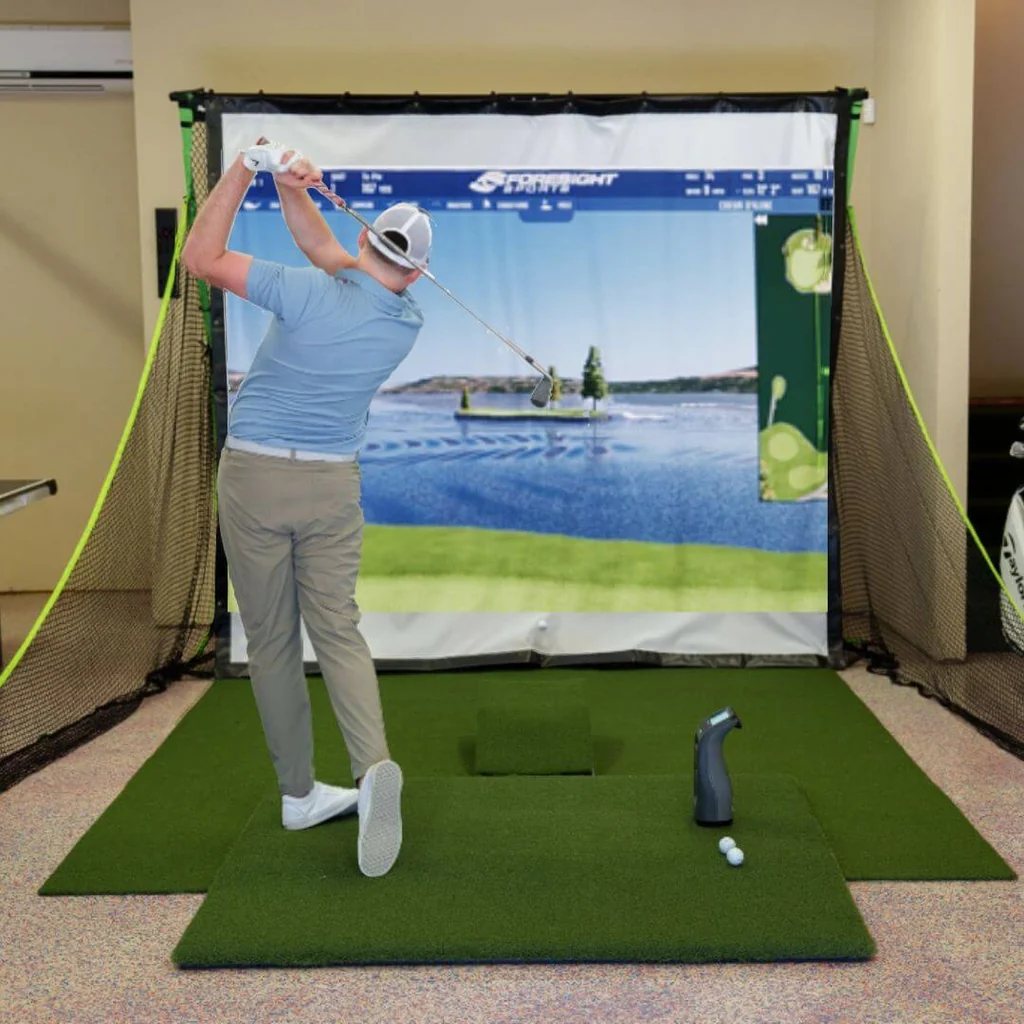
- An impact screen is what makes it a simulator. The ball flies into the course in front of the golfer, life size, which matters most for playing rounds, chipping and the short game. It needs a projector and a frame or an enclosure, 10 to 12 ft from the tee and 12 to 16 in off the wall.
- A screen's layers decide noise and bounce-back. A single-layer screen is the budget pick. A three-layer screen, with a cushioning layer between two faces, is the one both makers call quieter, with less bounce-back and a longer life.
- It does not have to be one or the other. Some nets take a screen on the same frame, so a net bought today can carry a screen later, and the launch monitor carries over either way.
Golf simulator net vs impact screen at a glance
| What | Hitting net | Impact screen |
|---|---|---|
| Shows the shot | On a phone, a tablet, a TV or a monitor beside the net | On the screen, life size, from a projector |
| Room it needs | The SIGPRO Golf Net: 10 ft wide, 8 ft high and 12 ft deep, by Shop Indoor Golf | 10 to 12 ft from the tee to the screen, 12 to 16 in behind it, at least 7 ft behind the tee, by Shop Indoor Golf |
| What else it takes | Side nets, a hitting mat, a launch monitor | A frame or an enclosure, a projector, a hitting mat, a launch monitor, a computer for most software |
| Short game | Numbers only | The ball flies into the green in front of the golfer |
| Warranty examples | SIGPRO Golf Net: 1 year. The Net Return: a 250,000 shot guarantee on most models, as Shop Indoor Golf relays it | SIG Preferred: 6 months. SIGPRO Premium and Premier: 1 year |
| GSV code | GSVBUDGET: $50 off the net practice bundles | GSV250: $250 off SIG enclosures and packages. GSV5OFF: 5% off a first order |
Room figures are from Shop Indoor Golf's SIGPRO Golf Net page and its space requirements article; Carl's Place gives the same 10 to 12 ft and 12 to 16 in. Warranties are from each product page.
Which one suits which golfer
Both are good choices for different golfers. The questions that decide it are what the golfer wants from the sessions and what the room allows.
- A net suits a golfer who wants range sessions and numbers: carry, ball speed, spin, gapping a bag. It suits a room that has to go back to being a garage or a spare room, a first launch monitor on a tight budget, and an outdoor patio or yard.
- An impact screen suits a golfer who wants to play courses, chip and putt into a green, practice with a target in front of them, or share the bay with friends and family. It also suits a room set aside for golf, where a frame or an enclosure can stay up.
- Either way, the launch monitor is the same. It reads the ball the same way into a net or a screen. What changes is the software: most simulator software, such as GSPro, runs on a computer driving the projector, while a launch monitor's own app on a phone or a tablet is enough for a net. The GSPro compatible launch monitors page lists which units connect to what.
Can you project onto a golf net?
Not well. Carl's Place, which makes impact screens, puts it simply: "you can't project an image onto a hitting net". A net is mostly holes, so most of the light passes through it, and the mesh lines cut across what is left. An impact screen is a solid woven face made to take the ball and to carry a picture: Shop Indoor Golf says its SIGPRO Premium screen gives a clear image up to 4K with minimal bleed-through.
The fix is a net that takes a screen. Two examples:
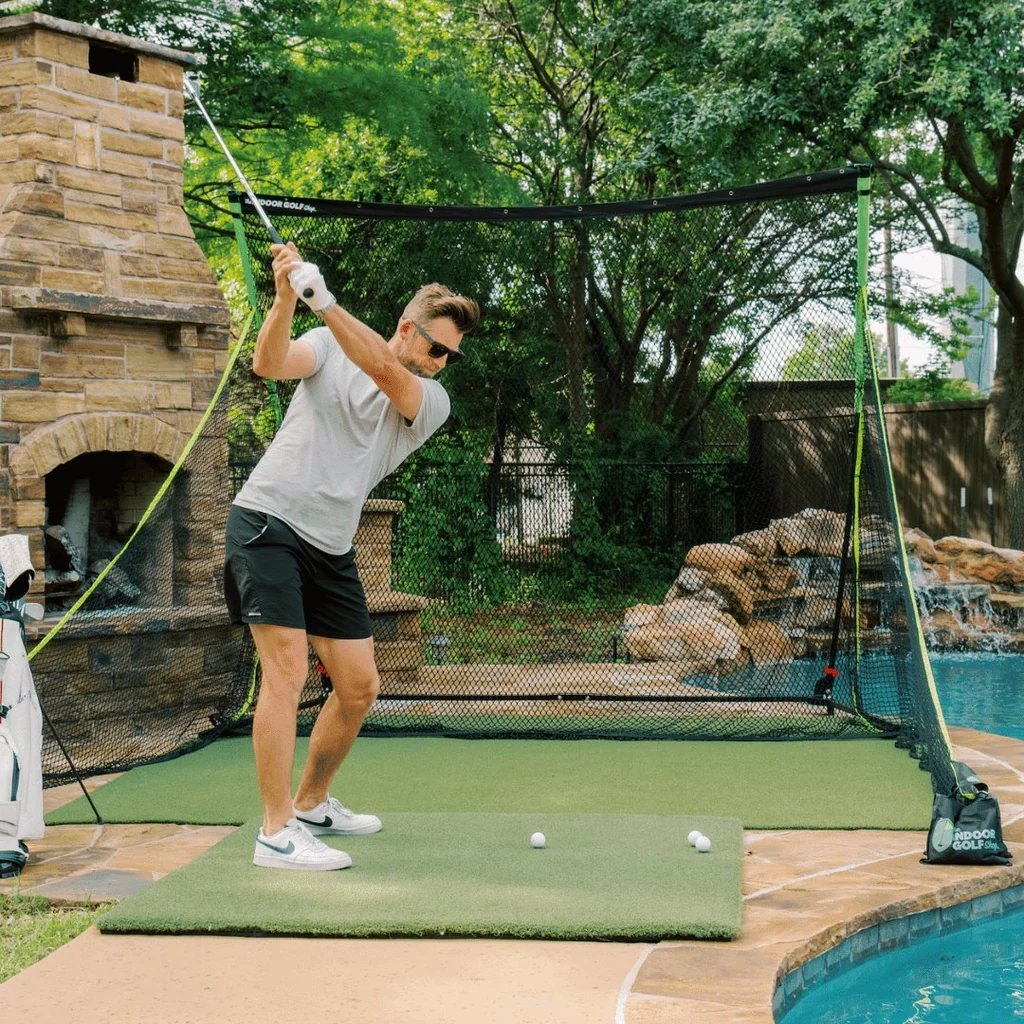
- The SIGPRO Golf Net. Shop Indoor Golf says a SIG Preferred impact screen attaches to the net's top crossbar, sold separately, and turns it into a simulator with a projector. It comes with two side barrier nets, and the net's page gives the net and a Preferred screen bought with it a year's warranty. This is the net GSV built its 2024 budget simulator around, first as a practice net and then with its screen.
- The Net Return Pro Series. Shop Indoor Golf's guide to The Net Return says the Pro Series takes an impact screen, sold separately, for a simulator with a projector.
Golf hitting nets: what to look for
- Size against the room. Shop Indoor Golf asks for a space 10 ft wide, 8 ft high and 12 ft deep for the SIGPRO Golf Net, and notes that a golfer may need more than an 8 ft ceiling to swing. Its advice for a garage is to check the size of the net, "primarily the height".
- Side nets. A shank or a thin shot leaves the net's face. Side barrier nets, like the two that come with the SIGPRO Golf Net, catch it.
- Wear in the middle. Shop Indoor Golf says of extreme budget nets that "holes will develop rather quickly in spots that are getting the most use". A heavier net, or a target panel in the middle, lasts longer. Shop Indoor Golf relays a 250,000 shot guarantee on most of The Net Return's models.
- Ball return. The Net Return's nets send the ball back toward the golfer, which saves walking to the net between shots.
- Room for the launch monitor. A radar unit behind the ball, such as the Garmin R10 or the Rapsodo MLM2PRO, needs room behind the golfer and ball flight in front. A unit beside the ball, such as Square Golf, needs neither.
Shop Indoor Golf sells net practice bundles with the Garmin R10, the Rapsodo MLM2PRO and Square Golf: the launch monitor, a choice of net and an optional mat. On the Garmin R10 bundle page, it is the SIGPRO Golf Net option, paired with a Preferred screen, that allows projection of simulator software. GSVBUDGET takes $50 off any of the three bundles.
Net practice bundles, the SIGPRO Golf Net and mats
- Garmin R10 Golf Net Practice Bundle$50 off at Shop Indoor Golf with code GSVBUDGET.Golf net practice bundles, G-TRAK simulator packages and Square Golf SIG packages.
- Rapsodo MLM2PRO Golf Net Practice Bundle$50 off at Shop Indoor Golf with code GSVBUDGET.
- Square Golf Net Practice Bundle$50 off at Shop Indoor Golf with code GSVBUDGET.
- SIGPRO Golf Net5% off at Shop Indoor Golf with code GSV5OFF.First-time buyers only, one use. Not valid on a standalone Trackman, the Square Golf launch monitor or the ProTee VX.
- Golf hitting mats$20 off at Shop Indoor Golf with code GSVMAT.SIGPRO Softy, Super Softy, Softy Lite and Commercial Teeline mats.
Impact screen materials compared
An impact screen is woven polyester, and what separates the grades is how it is woven and how many layers it has. Each maker's own range, from its product pages:
Shop Indoor Golf: SIG Preferred, SIGPRO Premium and SIGPRO Premier
| Screen | How it is made | Warranty and use |
|---|---|---|
| SIG Preferred | One layer of tightly woven, reinforced polyester | 6 months, residential. Not recommended for commercial use |
| SIGPRO Premium | Three layers: two heavy-duty polyester faces with vertical spacer yarns between them. White | 1 year, residential |
| SIGPRO Premier | The same three-layer build in gray, for brighter rooms | 1 year, residential |
Shop Indoor Golf calls the Premium the thickest screen in golf simulation, and by its own measurements it is more than four times as thick as the Preferred. It says the spacer yarns cushion the ball, which makes the Premium quieter, lowers bounce-back, and, with a smooth face that cuts the time the ball spins on it, extends its life. The Preferred is its budget screen, made for home use. The SIG8, SIG10 and SIG12 enclosures come with the Premium screen and foam padding around it.
A finished screen has 2 1/2 in vinyl edges with grommets around it; raw screen material has no border, for a frame of the buyer's own. The Premier comes in 24 standard sizes, square, 4:3, 16:10 and 16:9, from 7 ft 7 in square to 10 ft x 17 ft 6 in, and six commercial sizes.
Carl's Place: Standard, Preferred, Premium and High-Contrast Gray
| Screen | How it is made | Carl's Place calls it |
|---|---|---|
| Standard | Heavy-duty polyester, loosely woven, with an open weave | The budget material, best value for home use |
| Preferred | Heavy-duty polyester, tightly woven, with silicone reinforcement | A smoother surface and a better image than the Standard |
| Premium | Three layers of tight-knit polyester, with a noise-dampening center layer | The smoothest surface, the best image, the most durable and the quietest |
| High-Contrast Gray | The Premium's three-layer material in gray | Deeper blacks and richer colors, for rooms with more light |
Carl's Place tests all four to 250 mph, well above the highest tour average ball speeds of just over 180 mph, by its own figures. It says its Premium minimizes bounce-back and quiets the noise of the ball. GSV's Carl's Place code is sent by email from the Carl's Place discount code page.
White or gray
Both makers now sell a gray screen next to the white, and they agree on when each one fits. Carl's Place: "Dark, dedicated room with blackout curtains? White." and "Windows, overhead lights, or a room that pulls double duty? Gray." Shop Indoor Golf says its white Premium is made for dark rooms and the gray Premier for brighter ones, where gray absorbs some of the room's light and keeps the blacks deeper. The trade, in Carl's Place's words: on gray "the image will be a bit dimmer than it would be on white," and "a brighter projector makes up for it." GSV reviewed the SIGPRO Premier on video in 2025, below.
Impact screens and enclosures
- SIGPRO Premium impact screen5% off at Shop Indoor Golf with code GSV5OFF.First-time buyers only, one use. Not valid on a standalone Trackman, the Square Golf launch monitor or the ProTee VX.
- SIGPRO Premier gray impact screen5% off at Shop Indoor Golf with code GSV5OFF, first-time buyers.
- SIG Preferred impact screen5% off at Shop Indoor Golf with code GSV5OFF, first-time buyers.
- Carl's Place enclosures and screens5% off at Carl's Place. GSV emails you the code.
- Golf simulator enclosures and screens$250 off at Shop Indoor Golf with code GSV250.SIG8, SIG10 and SIG12 enclosures and studios, DIY and commercial enclosures, G-TRAK screens, SIGPRO flooring and complete simulator packages.
How to set up an impact screen
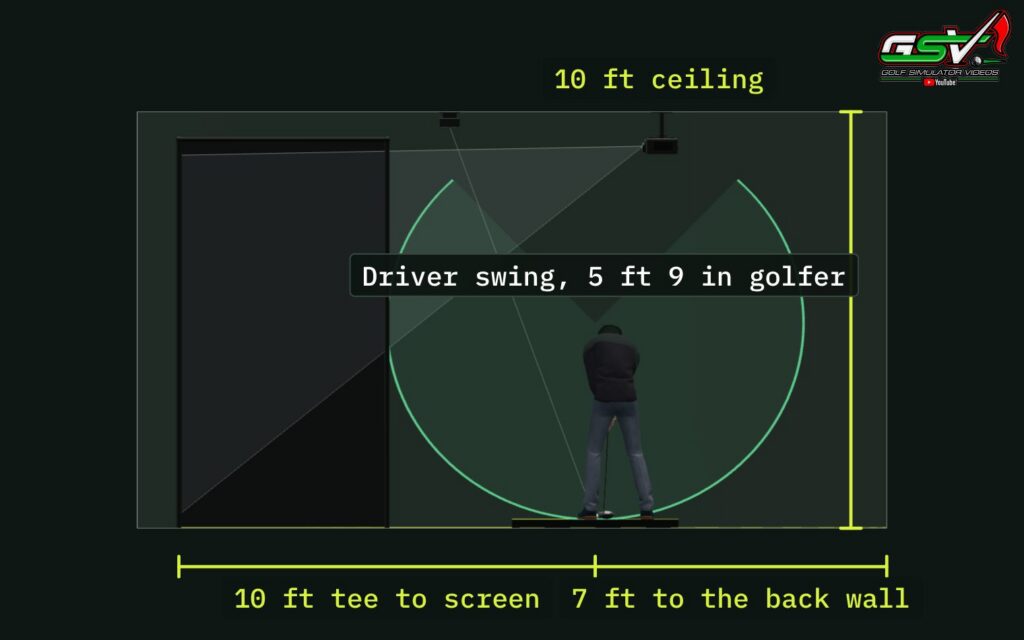
The two makers give nearly the same distances:
| Distance | Shop Indoor Golf | Carl's Place |
|---|---|---|
| Tee to screen | 10 to 12 ft | 10 to 12 ft, and never closer than 10 ft |
| Screen to the wall behind it | 12 to 16 in | 12 to 16 in |
| Behind the tee | At least 7 ft | 4 ft at least, 7 ft recommended |
| Room depth | 18 ft ideal | 15 ft at least, 18 to 20 ft recommended |
| Room width | 9 to 10 ft at least, 14 ft ideal | 10 ft at least with the tee off center, 14 ft recommended |
| Ceiling | 10 ft ideal; most golfers need 9 to 10 ft | 8 to 9 ft at least, 10 ft recommended |
From Shop Indoor Golf's space requirements article and Carl's Place's guides to measuring a space and choosing a screen size. A launch monitor behind the ball adds its own depth: check its maker's figure.
- Keep the gap behind the screen clear. The 12 to 16 in lets the screen give when the ball hits it. Carl's Place: "Keep the screen away from the wall behind it, or you'll damage the wall."
- Nothing touching the back of the screen. Both makers warn against foam or blankets pressed against it. Shop Indoor Golf says memory foam or a weighted blanket touching the screen, or too close to it, concentrates the impact and wears the screen fast; Carl's Place says a foam topper or blanket behind the screen may speed up wear.
- Black behind the screen. BenQ notes that every impact screen is slightly translucent, so some light passes through, and that black behind it gives the best contrast.
- The projector. Shop Indoor Golf says most simulators use a short throw projector 4 to 8 ft from the screen, which keeps the golfer's shadow off the picture, and that a standard projector may need 10 to 15 ft or more. The best golf simulator projectors page has the throw distance of each.
The GSV Sim Builder lays all of this out in 3D: the screen in an enclosure or built into the room, with 24 SIGPRO Premium sizes and 29 Carl's Place sizes, the tee, the launch monitor and the projector, and says what fits.
Bounce-back and screen tension
Bounce-back is the ball coming back off the screen toward the golfer. No maker publishes a bounce-back distance, but both say what drives it:
- Tension. Shop Indoor Golf: "A screen that's too tight can cause higher bounce-back." It suggests keeping the bottom edge looser and taking off some of the bungees, every other, third or fourth one. Carl's Place says to hang a screen flat for a sharp picture, "but not too tight to avoid fast ball bounce back."
- Something soft behind it, with a gap. Shop Indoor Golf suggests a heavy-duty moving blanket or archery netting hung behind the screen, kept clear of it.
- The layers. Both makers say their three-layer screens lower bounce-back. GSV's SIG10 build, with the SIGPRO Premium screen, found the bounce-back low.
- The frame. A ball that hits a pole can come straight back. Carl's Place: "Ever had a golf ball hit a metal pole 10' in front of you and come back at your face?" Foam padding on the frame, as the SIG enclosures come with, and a vinyl baffle across the top to catch high shots deal with it.
For shots that miss the screen, Shop Indoor Golf sells SIGPRO side barrier netting, two nets 10 ft long and 8 ft high, and a custom vinyl baffle that catches high shots and turns them down to the screen or the floor. Carl's Place sells net wall extensions, a set of two, 6, 8 or 10 ft deep and 92 in high, and its enclosures have an overhead ceiling panel.
Noise
Every screen and every net makes a sound when the ball hits it, and no maker publishes a decibel figure. What the makers do say is that the layers matter: Shop Indoor Golf says the Premium's spacer yarns act as a cushion and dampen the noise of the ball, and Carl's Place says the three layers make its Premium its most durable and quietest screen, and gives noise dampening only to its Premium and High-Contrast Gray. Both also ask for the 12 to 16 in gap behind the screen, so it can give when the ball lands.
For a room next to a bedroom or a neighbor, hit a few shots at the hours you plan to play, into the net or the screen you are thinking of, before building it in.
How long a net and a screen last
No maker gives a lifespan in years, because it depends on how many balls hit it, how hard, and where. What they do give:
- Warranties: the SIG Preferred 6 months; the SIGPRO Premium and Premier a year, for rips and tears from golf balls in residential use; the SIGPRO Golf Net a year on the net and on a Preferred screen bought with it, by the net's page, against six months on the Preferred's own page.
- Scuffed balls. Carl's Place: "Even the slightest scuffed ball, one where you might not even notice the scuff, can cause damage." Clean, unscuffed balls make any screen last longer.
- The same spot. Nets wear through where they are hit most. Some wear on a screen is normal from the first shots, Carl's Place says.
- The smooth face. Shop Indoor Golf says a smoother screen face cuts the time the ball spins against it, which reduces wear.
- Backing. Foam or blankets pressed against the screen wear it fast, as above.
In a garage
A garage often has to stay a garage, so the choice comes down to how fast the setup clears out for the car. The G-TRAK is a remote-controlled impact screen that mounts around the garage door tracks and rolls up out of the way, and GSV built and reviewed one in 2024. GSV250 takes $250 off the G-TRAK packages. The garage golf simulator page has nine real builds.
Start with a net, add a screen later
Many home simulators start as a net. The path GSV took in its 2024 budget build:
- A launch monitor, a net and a mat. Practice with the numbers on a phone or a tablet.
- A screen on the same frame and a projector. On the SIGPRO Golf Net, the Preferred screen goes on the top crossbar. A computer runs the simulator software.
- An enclosure. A SIG8, SIG10, SIG12 or Carl's Place enclosure, with a three-layer screen, padding and side nets, when the room is set aside for golf.
The launch monitor and the mat carry over at every step. The budget golf simulator page has all three builds with every part named.
Swing indoors with caution. The figures in this guide are the makers' guidance, not guarantees. Always test your setup before you make a full swing: start with slow practice swings with your longest club, check the ceiling, the walls, the lights, the frame and anyone standing nearby, and watch where the first shots bounce back to. Golf Simulator Videos and its affiliates take no responsibility for your safety, or for any injury or damage, when you swing indoors.
Nets and screens on video
GSV's 2024 budget build: the SIGPRO Golf Net, then its screen, a mat, a projector and a Garmin R10.
The SIGPRO Premier gray screen, reviewed in 2025 (the written review):
A full Carl's Place enclosure, with its three-layer screen:
Discount codes
GSVBUDGET takes $50 off the Garmin R10, Rapsodo MLM2PRO and Square Golf net practice bundles at Shop Indoor Golf. GSV250 takes $250 off the SIG8, SIG10 and SIG12 enclosures, DIY enclosures, the G-TRAK and complete packages there, and GSV5OFF takes 5% off a first order, including the screens and the SIGPRO Golf Net. The Carl's Place code is sent by email from the Carl's Place discount code page. Every code is on the golf simulator discount codes page.
Free consultation with GSV's partner builders
Not sure whether a net or a screen fits your room? Jay works with official partners: master builders he hand-picked, who get on a call quickly and make sure you have the right fit before you buy anything. They offer package deals on the whole build, DIY packages to put together yourself, full installation, and more. The consultation is free.
Golf simulator net vs impact screen questions
Is an impact screen better than a hitting net?
It depends on what the golfer wants. A net is the lowest cost way to start and suits range sessions with the numbers on a phone, a tablet or a TV. An impact screen shows the shot flying into the course from a projector, which suits playing rounds, the short game and sharing the bay. It needs a frame or an enclosure, a projector and 10 to 12 ft from the tee.
Can you project a golf simulator onto a net?
Not well. Carl's Place says you cannot project an image onto a hitting net: most of the light passes through the holes and the mesh lines cut across the rest. Some nets take an impact screen on the same frame, such as the SIGPRO Golf Net with a SIG Preferred screen on its top crossbar.
How far should an impact screen be from the wall?
12 to 16 in, by both Shop Indoor Golf and Carl's Place. The gap lets the screen give when the ball hits it and keeps the ball off the wall. Keep foam and blankets from touching the back of the screen, which wears it fast.
How far should the tee be from an impact screen?
10 to 12 ft, by both Shop Indoor Golf and Carl's Place, and Carl's Place asks golfers never to stand closer than 10 ft. Shop Indoor Golf asks for at least 7 ft behind the tee, and a launch monitor behind the ball may need more.
What is the best impact screen material?
For noise, bounce-back and image, a three-layer screen: the SIGPRO Premium and Premier, or the Carl's Place Premium and High-Contrast Gray. Both makers say the three-layer build is quieter, lowers bounce-back and lasts longer. Single-layer screens such as the SIG Preferred and the Carl's Place Preferred are the budget choice for home use.
Is a white or gray impact screen better?
White for a dark room, gray for a room with windows or lights on. Gray keeps the blacks deeper in a bright room, but Carl's Place notes the picture is a bit dimmer than on white and that a brighter projector makes up for it.
How do you stop bounce-back from an impact screen?
Loosen the screen. Shop Indoor Golf says a screen that is too tight causes higher bounce-back, and suggests keeping the bottom edge looser, taking off some bungees, and hanging a heavy moving blanket or archery netting behind the screen with a gap. A three-layer screen and padding on the frame help too.
Are golf impact screens loud?
Every screen makes a sound when the ball hits it, and no maker publishes a decibel figure. Shop Indoor Golf and Carl's Place both say their three-layer screens are the quieter ones, with a cushioning layer between the two faces. Hang the screen with its 12 to 16 in gap so it can give.
How long does a golf impact screen last?
No maker gives a lifespan in years, since it depends on how many shots hit it and where. The SIG Preferred carries a 6 month warranty and the SIGPRO Premium and Premier a year. Clean, unscuffed balls and nothing pressed against the back of the screen make it last longer.
Can a golf net be turned into a simulator?
Some can. The SIGPRO Golf Net takes a SIG Preferred impact screen on its top crossbar, and The Net Return Pro Series takes an impact screen, both sold separately. Add a projector and simulator software and the launch monitor and mat carry over.
Is there free help choosing between a net and a screen?
Yes. Jay offers a free consultation with GSV's partner master builders, hand-picked by Jay, who get on a call quickly and make sure everything fits. They offer package deals, DIY packages, full installation and more. Use the free consultation button on this page.
More from GSV
Build the rest of your sim
- Hitting mat$20 off at Shop Indoor GolfShop
- Projector5% off at Shop Indoor Golf. First-time buyersShop
- Simulator computerSurfThing: $100 off applied automatically, no codeShop
- TouchscreenGSV code for TouchscreenGuruShop
- Complete package$250 off at Shop Indoor GolfShop
GSV earns a small commission on these links, at no extra cost to you. Shop Indoor Golf takes one code per order.