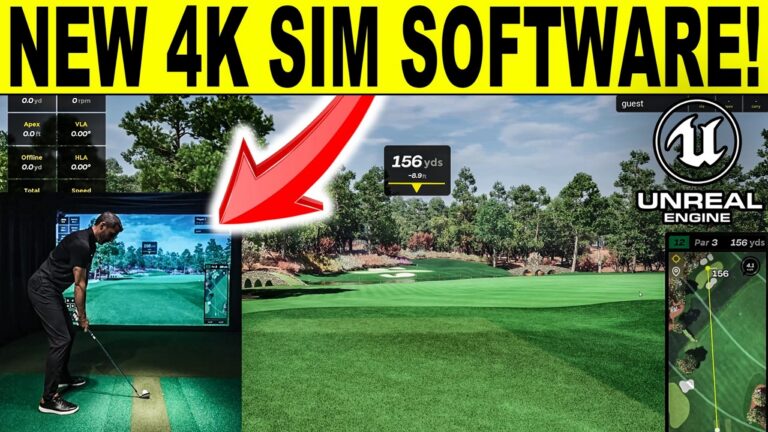
We are doing a full review of the BenQ LK830ST, which might just be the perfect golf sim projector for your setup! This benq projector is ideal for a home golf simulator, offering a fantastic visual 4K experience, 4,000 lumens, and a very short .5 throw ratio making it ideal for specific setups and enclosure mounting. I will use 4K GSPRO & 4K Trackman VG3 to show graphics quality for comparison. Building a Home Golf Simulator and need help and discount codes? Email me anytime at: Email Jay
Why is the throw ratio so vital for some home golf simulator setups? Take a 8ft tall screen for instance and let’s use the popular 4:3 format, with the AK700ST .69 Throw ratio you would need to mount at a bare minimum of 9.8ft. But with the LK830ST .5 throw ratio, you can mount at 7.1ft! That is a HUGE difference for ability to fit, with the projector in front of the golfer!
True 4K resolution. The pixel density on a 200 inch screen is around 485 pixels every square inch. For our AH500ST model its 121 pixels in the same space. Since a lot of these go into smaller home golf simulator spaces – that density enables people closer to the screen to see more detail compared to being 12-14 feet away.
93% Rec. 709 color accuracy – our original AH500ST was only 83% of the Rec. 709 space (and had good color), and the new one looks great on our shootouts, especially on the newer 4K platforms with more details.
Screen Fill – This has a manual screen fill setup to enable the installer to setup new aspect ratios for different screens like 5:4 and even 21:9 if they want. This has been one of the most popular features for DIY installers as it eliminates the need to program the graphics card. Just pick your aspect ratio on the menu and the projector reformats the screen without distortion – and send the EDID info back to the PC. In my setup I duplicate and run 16:9 on my PC monitor and 16:10 on the projector screen and as you can see it fills perfectly which is a great feature!
It’s about the same size/footprint as the AH500ST, and has golf mode color settings, a low offset (114%) so it can work with both floor and ceiling mounts. It also as the same digital correction tools as the AH500ST.
If you are looking for the best home golf simulator projector, the LK830ST might just be it with these great features and installation capabilities. Feel free to email me for home golf simulator build help at: Email Jay
Chapters
00:00 BenQ LK830ST Unboxing
02:22 LK830ST Remote
03:18 Weight & Size
03:58 LK830T Specs
06:38 Closeup & Inputs
09:15 LK830ST Floor Mount Setup
11:36 GSPRO 4K Graphics
17:39 Trackman VG3 4K Graphics
23:18 LK830ST Menu & Settings
26:29 2D Auto Keystone
27:26 LK830ST Final Thoughts
#benqak830st #benq #ak830st #golfsimulatorprojector #bestgolfsimulatorprojector #golfsimulator #homegolfsimulator #golfequipment #benqprojecotor #ak830streview #review
Quick buy: BenQ LK830ST
- BenQ LK830ST5% off at Shop Indoor Golf with code GSV5OFF.First-time buyers only, one use. Not valid on a standalone Trackman, the Square Golf launch monitor or the ProTee VX.
Buying through GSV's links and codes helps support the channel: GSV earns a small commission at no extra cost to you, and you still get every saving available.
Why is the throw ratio so vital for some home golf simulator setups? Take a 8ft tall screen for instance and let’s use the popular 4:3 format, with the AK700ST .69 Throw ratio you would need to mount at a bare minimum of 9.8ft. But with the LK830ST .5 throw ratio, you can mount at 7.1ft! That is a HUGE difference for ability to fit, with the projector in front of the golfer!
True 4K resolution. The pixel density on a 200 inch screen is around 485 pixels every square inch. For our AH500ST model its 121 pixels in the same space. Since a lot of these go into smaller home golf simulator spaces – that density enables people closer to the screen to see more detail compared to being 12-14 feet away.
93% Rec. 709 color accuracy – our original AH500ST was only 83% of the Rec. 709 space (and had good color), and the new one looks great on our shootouts, especially on the newer 4K platforms with more details.
Screen Fill – This has a manual screen fill setup to enable the installer to setup new aspect ratios for different screens like 5:4 and even 21:9 if they want. This has been one of the most popular features for DIY installers as it eliminates the need to program the graphics card. Just pick your aspect ratio on the menu and the projector reformats the screen without distortion – and send the EDID info back to the PC. In my setup I duplicate and run 16:9 on my PC monitor and 16:10 on the projector screen and as you can see it fills perfectly which is a great feature!
It’s about the same size/footprint as the AH500ST, and has golf mode color settings, a low offset (114%) so it can work with both floor and ceiling mounts. It also as the same digital correction tools as the AH500ST.
If you are looking for the best home golf simulator projector, the LK830ST might just be it with these great features and installation capabilities. Feel free to email me for home golf simulator build help at: Email Jay
Chapters
00:00 BenQ LK830ST Unboxing
02:22 LK830ST Remote
03:18 Weight & Size
03:58 LK830T Specs
06:38 Closeup & Inputs
09:15 LK830ST Floor Mount Setup
11:36 GSPRO 4K Graphics
17:39 Trackman VG3 4K Graphics
23:18 LK830ST Menu & Settings
26:29 2D Auto Keystone
27:26 LK830ST Final Thoughts
#benqak830st #benq #ak830st #golfsimulatorprojector #bestgolfsimulatorprojector #golfsimulator #homegolfsimulator #golfequipment #benqprojecotor #ak830streview #review
Where to buy the BenQ LK830ST
- BenQ LK830ST5% off at Shop Indoor Golf with code GSV5OFF.First-time buyers only, one use. Not valid on a standalone Trackman, the Square Golf launch monitor or the ProTee VX.
Free consultation. GSV's partner master builders, hand-picked by Jay, get on a call quickly and make sure everything fits, with package deals, DIY packages, full installation and more.
Get a free consultationPrices are on the shop's page. Codes last checked October 9, 2026.
Build the rest of your sim
- Enclosure and screen$250 off at Shop Indoor GolfShop
- Carl's Place enclosure5% off, code sent by emailShopGet the code
- Hitting mat$20 off at Shop Indoor GolfShop
- Simulator computerSurfThing: $100 off applied automatically, no codeShop
- TouchscreenGSV code for TouchscreenGuruShop
- Complete package$250 off at Shop Indoor GolfShop
GSV earns a small commission on these links, at no extra cost to you. Shop Indoor Golf takes one code per order.