How to Choose the Right Golf Simulator PC for GSPro, Trackman, 4K & Beyond
If you’re building a home golf simulator in 2026, one of the most important decisions you’ll make is choosing the right computer. Feel free to contact me anytime for help!
The launch monitor gets most of the attention. The enclosure looks impressive. The projector gets discussed endlessly.
But the PC is what determines whether your simulator feels smooth and immersive — or laggy and frustrating.
In this in-depth guide, we’ll break down:
- What makes the best computer for a golf simulator
- GPU and CPU recommendations for GSPro, Trackman, and other software
- 4K vs 1080p performance differences
- High-speed camera considerations
- Why the RTX 5080 build we tested sets a new performance standard
- SurfThing model comparisons
- How to choose the right build for your room and budget
🎥 Watch the Full RTX 5080 Golf Simulator PC Review
Why the Right Golf Simulator Computer Matters
A golf simulator is very different from a standard gaming PC setup.
Here’s why:
- Simulator software runs high-resolution 3D environments
- Ball flight physics are calculated in real time
- Some systems integrate high-speed impact cameras
- Many users push 4K projectors
- Multi-screen or ultrawide displays are common
Unlike casual gaming, simulator software must deliver:
- Consistent frame pacing
- Low input latency
- Zero stutter during the swing
- Stable USB and camera integration
If your PC struggles, you’ll notice:
- Micro stutters mid-swing
- Delayed ball flight rendering
- Frame drops on complex courses
- Inconsistent high-speed camera capture
That’s why choosing the best PC for your golf simulator is critical.
What Determines the Best Computer for a Golf Simulator?
There are four core components that matter most:
1️⃣ GPU (Graphics Card)
This is the most important component for simulator performance.
Simulator software like:
- GSPro
- Trackman Virtual Golf 3
- TGC 2019 / TGC 2026
- E6 Connect
- Creative Golf
- FSX Play
…are GPU-intensive.
Why the GPU Matters
- Renders 3D courses
- Handles lighting, textures, shadows
- Drives 4K projectors
- Supports multiple displays
- Maintains high FPS under heavy loads
In our testing, the NVIDIA RTX 5080 with 16GB GDDR7 memory delivered:
- Stable high FPS at maxed-out 4K settings
- No stutter on complex courses
- Headroom for future software updates
For 2026, the RTX 5080 represents a new benchmark for simulator builds.
2️⃣ CPU (Processor)
While the GPU handles rendering, the CPU handles:
- Physics calculations
- Simulator logic
- USB data from launch monitors
- Background processes
- Camera integration
The build featured in our review used:
Intel Core Ultra 7 265F (Liquid Cooled)
Why that matters:
- High single-core performance (important for simulator physics)
- Strong multi-core capability for camera systems
- Excellent thermal stability under extended sessions
Simulator PCs benefit more from strong single-thread performance than extreme core counts.
3️⃣ RAM (Memory)
We recommend:
- Minimum: 16GB DDR5
- Ideal: 32GB DDR5 6000MHz
The SurfThing SG3-5802 build includes:
32GB DDR5 6000MHz
Why 32GB matters:
- Future-proofing
- Multi-software installs
- Camera processing
- Background tools (OBS, analytics, etc.)
- Large texture environments
4️⃣ Storage
Fast NVMe SSD storage dramatically improves:
- Load times
- Course switching
- Software updates
- Overall system responsiveness
For simulator builds:
- 1TB minimum
- 2TB recommended
1080p vs 4K: What You Actually Need
One of the biggest mistakes golfers make is underestimating the jump from 1080p to 4K.
1080p (1920×1080)
- Easier on GPU
- More affordable builds
- Suitable for budget simulators
4K (3840×2160)
- 4x the pixel count
- Sharper visuals
- Better immersion
- More GPU demand
If you’re running a 4K projector, your GPU must handle significantly higher load.
That’s where the RTX 5080 build shines.
In our benchmark testing:
- Max settings at 4K Ultra on GSPro we got 60fps without anything below and 100fps or more on Trackman.
- Stable FPS and more heat or high fan rpms reducing noise.
- No performance dips during swings or flyovers etc.
If you’re building a premium simulator, 4K is worth it — but only if your PC can handle it.
Testing the SurfThing SG3-5802 RTX 5080 Build
In our full review, we pushed this system with:
- GSPro max settings
- Trackman Virtual Golf 3
- High-speed camera integration
- 4K projector output
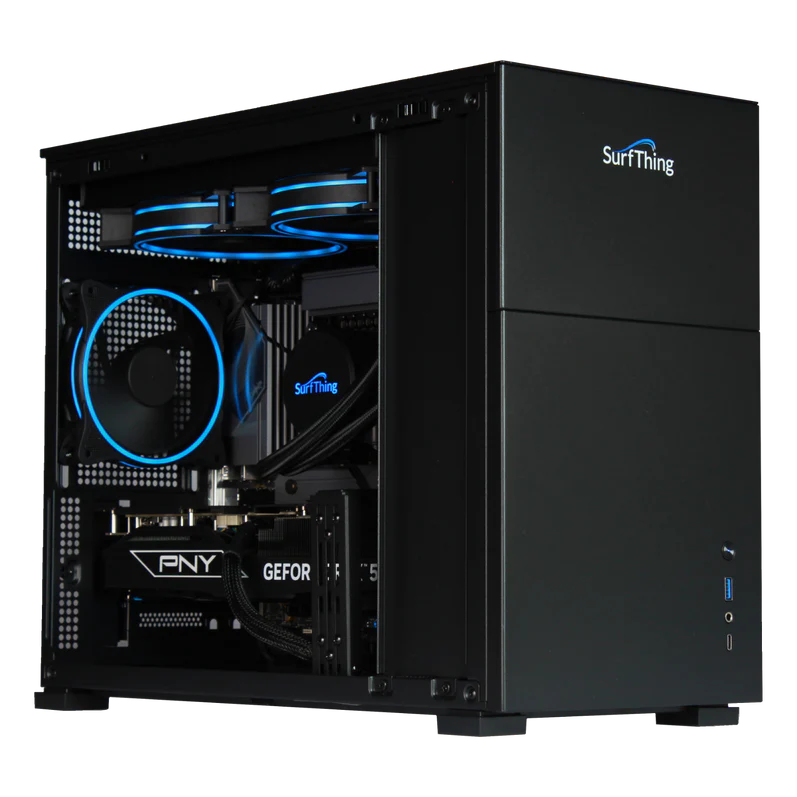
Results:
- Smooth ball flight rendering
- Zero stutter during swing
- Stable latency
- Strong thermals under load
This build is clearly designed specifically for simulator use, not just general gaming.
SurfThing Golf Simulator PC Models Explained
While the RTX 5080 SG3-5802 build represents a top-tier option, SurfThing offers multiple configurations.
Here’s how to think about them:
🟢 Entry-Level Golf Simulator PC
Best For:
- 1080p setups
- Basic simulator use
- Smaller rooms
Typical Specs:
- RTX 4060 / 4070 class GPU
- Mid-tier CPU
- 16GB RAM
Ideal if:
- You’re not running 4K
- No high-speed cameras
- Budget-conscious
🟡 Mid-Range Simulator PC
Best For:
- High settings at 1080p
- Light 4K
- GSPro users
- Moderate camera usage
Typical Specs:
- RTX 4070 Ti / 4080
- Strong CPU
- 32GB RAM
Balanced performance for most users.
🔴 High-End / Future-Proof Build (RTX 5080 Tier)
Best For:
- Maxed-out Ultra 4K
- GSPro Ultra 4k 60fps locked
- Trackman VG3 100fps or more
- High-speed camera integration
- Future simulator software updates
- No compromise performance
Specs (SG3-5802 example):
- NVIDIA RTX 5080 (16GB GDDR7)
- Intel Core Ultra 7 265F
- 32GB DDR5 6000MHz
This is currently one of the best computers for serious golf simulator builds in 2026.
Matching the PC to Your Simulator Software
Different software has different demands.
GSPro
- GPU heavy
- Benefits from strong RTX class GPU
- Scales beautifully with higher hardware
Recommended by GSPRO:
- RTX 4070 minimum
- RTX 5080 ideal for 4K
Trackman Virtual Golf 3
- High fidelity graphics
- Demands strong GPU
- Requires stable CPU for integration
Recommended by Trackman:
- High-end GPU
- 32GB RAM
- Strong single-core CPU
E6 Connect
- Scales well
- More forgiving
- Still benefits from modern GPU
High-Speed Camera Considerations
If you’re integrating:
- Impact cameras
- Swing cameras
- Slow-motion capture
- OBS recording
Your PC needs:
- Strong CPU
- Plenty of RAM
- Stable USB bandwidth
- Clean power delivery
This is where many cheaper gaming PCs fail.
The SurfThing build tested handled camera integration without dropped frames.
Common Mistakes When Choosing a Golf Simulator PC
- Buying based on gaming marketing, not simulator testing
- Underestimating 4K GPU demands
- Choosing too little RAM
- Ignoring cooling
- Forgetting future software updates
Simulator software is only getting more demanding.
Buy once, buy right.
Future-Proofing Your Golf Simulator PC
Technology evolves quickly.
A few smart decisions help extend lifespan:
- Choose 32GB RAM
- Select a GPU with ample VRAM (16GB ideal)
- Use modern DDR5 platform
- Invest in quality cooling
- Leave upgrade headroom
The RTX 5080 class GPU offers meaningful long-term value for simulator users.
So… What Is the Best Computer for a Golf Simulator?
It depends on:
- Your resolution (1080p vs 4K)
- Your software (GSPro, Trackman, etc.)
- Whether you use cameras
- Your budget
- How future-proof you want to be
For premium 4K simulator builds in 2026, the SurfThing SG3-5802 RTX 5080 configuration represents one of the strongest options currently available.
For lighter setups, mid-tier models can deliver excellent value.
The key is matching hardware to your specific use case.
Golf Simulator PC FAQ (2026)
Do I need a gaming PC for GSPro?
Yes — if you want smooth gameplay, realistic graphics, and consistent ball-to-impact timing.
GSPro is graphics-intensive, especially at higher resolutions or Ultra settings. While it may technically launch on a lower-spec computer, a true gaming PC with a dedicated GPU (like an RTX series card) ensures:
- Smooth 60+ FPS performance
- No stutter at impact
- Better lighting, shadows, and course detail
- Stable performance when running launch monitor software simultaneously
If you’re building a permanent home simulator, a properly spec’d gaming desktop is the safest long-term investment.
Is an RTX 4070 enough for 4K golf simulator play?
It depends on your expectations.
An RTX 4070 can run GSPro at 4K, but usually with settings dialed back from Ultra. You may see:
- 45–60 FPS depending on course and settings
- Occasional dips on demanding courses
- Less headroom if running OBS or multiple cameras
For consistent 4K Ultra performance with overhead for recording, streaming, or future updates, stepping up to a higher-tier GPU provides a smoother long-term experience.
If you’re strictly playing and not recording, a 4070 can work — but it’s closer to “minimum comfortable 4K” than “maximum performance.”
Laptop vs Desktop for a Golf Simulator?
Desktop wins for performance, cooling, and upgradeability.
While high-end gaming laptops can technically run simulator software, they come with limitations:
Laptop Pros
- Compact
- Easy to move
- Good for temporary setups
Laptop Cons
- Thermal throttling under long sessions
- Limited upgrade options
- Mobile GPUs are weaker than desktop equivalents
- Higher cost for same performance
For a dedicated simulator bay — especially 4K projection — a desktop PC offers better performance per dollar and long-term flexibility.
How much RAM do I need if I’m running cameras or OBS?
For basic simulator play only:
16GB RAM is usually sufficient.
If you’re running:
- Multiple high-speed swing cameras
- OBS recording or streaming
- Launch monitor software alongside GSPro
- Background apps or browser windows
Then 32GB RAM is strongly recommended.
Recording 4K gameplay with swing overlays can consume significant memory. 32GB gives you smoother multitasking and prevents frame drops during capture.
Windows 10 or Windows 11 for a Golf Simulator PC?
Both work — but Windows 11 is the better long-term choice.
Windows 11 advantages:
- Better CPU scheduling for newer processors
- Ongoing security updates
- Longer future support lifecycle
- Improved DirectX optimization
Windows 10 still runs GSPro and other simulator software fine today. However, for a new build in 2026, Windows 11 is the smarter future-proof option.
Final Thoughts
The PC is the heart of your golf simulator.
If you want:
- Zero stutter
- Smooth ball flight
- Crisp 4K visuals
- Reliable camera integration
- Long-term performance
…investing in the right computer matters.
If you’re unsure what direction to go, feel free to reach out. I’m happy to help recommend a build that fits your room, goals, and budget.